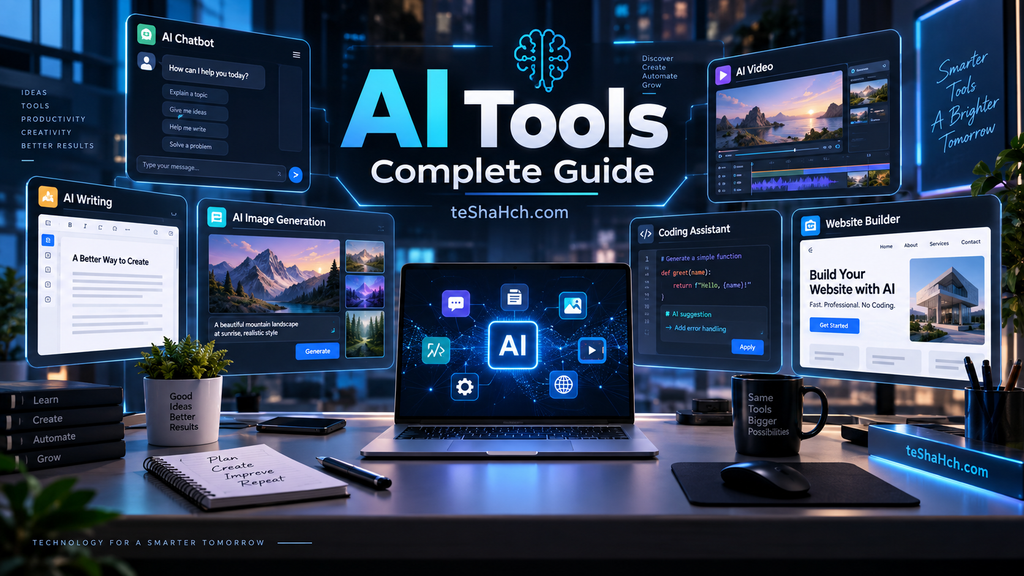
Discover the best AI tools for writing, coding, SEO, images, video, productivity and more. Learn how AI tools work and how to choose the right one.
AI Tools Complete Guide: What They Are, How They Work, Types, Uses and Best AI Tools
Artificial Intelligence (AI) has become a practical part of everyday technology. From writing and creating images to analyzing information, building websites, improving productivity, and helping with coding, AI tools can now perform many tasks that once required specialized software or manual work.
But with thousands of AI tools available, choosing the right one can be difficult.
This AI Tools Complete Guide explains what AI tools are, how they work, the major types of AI tools, what they can do, how to choose the right tool, and which categories of AI tools are worth exploring.
Whether you are a student, content creator, marketer, business owner, designer, developer, or everyday technology user, this guide will help you understand the AI tools ecosystem.
What Are AI Tools?
AI tools are software applications or online services that use artificial intelligence technologies to perform tasks, generate content, analyze information, automate processes, or assist users with decision-making.
Depending on the tool, AI may be used to understand natural language, generate text and images, recognize speech, analyze data, create videos, write code, or automate repetitive tasks.
For example, an AI writing tool can help create or improve text, while an AI image generator can create an image from a written description.
In simple terms:
AI tools use artificial intelligence to help people complete tasks faster, more efficiently, or with less manual effort.
Many AI tools are available through websites, desktop applications, browser extensions, and mobile apps.
How Do AI Tools Work?
The technology behind AI tools varies, but many modern AI applications use machine learning models trained on large amounts of data.
A simplified AI workflow looks like this:
User Input → AI Model → Processing → AI Output
For example, when you enter a request into an AI assistant:
- You provide a prompt or instruction.
- The AI system processes the input.
- The underlying AI model identifies patterns and relationships.
- The system generates an appropriate response.
- You receive the output.
Different AI tools use different types of models and technologies depending on their purpose.
Some specialize in text, while others focus on images, audio, video, coding, search, or business automation.
Major Types of AI Tools
AI tools can be divided into several categories based on what they help users accomplish.
1. AI Writing Tools
AI writing tools help users create, rewrite, summarize, edit, or improve written content.
Common uses include:
- Blog writing
- Article outlines
- Email writing
- Social media content
- Product descriptions
- Copywriting
- Summarization
- Rewriting
- Grammar improvement
- Content ideas
These tools can be useful for writers, bloggers, marketers, students, and businesses.
Related guide: Best AI Writing Tools
2. AI Coding Tools
AI coding tools are designed to help people write, understand, debug, and improve computer code.
Depending on the tool, they can assist with:
- Code generation
- Code completion
- Debugging
- Explaining code
- Refactoring
- Documentation
- Programming questions
- Development workflows
AI coding assistants can be useful for both experienced developers and people learning programming.
Related guide: Best AI Coding Tools
3. AI SEO Tools
AI SEO tools use artificial intelligence to assist with different search engine optimization tasks.
They may help with:
- Keyword research
- Content ideas
- Search intent analysis
- Content optimization
- Topic research
- Title generation
- Meta descriptions
- Content briefs
- SEO analysis
AI does not replace the need for a proper SEO strategy, but it can make many research and content tasks faster.
Related guide: Best AI SEO Tools
4. AI Image Generators
AI image generators can create images based on text descriptions or other inputs.
Typical uses include:
- Blog illustrations
- Marketing graphics
- Social media visuals
- Concept art
- Product ideas
- Presentations
- Creative projects
The quality and capabilities of AI image generators vary considerably, so choosing a tool based on your specific requirements is important.
Related guide: Best AI Image Generator Tools
5. AI Video Generators
AI video tools can assist with creating, editing, or transforming video content.
Depending on the platform, features may include:
- Text-to-video generation
- AI avatars
- Automated video creation
- Video editing
- Subtitle generation
- Script assistance
- Voiceovers
- Video translation
These tools are becoming increasingly useful for content creators, educators, marketers, and businesses.
Related guide: Best AI Video Generator Tools
6. AI Productivity Tools
AI productivity tools are designed to help users save time and organize their work.
They can assist with:
- Note-taking
- Summarization
- Task management
- Meeting notes
- Document processing
- Email assistance
- Research
- Information organization
- Workflow automation
For people who work with large amounts of information, AI productivity tools can significantly reduce repetitive work.
Related guide: Best AI Productivity Tools
7. AI Chatbots
AI chatbots allow users to interact with artificial intelligence through natural-language conversations.
They can be used for:
- Asking questions
- Research
- Brainstorming
- Writing assistance
- Learning
- Summarization
- Planning
- General problem solving
Different chatbots have different strengths, so there is no single AI chatbot that is perfect for every task.
Related guide: Best AI Chatbots
8. AI Website Builders
AI website builders use artificial intelligence to simplify website creation.
Some tools can help users generate:
- Website layouts
- Website copy
- Images
- Landing pages
- Basic website structures
- Design suggestions
This can be particularly useful for beginners, freelancers, small businesses, and people who want to create a website without starting everything from scratch.
Related guide: AI Website Builders
9. AI Tools for Students
AI tools can support students with learning and study-related tasks.
Potential uses include:
- Explaining difficult concepts
- Summarizing study material
- Creating study notes
- Brainstorming ideas
- Language learning
- Research assistance
- Practice questions
- Organization
However, students should use AI as a learning assistant rather than simply submitting AI-generated work as their own.
Related guide: Best AI Tools for Students
10. AI Chrome Extensions
AI Chrome extensions bring AI features directly into the web browser.
They can help with:
- Writing
- Summarization
- Research
- Productivity
- Search
- Web page analysis
- Content creation
The main advantage is convenience because users can access AI features without constantly switching between different websites.
Related guide: Top AI Chrome Extensions
What Can AI Tools Be Used For?
AI tools are useful across many everyday activities and professional workflows.
Content Creation
AI can help generate ideas, outlines, text, images, videos, and other forms of content.
Marketing
Businesses can use AI to assist with content planning, SEO, advertising ideas, customer communication, and social media workflows.
Education
Students and educators can use AI for explanations, summaries, research assistance, and learning support.
Business
AI tools can help automate repetitive tasks, analyze information, assist customers, and improve productivity.
Website Creation
AI-powered website tools can simplify design, content creation, and website setup.
Software Development
AI coding assistants can help developers understand, generate, debug, and improve code.
Research
AI can help users organize information, summarize documents, generate research questions, and explore topics.
Benefits of AI Tools
AI tools can provide several practical advantages.
Save Time
AI can automate or accelerate repetitive tasks, allowing users to focus on higher-value work.
Improve Productivity
AI assistants can help organize information, create drafts, summarize content, and support everyday workflows.
Reduce Manual Work
Tasks that previously required repetitive manual effort can sometimes be partially automated.
Generate Ideas
AI can be useful for brainstorming content, designs, campaigns, projects, and solutions.
Make Advanced Technology More Accessible
Many AI tools allow non-technical users to perform tasks that previously required specialized knowledge.
Limitations of AI Tools
AI tools are powerful, but they are not perfect.
AI Can Make Mistakes
AI-generated information may be inaccurate, incomplete, or outdated.
Always verify important information before relying on it.
Output Quality Depends on Input
The quality of an AI response often depends on how clearly the user explains the task.
Privacy Can Be a Concern
Users should understand how a tool handles uploaded files, prompts, personal information, and other data before using it for sensitive work.
Many Useful Features Are Paid
Some AI tools offer free plans, while advanced features may require a subscription.
AI Does Not Replace Human Judgment
AI should generally be treated as an assistant rather than an unquestionable authority.
Free vs Paid AI Tools
Many AI platforms offer both free and paid plans.
Free AI Tools
Free plans can be useful for:
- Beginners
- Occasional users
- Testing a tool
- Simple tasks
- Learning AI workflows
Paid AI Tools
Paid plans may provide:
- Higher usage limits
- More advanced models
- Additional features
- Better performance
- Priority access
- More automation options
The best choice depends on how frequently you use the tool and what features you actually need.
How to Choose the Right AI Tool
With so many AI tools available, choosing one can be confusing.
Consider these factors before signing up.
1. What Do You Want to Do?
Start with the task rather than the tool.
For example:
Need images? → AI image generator
Need better writing? → AI writing tool
Need coding assistance? → AI coding tool
Need SEO assistance? → AI SEO tool
2. Check the Features
Make sure the tool provides the features you actually need.
3. Check Pricing
Compare free and paid plans before committing to a subscription.
4. Consider Ease of Use
A tool with hundreds of features may not be useful if it is difficult to operate.
5. Check Privacy
Review the provider’s privacy policy and understand how your data is handled.
6. Compare Alternatives
Do not automatically choose the most popular tool. Compare several options based on your specific requirements.
How to Use AI Tools Effectively
Getting good results from AI is not only about choosing the right platform.
You should also learn how to communicate clearly with AI systems.
Give Clear Instructions
Instead of asking:
“Write something about SEO.”
Try:
“Create a beginner-friendly explanation of SEO covering what it is, how search engines work, and why businesses use SEO.”
Provide Context
Tell the AI who the content is for and what you want to achieve.
Specify the Output
You can request:
- Bullet points
- Tables
- Step-by-step instructions
- Short answers
- Detailed explanations
- Blog outlines
Review the Output
Always check important AI-generated information before publishing or using it.
Are AI Tools Free?
Some AI tools are completely free, while others use freemium or subscription-based models.
A common pricing structure is:
Free → Limited features or usage
Paid → More features and higher limits
Business/Enterprise → Advanced features, administration and larger usage
Therefore, “AI tool” does not automatically mean that you have to pay for it.
Are AI Tools Safe to Use?
AI tools can generally be useful, but users should consider privacy, security, accuracy, and data handling before using them.
Avoid entering highly sensitive information into an AI service unless you understand how that service handles the data.
For business use, organizations should also review the provider’s privacy, security, data retention, and usage policies.
Who Can Use AI Tools?
AI tools are no longer limited to AI specialists.
They can be useful for:
- Students
- Teachers
- Bloggers
- Content creators
- Digital marketers
- Business owners
- Freelancers
- Designers
- Developers
- Researchers
- Office professionals
- Everyday technology users
The best tool depends on the user’s specific goal.
AI Tools for Different Users
| User | Useful AI Tool Categories |
|---|---|
| Students | AI study, writing, research and productivity tools |
| Teachers | AI education, writing and presentation tools |
| Bloggers | AI writing, SEO and image tools |
| YouTubers | AI video, voice and writing tools |
| Developers | AI coding and productivity tools |
| Marketers | AI SEO, writing, image and marketing tools |
| Designers | AI image and design tools |
| Businesses | AI productivity, chatbot, marketing and website tools |
| Freelancers | AI writing, design, productivity and business tools |
The Future of AI Tools
AI tools are evolving rapidly.
Instead of using AI only through standalone chat interfaces, users are increasingly seeing AI integrated into browsers, productivity software, creative applications, websites, mobile apps, and business platforms.
This means the important question is gradually changing from:
“What is AI?”
to:
“Which AI tool is best for this particular task?”
As AI technology continues to develop, users will have more choices—but choosing the right tool based on purpose, reliability, features, price, and privacy will become increasingly important.
Frequently Asked Questions (FAQ) About AI Tools
What are AI tools?
AI tools are software applications or services that use artificial intelligence to perform tasks such as generating content, analyzing information, assisting with coding, creating images, producing videos, or improving productivity.
What is the best AI tool?
There is no single best AI tool for everyone. The right choice depends on the task, features, budget, ease of use, and other requirements.
Are AI tools free?
Some AI tools are free, while others offer free plans with limitations or require paid subscriptions for advanced features.
Which AI tools are best for students?
Students can benefit from AI tools for studying, research, writing assistance, summarization, organization, and learning. The best choice depends on the student’s specific requirements.
Can AI tools replace human workers?
AI can automate and assist with many tasks, but it does not necessarily replace the need for human judgment, creativity, expertise, and decision-making.
Are AI tools safe?
Safety depends on the specific tool and how it handles data. Users should review privacy and security policies and avoid sharing sensitive information without understanding the risks.
Can AI tools help businesses?
Yes. Businesses can use AI tools for content creation, marketing, customer support, productivity, research, website creation, coding, and workflow automation.
How do I choose an AI tool?
Start by identifying the task you want to complete, then compare relevant tools based on features, quality, pricing, ease of use, privacy, and limitations.
AI tools have become an important part of modern digital technology. Whether you want to write content, create images, generate videos, improve SEO, build a website, write code, study more effectively, or simply become more productive, there is likely an AI tool designed for that purpose.
However, the goal should not be to use as many AI tools as possible.
The better approach is to find the right AI tool for the right task.
Explore our individual AI tools guides to compare different categories and find the options that best match your needs.