Learn how to use an API step by step. Understand API endpoints, HTTP methods, parameters, headers, authentication, JSON responses, API keys, and practical API requests.
How to Use an API: A Beginner-Friendly Practical Guide
APIs are everywhere in modern websites, mobile apps, software, and digital services. When an application needs information or functionality from another application or server, it often uses an API (Application Programming Interface).
For example, a weather app can use a weather API to get current weather information. An online store can use APIs to process payments, retrieve product information, or manage orders. A mobile application can communicate with a server through APIs to send and receive data.
But knowing what an API is is only the beginning.
The next important question is:
How do you actually use an API?
In this beginner-friendly guide, you will learn how to use an API step by step, from finding an API and reading its documentation to sending requests, working with JSON responses, handling authentication, and understanding common API errors.
What Does It Mean to Use an API?
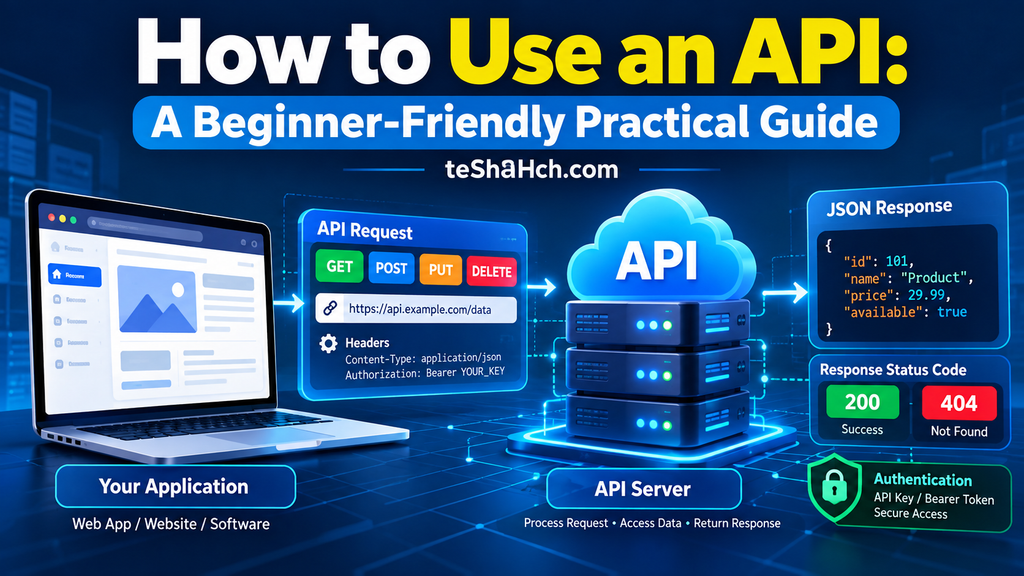
Using an API generally means sending a request to an API endpoint and receiving a response from the server.
The basic process looks like this:
Your Application → API Request → API Server → API Response → Your Application
For example:
Your App
   ↓
GET Request
   ↓
Weather API
   ↓
JSON Response
   ↓
Your App Displays Weather
The request tells the API what you want, while the response contains the result.
What Do You Need to Use an API?
Before using an API, you usually need a few basic things:
- An API
- API documentation
- An API endpoint
- An HTTP method
- Parameters, when required
- Headers, when required
- Authentication credentials, when required
- A tool or programming language for sending requests
For beginners, tools such as a web browser, Postman, or a simple command-line request can be useful for testing APIs.
Step 1: Find an API
The first step is to find an API that provides the information or functionality you need.
For example, you might need:
- A weather API
- A currency exchange API
- A map API
- A payment API
- A translation API
- A news API
- A product API
- A public data API
Many APIs provide documentation explaining exactly how developers can use them.
The documentation is extremely important because it tells you:
- Available endpoints
- Supported HTTP methods
- Required parameters
- Authentication requirements
- Request formats
- Response formats
- Error codes
- Usage limits
Never guess how an API works when official documentation is available.
Step 2: Read the API Documentation
API documentation is the instruction manual for an API.
Suppose an API documentation page shows an endpoint like:
GET /users
This tells you that the API provides a /users endpoint and expects a GET request.
Documentation may also provide a complete URL such as:
https://api.example.com/users
You may also see information such as:
Method: GET
Endpoint: /users
Authentication: API Key
Response: JSON
Before sending a request, carefully check the documentation.
Step 3: Understand the API Endpoint
An API endpoint is a specific URL through which you interact with an API.
For example:
https://api.example.com/users
Here:
https://api.example.com
is the base URL, while:
/users
identifies a particular resource or operation.
Another endpoint might be:
https://api.example.com/products
or:
https://api.example.com/orders
Different endpoints can provide access to different resources.
Step 4: Choose the HTTP Method
APIs commonly use HTTP methods to tell the server what action you want to perform.
The most common methods are:
| HTTP Method | Common Purpose |
|---|---|
| GET | Retrieve data |
| POST | Create or submit data |
| PUT | Replace or update a resource |
| PATCH | Partially update a resource |
| DELETE | Delete a resource |
For example, if you want to retrieve users:
GET /users
If you want to create a new user:
POST /users
The exact behavior depends on the API’s documentation.
Step 5: Understand Parameters
Some APIs need additional information to process a request. This information can be provided through parameters.
For example:
https://api.example.com/products?category=books
Here:
category=books
is a query parameter.
An API might allow multiple parameters:
https://api.example.com/products?category=books&limit=10
In this example:
category=bookstells the API which category you want.limit=10tells the API how many results you want.
The available parameters and their accepted values should be provided in the API documentation.
Step 6: Check Authentication Requirements
Not every API is completely open.
Many APIs require authentication before they allow requests.
Common authentication methods include:
- API keys
- Bearer tokens
- OAuth
- Access tokens
For example, an API may require a header such as:
Authorization: Bearer YOUR_ACCESS_TOKEN
Your actual authentication method depends on the API.
What Is an API Key?
An API key is a credential that an API provider can use to identify or authorize an application or user.
A request might look conceptually like:
https://api.example.com/weather?city=London&api_key=YOUR_API_KEY
However, many APIs recommend sending credentials in HTTP headers instead of putting them directly in the URL.
Keep API Keys Secret
Never publicly share a private API key.
Avoid placing sensitive credentials directly in:
- Public GitHub repositories
- Public websites
- Screenshots
- Social media posts
- Client-side code when the API provider requires server-side protection
For applications, environment variables or secure secret-management systems are commonly used to protect credentials.
Step 7: Send an API Request
Once you understand the endpoint, method, parameters, and authentication requirements, you can send the request.
There are several ways to do this.
Using a Web Browser
For a simple GET API that does not require special authentication, you may be able to open the endpoint directly in a browser.
For example:
https://api.example.com/users
If the API allows the request, it may return data.
Using cURL
cURL is a command-line tool that can send HTTP requests.
A simple GET request can look like:
curl https://api.example.com/users
With a query parameter:
curl "https://api.example.com/products?category=books"
With an authorization header:
curl -H "Authorization: Bearer YOUR_ACCESS_TOKEN" \
https://api.example.com/users
The exact command depends on the API documentation.
Using Postman
Postman is a popular tool for testing APIs.
A typical workflow is:
- Open Postman.
- Create a new request.
- Select the HTTP method.
- Enter the API endpoint.
- Add parameters if required.
- Add authentication if required.
- Add headers if required.
- Add a request body if required.
- Send the request.
- Examine the response.
Postman can be particularly useful when learning APIs because you can test requests without first writing a complete application.
Step 8: Understand the API Response
After sending a request, the server returns a response.
A response usually contains:
- HTTP status code
- Response headers
- Response body
Many modern APIs return data in JSON format.
For example:
{
  "id": 101,
  "name": "John",
  "email": "john@example.com"
}
Your application can read this JSON and use the returned information.
JSON Explained for Beginners: Complete Guide to JavaScript Object Notation and API Data Exchange
For example, a website might display:
Name: John
Email: john@example.com
Step 9: Check the HTTP Status Code
The HTTP status code tells you what happened to your request.
Some common status codes include:
| Status Code | Meaning |
|---|---|
| 200 | Request successful |
| 201 | Resource created |
| 204 | Request successful with no response content |
| 400 | Bad request |
| 401 | Authentication required or invalid |
| 403 | Access forbidden |
| 404 | Resource not found |
| 429 | Too many requests |
| 500 | Internal server error |
| 503 | Service unavailable |
For example, a response with:
200 OK
usually indicates that the request was successfully processed.
A:
404 Not Found
usually means that the requested resource or endpoint could not be found.
Step 10: Use the API Response in Your Application
The final step is using the returned data.
For example, imagine a weather API returns:
{
  "city": "Kolkata",
  "temperature": 30,
  "condition": "Cloudy"
}
Your application could read these values and display:
Kolkata
30°C
Cloudy
This is the basic idea behind many applications that consume APIs.
The API provides the data, while your application decides how to use and display it.
Simple API Workflow Example
Let’s put everything together.
Suppose you want to retrieve a list of products.
1. Find the endpoint
https://api.example.com/products
2. Check the method
GET
3. Add parameters if needed
https://api.example.com/products?category=books
4. Add authentication if required
Authorization: Bearer YOUR_ACCESS_TOKEN
5. Send the request
You can use Postman, cURL, JavaScript, Python, or another programming language.
6. Receive the response
{
  "products": [
    {
      "id": 1,
      "name": "Book A"
    },
    {
      "id": 2,
      "name": "Book B"
    }
  ]
}
7. Check the status code
200 OK
8. Use the data
Your application can read the product information and display it to the user.
How to Use an API with JavaScript
JavaScript applications can use the fetch() function to send HTTP requests.
For example:
fetch("https://api.example.com/users")
  .then(response => response.json())
  .then(data => {
    console.log(data);
  })
  .catch(error => {
    console.error(error);
  });
The basic process is:
fetch()
   ↓
Send API Request
   ↓
Receive Response
   ↓
Convert Response to JSON
   ↓
Use the Data
In real applications, you should also check the response status and handle errors appropriately.
How to Use an API with Python
Python can also be used to communicate with APIs.
One common approach is to use the requests library.
Example:
import requests

response = requests.get("https://api.example.com/users")

if response.ok:
    data = response.json()
    print(data)
else:
    print("Request failed:", response.status_code)
The basic idea remains the same:
Python Program
      ↓
HTTP Request
      ↓
API
      ↓
HTTP Response
      ↓
JSON Data
GET vs POST When Using an API
One of the most common beginner questions is:
A simplified explanation is:
GET
Use GET when you want to retrieve information.
Example:
GET /products
POST
Use POST when you want to send data to the server, often to create a new resource or trigger a server-side operation.
Example:
POST /users
The exact behavior should always be checked in the API documentation.
What Are Headers in an API Request?
HTTP headers provide additional information about a request or response.
For example:
Content-Type: application/json
This indicates that the request or response body is JSON.
An authentication header might look like:
Authorization: Bearer YOUR_ACCESS_TOKEN
Some APIs require specific headers, so always check the documentation.
What Is a Request Body?
A request body contains data sent to the server.
For example, a POST request might send:
{
  "name": "John",
  "email": "john@example.com"
}
The server can process this information and create or update a resource, depending on the API.
Request bodies are especially common with:
- POST
- PUT
- PATCH
Common API Problems Beginners Face
Using an API for the first time can be confusing. Here are some common problems.
401 Unauthorized
This usually indicates an authentication problem.
Possible causes include:
- Missing API key
- Invalid token
- Expired token
- Incorrect authentication format
403 Forbidden
The server understood the request but is refusing access.
Possible reasons include:
- Insufficient permissions
- Restricted resource
- API plan limitations
- Access policy restrictions
404 Not Found
The endpoint or requested resource could not be found.
Check:
- URL
- Endpoint path
- Resource ID
- API version
429 Too Many Requests
This usually means you have exceeded a rate limit.
Some APIs restrict how many requests an application can make within a specific period.
500 Internal Server Error
This indicates a server-side problem.
It does not necessarily mean that your application is the cause.
Check the API documentation and service status if available.
Common Mistakes When Using APIs
Beginners often make a few common mistakes.
Using the Wrong HTTP Method
Using POST when the documentation requires GET can result in an error.
Incorrect Endpoint
A small spelling or path mistake can result in a 404 response.
Missing Authentication
Some APIs require an API key or access token.
Incorrect Parameters
Parameter names and values usually need to match the API documentation.
Incorrect JSON
Invalid JSON formatting can cause a request to fail.
Ignoring Status Codes
Don’t assume every response is successful. Always consider the HTTP status code.
Exposing API Credentials
Never expose private API keys or access tokens unnecessarily.
API Rate Limits
Many APIs have rate limits.
For example, an API might allow a certain number of requests per minute, hour, or day.
If your application sends too many requests, the API may return:
429 Too Many Requests
To work with rate limits effectively:
- Read the API documentation.
- Avoid unnecessary requests.
- Cache data when appropriate.
- Follow the provider’s recommended retry behavior.
- Respect rate-limit headers when provided.
How to Learn API Usage as a Beginner
If you are learning APIs for the first time, follow this order:
1. Understand what an API is
↓
2. Learn how API requests and responses work
↓
3. Learn HTTP methods
↓
4. Understand endpoints
↓
5. Learn JSON
↓
6. Learn HTTP status codes
↓
7. Test APIs with Postman or cURL
↓
8. Use APIs with JavaScript or Python
↓
9. Learn authentication
↓
10. Build a small project using a real API
This approach allows you to move from basic concepts to practical API development step by step.
A Simple API Learning Project
Once you understand the basics, try building a small project.
For example, create a simple weather application.
The basic architecture could be:
User enters city
       ↓
Your Application
       ↓
Weather API Request
       ↓
Weather API
       ↓
JSON Response
       ↓
Your Application
       ↓
Display Weather
Through this one project, you can practice:
- API endpoints
- GET requests
- Query parameters
- API keys
- JSON
- HTTP status codes
- Error handling
- JavaScript or Python
This makes API learning much more practical.
Frequently Asked Questions About Using APIs
Can beginners use APIs?
Yes. Beginners can start using APIs without building a complete backend system. API documentation, Postman, cURL, JavaScript, and Python can help beginners practice API requests.
Do all APIs require an API key?
No. Some APIs are publicly accessible, while others require API keys, access tokens, OAuth, or another authentication method.
Can I use an API without coding?
Sometimes. Tools such as Postman can allow you to send and inspect API requests without writing a complete application. However, programming is generally needed when you want to integrate the API into your own application.
What is the easiest way to test an API?
For beginners, Postman is a convenient option because it provides a graphical interface for creating and testing requests. Simple GET requests can also sometimes be tested with a browser or cURL.
What format do APIs usually return?
Many modern web APIs return JSON, although APIs can use other formats as well.
Can I use an API with JavaScript?
Yes. JavaScript applications commonly use functions such as fetch() to send requests and process API responses.
Can I use an API with Python?
Yes. Python can communicate with APIs using libraries such as requests and built-in networking capabilities.
What should I do if an API returns 404?
Check the endpoint URL, resource path, resource ID, API version, and documentation. A 404 response generally means the requested resource or endpoint could not be found.
What does a 401 API error mean?
A 401 response generally indicates that authentication is missing or invalid. Check the required credentials and authentication format in the API documentation.
What is the difference between an API endpoint and an API?
An API is the overall interface that allows software systems to communicate. An endpoint is a specific URL through which a particular resource or operation can be accessed.
Using an API becomes much easier when you understand the basic workflow.
You typically:
Find an API → Read the documentation → Choose an endpoint → Select an HTTP method → Add parameters and authentication → Send the request → Receive the response → Check the status code → Use the returned data
You can test APIs using tools such as Postman and cURL, and you can integrate them into applications using languages such as JavaScript and Python.
Once you are comfortable with API requests, endpoints, HTTP methods, JSON, authentication, and error handling, you can start building real-world projects that connect your applications with external services.