Learn HTTP Methods from scratch with this complete beginner’s guide. Understand GET, POST, PUT, PATCH, DELETE, HTTP requests, REST APIs, CRUD mapping, best practices, and real-world examples for modern web development.
HTTP Methods Explained for Beginners: Complete Guide to GET, POST, PUT, PATCH & DELETE
Every time you open a website, submit a login form, purchase a product online, or update your social media profile, your browser communicates with a server using HTTP methods.
These methods define what action should be performed on a particular resource.
Whether you’re building a REST API, developing a MERN Stack application, or creating a backend with Express.js, understanding HTTP methods is essential.
In fact, HTTP methods are one of the most fundamental concepts in web development because they allow clients and servers to communicate in a standardized way.
If you’ve already learned REST APIs and CRUD Operations, then HTTP methods are the next building block in understanding how modern applications exchange data.
In this complete beginner-friendly guide, you’ll learn what HTTP methods are, why they exist, how each method works, when to use them, and how professional developers design RESTful APIs using them.
What Are HTTP Methods?
HTTP methods (also called HTTP verbs) are standardized request types that tell a server what action the client wants to perform.
Instead of creating different URLs for every action, web applications use HTTP methods to express intent.
For example:
- Retrieve data
- Create new data
- Update existing data
- Delete data
This approach keeps APIs clean, consistent, and easy to understand.
Why Do HTTP Methods Matter?
Imagine visiting an online shopping website.
You might:
- View products
- Add a new product (admin)
- Edit product information
- Delete discontinued products
Although all these operations involve the same resource (/products), the server needs to know what action you want to perform.
That’s exactly what HTTP methods communicate.
Without them, every request would look identical.
A Simple Real-World Analogy
Think of a library.
The library has books (resources), but different visitors interact with those books differently.
- Reading a book → GET
- Donating a new book → POST
- Replacing an old edition → PUT
- Correcting a typo in the book catalog → PATCH
- Removing a damaged book → DELETE
The resource remains the same, but the requested action changes.
HTTP methods work in the same way.
HTTP Request Overview
Every HTTP request consists of several components.
HTTP Method
       │
       ▼
URL (Endpoint)
       │
       ▼
Headers
       │
       ▼
(Optional) Request Body
Example:
POST /usersHere:
- POST → HTTP Method
- /users → Endpoint
The server reads both pieces of information before processing the request.
How HTTP Methods Work
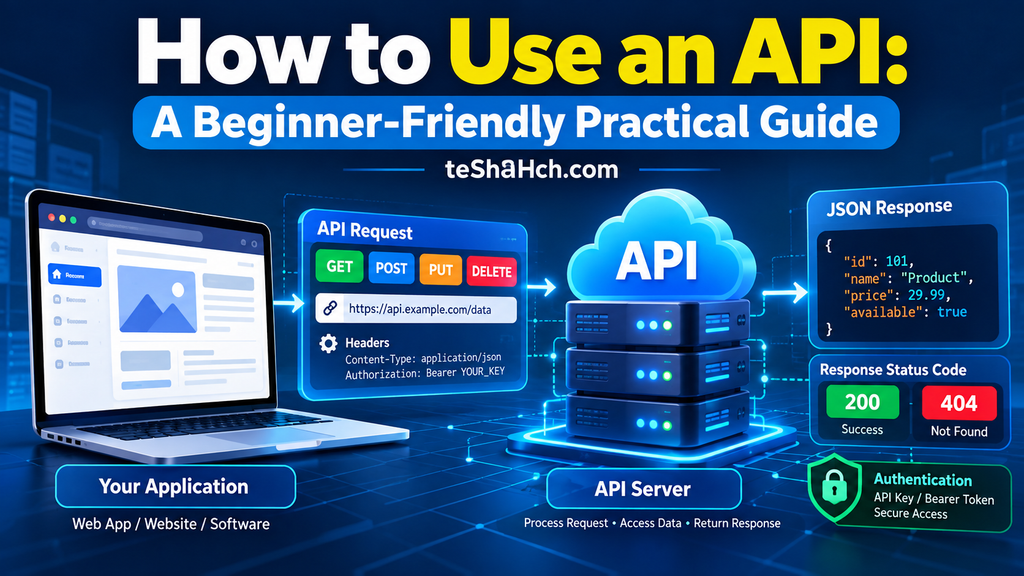
A simplified communication flow looks like this:
Browser / Mobile App
          │
          ▼
HTTP Request
(Method + URL)
          │
          ▼
REST API
          │
          ▼
Business Logic
          │
          ▼
Database
          │
          ▼
HTTP Response
Every request follows this basic workflow.
The Five Most Common HTTP Methods
Although HTTP defines several request methods, modern REST APIs primarily use five.
| HTTP Method | Purpose |
|---|---|
| GET | Retrieve data |
| POST | Create new data |
| PUT | Replace existing data |
| PATCH | Update part of existing data |
| DELETE | Remove data |
These five methods form the foundation of nearly every REST API.
GET Method Explained
The GET method retrieves information from the server.
It never creates, updates, or deletes data.
Its purpose is simply to read information.
Common GET Examples
Retrieve all users:
GET /usersRetrieve a specific user:
GET /users/15Retrieve all products:
GET /productsRetrieve blog posts:
GET /articlesReal-World GET Examples
When you:
- Open Facebook
- Browse Amazon
- Read a blog
- Search YouTube
- View your email inbox
Your browser is mostly sending GET requests.
Characteristics of GET
- Retrieves data only
- Doesn’t modify the database
- Safe to repeat
- Fast
- Cacheable
- Most commonly used HTTP method
POST Method Explained
The POST method creates new resources.
Whenever a user submits new information, POST is typically used.
Common POST Examples
Create a user:
POST /usersCreate a product:
POST /productsPublish an article:
POST /articlesSubmit a contact form:
POST /contactReal-World POST Examples
When you:
- Register a new account
- Upload a profile picture
- Publish a blog post
- Place an online order
- Send a message
A POST request is usually involved.
POST Request Body
Unlike GET, POST usually sends data to the server.
Example JSON:
{
  "name": "Alice Johnson",
  "email": "alice@example.com"
}
The server receives this data and stores it in the database.
Characteristics of POST
- Creates new data
- Includes a request body
- Changes server data
- Usually returns 201 Created
- Not cacheable
- Not idempotent
GET vs POST
Many beginners confuse these two methods.
| GET | POST |
|---|---|
| Retrieve data | Create data |
| No request body (typically) | Uses request body |
| Safe | Changes server state |
| Cacheable | Not cacheable |
| Idempotent | Not idempotent |
Understanding this difference is one of the first steps toward building professional REST APIs.
HTTP Methods and CRUD
HTTP methods directly map to CRUD operations.
| CRUD | HTTP Method |
|---|---|
| Create | POST |
| Read | GET |
| Update | PUT / PATCH |
| Delete | DELETE |
This mapping makes REST APIs intuitive and predictable.
HTTP Methods in REST APIs
Consider a simple user management API.
Retrieve all users:
GET /usersCreate a new user:
POST /usersUpdate user:
PUT /users/5Delete user:
DELETE /users/5Notice that the endpoint remains the same (/users), while the HTTP method defines the action.
This is one of the key principles of RESTful API design.
Why Professional Developers Prefer HTTP Methods
Using standardized methods provides many benefits.
- Cleaner API design
- Easier documentation
- Better maintainability
- Improved scalability
- Consistent behavior across applications
- Compatibility with browsers, mobile apps, and third-party services
Every major web framework—including Express.js, Django, Laravel, Spring Boot, and ASP.NET Core—relies on HTTP methods.
PUT Method Explained
The PUT method is used to replace an existing resource with new data.
Unlike POST, which creates a new resource, PUT updates an existing one.
If the resource already exists, PUT replaces it with the data provided by the client.
Example
Update user ID 5:
PUT /users/5Example request body:
{
  "name": "Alice Johnson",
  "email": "alice@example.com",
  "phone": "9876543210"
}
The server replaces the existing user information with the new data.
Real-World Examples
PUT is commonly used when:
- Updating an employee profile
- Replacing product information
- Updating customer details
- Editing course information
- Updating student records
Characteristics of PUT
- Updates existing resources
- Usually replaces the complete resource
- Requires a request body
- Idempotent
- Changes server data
PATCH Method Explained
The PATCH method updates only specific fields of an existing resource.
Instead of replacing the entire object, PATCH modifies only the information that needs to change.
Example
Update only the email:
PATCH /users/5Request body:
{
  "email": "newemail@example.com"
}
Only the email changes.
Everything else remains unchanged.
Real-World Examples
PATCH is useful for:
- Changing passwords
- Updating profile pictures
- Editing phone numbers
- Updating account status
- Changing shipping addresses
Characteristics of PATCH
- Partial updates
- Smaller request payload
- More efficient than PUT
- Idempotent in well-designed APIs
- Widely used in modern REST APIs
PUT vs PATCH
One of the most common interview questions is the difference between PUT and PATCH.
| PUT | PATCH |
|---|---|
| Replaces the entire resource | Updates only specific fields |
| Larger request body | Smaller request body |
| Better for complete updates | Better for partial updates |
| Easier to understand | More efficient |
Example
Suppose a user has:
{
  "name": "Alice",
  "email": "alice@example.com",
  "phone": "9876543210"
}
Using PUT:
{
  "name": "Alice Johnson",
  "email": "alice@example.com",
  "phone": "9876543210"
}
The entire object is replaced.
Using PATCH:
{
  "name": "Alice Johnson"
}
Only the name changes.
DELETE Method Explained
The DELETE method removes a resource from the server.
Example
Delete user ID 5:
DELETE /users/5The server deletes the specified user.
Real-World Examples
DELETE is used when:
- Removing products
- Deleting blog posts
- Canceling orders
- Deleting comments
- Removing user accounts
Characteristics of DELETE
- Removes data
- Usually no request body
- Idempotent
- Changes server data
Safe vs Unsafe HTTP Methods
HTTP methods are categorized as Safe or Unsafe.
Safe Methods
Safe methods do not modify server data.
Examples:
- GET
- HEAD
- OPTIONS
These methods simply retrieve information.
Unsafe Methods
Unsafe methods modify server data.
Examples:
- POST
- PUT
- PATCH
- DELETE
These methods create, update, or remove resources.
What Is an Idempotent Method?
An idempotent method produces the same result no matter how many times the same request is sent.
Example:
PUT /users/5Sending the exact same PUT request multiple times results in the same final state.
Idempotent Methods
- GET
- PUT
- DELETE
- HEAD
- OPTIONS
Non-Idempotent Methods
- POST
Every POST request typically creates a new resource.
Example:
POST /ordersSending the request twice creates two separate orders.
HTTP Method Comparison Table
| Method | CRUD | Request Body | Changes Data | Idempotent |
|---|---|---|---|---|
| GET | Read | No | No | Yes |
| POST | Create | Yes | Yes | No |
| PUT | Update | Yes | Yes | Yes |
| PATCH | Update | Yes | Yes | Usually Yes |
| DELETE | Delete | Usually No | Yes | Yes |
This table summarizes the behavior of the five most important HTTP methods.
HTTP Methods in Express.js
Express.js provides dedicated methods for handling each HTTP request.
Example routes:
app.get("/users", getUsers);

app.post("/users", createUser);

app.put("/users/:id", updateUser);

app.patch("/users/:id", patchUser);

app.delete("/users/:id", deleteUser);
This clean routing structure makes Express.js one of the most popular frameworks for building REST APIs.
HTTP Methods in REST APIs
A well-designed REST API uses the same endpoint with different HTTP methods.
Example:
GET /products
POST /products
PUT /products/12
PATCH /products/12
DELETE /products/12
Instead of creating endpoints like:
❌ /createProduct
❌ /deleteProduct
REST relies on HTTP methods to express the intended action.
Best Practices
Professional API developers follow several best practices.
1. Use the Correct HTTP Method
Don’t use POST for everything.
Use:
- GET → Read
- POST → Create
- PUT → Replace
- PATCH → Partial Update
- DELETE → Remove
2. Keep URLs Resource-Oriented
Good:
/usersBad:
/getUsersDataREST APIs should represent resources, not actions.
3. Return Proper Status Codes
Examples:
- 200 OK
- 201 Created
- 204 No Content
- 400 Bad Request
- 404 Not Found
- 500 Internal Server Error
Meaningful status codes improve debugging and client integration.
4. Validate Input
Always validate:
- Email addresses
- Passwords
- IDs
- Required fields
- Numeric values
Never trust client input.
5. Secure Sensitive Methods
Protect POST, PUT, PATCH, and DELETE routes using:
- Authentication
- Authorization
- HTTPS
- Rate limiting
- Input validation
Security is a critical part of API design.
Common Beginner Mistakes
Many beginners make the same mistakes when working with HTTP methods.
Using POST for Everything
Ignoring GET, PUT, PATCH, and DELETE defeats REST principles.
Confusing PUT and PATCH
Remember:
- PUT replaces
- PATCH modifies
Poor Endpoint Design
Avoid action-based URLs.
Use resource-based endpoints.
Ignoring Status Codes
Returning 200 OK for every response creates confusion.
Not Validating Requests
Unvalidated input can lead to security vulnerabilities and corrupted data.
Forgetting Authentication
Sensitive operations should never be publicly accessible.
Advantages of Using HTTP Methods
Using standardized HTTP methods provides many benefits.
Simple
Easy to understand and implement.
Standardized
Supported by every major programming language and framework.
REST-Friendly
Perfectly aligns with REST API principles.
Scalable
Suitable for applications ranging from small websites to enterprise systems.
Platform Independent
Works with:
- Browsers
- Mobile Apps
- Desktop Applications
- IoT Devices
- Cloud Services
Easy Integration
Third-party services expect APIs to follow standard HTTP methods.
Limitations
While HTTP methods are essential, developers should also understand their limitations.
- Incorrect usage leads to poorly designed APIs.
- Some legacy systems misuse POST for updates.
- Large-scale APIs require proper documentation alongside method usage.
- Security must always be implemented separately.
Despite these considerations, HTTP methods remain the foundation of modern RESTful API development.
When Should You Use Each HTTP Method?
Choosing the correct HTTP method is one of the hallmarks of a well-designed REST API.
The table below summarizes the recommended usage:
| HTTP Method | Use When | Example |
|---|---|---|
| GET | Retrieve data | View products |
| POST | Create a new resource | Register a user |
| PUT | Replace an entire resource | Update a user profile |
| PATCH | Modify part of a resource | Change email address |
| DELETE | Remove a resource | Delete a product |
A simple rule to remember is:
- Need data? → GET
- Creating something new? → POST
- Replacing everything? → PUT
- Changing only a few fields? → PATCH
- Removing something? → DELETE
Real-World REST API Design Example
Imagine you’re building an online bookstore.
Retrieve all books
GET /booksRetrieve one book
GET /books/15Add a new book
POST /booksReplace book information
PUT /books/15Update only the price
PATCH /books/15Delete a book
DELETE /books/15Notice something important:
The endpoint stays almost the same.
Only the HTTP method changes.
This is the core principle of RESTful API design.
Why Every Developer Should Learn HTTP Methods
HTTP methods are not optional.
They are one of the first concepts employers expect backend and full-stack developers to understand.
Whether you’re using:
- Node.js
- Express.js
- Django
- Laravel
- Spring Boot
- ASP.NET Core
- FastAPI
you’ll work with HTTP methods every day.
Career Importance
HTTP methods are essential for many software development roles.
Common Job Roles
- Backend Developer
- Full Stack Developer
- MERN Stack Developer
- Node.js Developer
- API Developer
- Software Engineer
- Cloud Developer
- Web Application Developer
Frequently Asked in Interviews
Interviewers often ask questions such as:
- What is the difference between GET and POST?
- Explain PUT vs PATCH.
- Which HTTP methods are idempotent?
- What are safe HTTP methods?
- Why shouldn’t POST be used for updates?
- Which status code should POST return?
- How do CRUD operations map to HTTP methods?
Mastering these concepts improves both your practical skills and interview confidence.
Best Resources to Learn HTTP Methods
Learning HTTP methods becomes much easier through practice.
1. Build REST APIs
Create projects like:
- Notes API
- To-Do API
- Student Management API
- Blog API
- Product Management API
2. Test APIs
Use API testing tools to:
- Send GET requests
- Create data with POST
- Update data using PUT and PATCH
- Delete records
Testing helps you understand how clients and servers communicate.
3. Read API Documentation
Study well-designed public APIs to understand:
- Endpoint naming
- HTTP method usage
- Response formats
- Error handling
4. Build Real Projects
The fastest way to master HTTP methods is by building complete applications.
Examples:
- E-commerce Backend
- CRM Dashboard
- School Management System
- Inventory Management System
- Learning Management System

Frequently Asked Questions (FAQ)
What are HTTP methods?
HTTP methods (also called HTTP verbs) define the action a client wants a server to perform on a resource.
Which HTTP method retrieves data?
GET is used to retrieve data from a server.
It should never modify server data.
Which HTTP method creates new resources?
POST is used to create new resources.
Examples include creating users, products, blog posts, or orders.
What is the difference between PUT and PATCH?
PUT replaces the entire resource.
PATCH updates only specific fields.
Which HTTP method deletes data?
DELETE removes an existing resource from the server.
What does idempotent mean?
An idempotent method produces the same result no matter how many times the identical request is sent.
Examples:
- GET
- PUT
- DELETE
Are HTTP methods only used in REST APIs?
No.
HTTP methods are part of the HTTP protocol itself and are used across the web.
However, REST APIs rely heavily on them to define resource operations.
Which HTTP method is most commonly used?
GET is the most frequently used method because users spend most of their time reading information rather than modifying it.
HTTP methods are one of the fundamental building blocks of the web.
Every time an application communicates with a server, an HTTP method tells the server what action should be performed.
By understanding GET, POST, PUT, PATCH, and DELETE, you gain the ability to design cleaner APIs, build scalable backend systems, and create applications that follow modern RESTful principles.
These methods also form the bridge between frontend applications, backend services, and databases, making them essential knowledge for anyone pursuing web development.
As you continue your learning journey, you’ll discover that concepts like authentication, API security, database integration, and cloud deployment all build upon a solid understanding of HTTP methods.
The best way to master them is through hands-on practice. Build APIs, test requests, analyze responses, and continuously refine your projects.



One response to “HTTP Methods Explained for Beginners: Complete Guide to GET, POST, PUT, PATCH & DELETE”
[…] you’ve already learned HTTP Methods, HTTP Status Codes, REST APIs, and CRUD Operations, then JSON is the next building block that […]