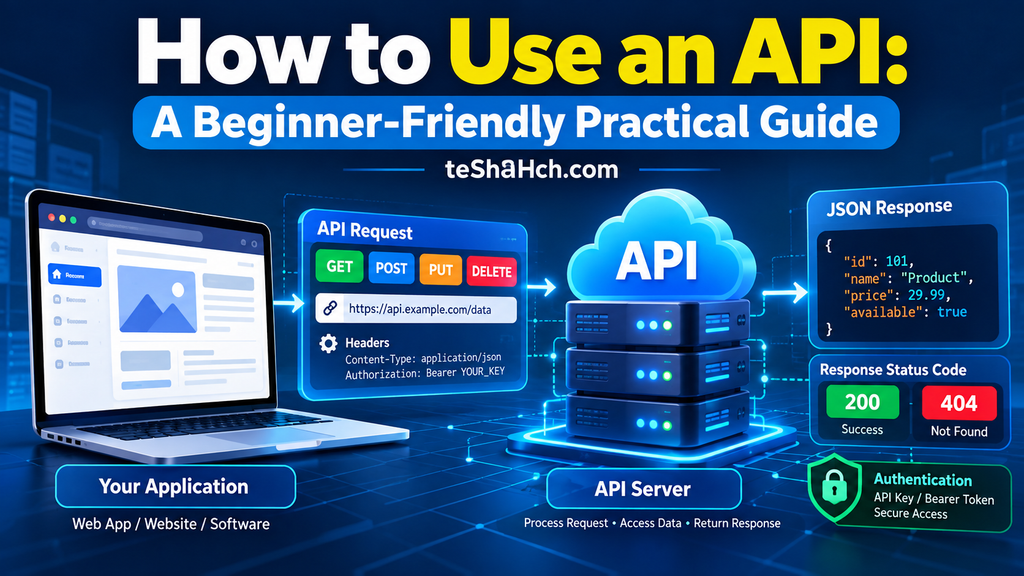
Learn REST API from scratch with this complete beginner’s guide. Understand REST architecture, HTTP methods, JSON, endpoints, request-response lifecycle, authentication basics, and API best practices for modern web development.
REST API Explained for Beginners: Complete Guide to Modern API Development
Modern applications rarely work in isolation.
When you order food online, book a flight, make a digital payment, or browse social media, multiple applications communicate with one another behind the scenes. This communication is made possible through APIs, and the most widely used style for building these APIs is REST.
Whether you’re building a MERN Stack application, developing a mobile app, creating a SaaS platform, or integrating third-party services, understanding REST APIs is an essential skill.
If you’ve already learned JavaScript, Node.js, and Express.js, then REST APIs are the next logical step in your backend development journey.
In this comprehensive guide, you’ll learn what REST APIs are, how they work, why they’re so popular, the principles behind RESTful architecture, and how developers use them to build scalable web applications in 2026.
What Is an API?
API stands for Application Programming Interface.
An API acts as a bridge that allows two software applications to communicate with each other.
Instead of accessing a database directly, applications send requests to an API, which processes the request and returns the appropriate response.
Think of an API as a waiter in a restaurant.
- The customer places an order.
- The waiter takes the order to the kitchen.
- The kitchen prepares the food.
- The waiter brings the food back to the customer.
The customer never enters the kitchen.
Similarly, applications don’t directly access internal systems—they communicate through APIs.
Real-World Examples of APIs
APIs are everywhere.
Examples include:
- Weather applications retrieving forecast data
- Payment gateways processing online transactions
- Google Maps displaying locations
- E-commerce websites showing product information
- Banking apps checking account balances
- Food delivery apps tracking orders
- Social media platforms loading user profiles
Without APIs, modern software ecosystems would not function efficiently.
What Is a REST API?
A REST API is an API that follows the architectural principles of REST.
REST stands for Representational State Transfer.
It is an architectural style introduced by Roy Fielding in 2000 to simplify communication between clients and servers over the web.
REST APIs use standard HTTP methods such as:
- GET
- POST
- PUT
- PATCH
- DELETE
Because REST is simple, scalable, and language-independent, it has become the most widely adopted approach for building web APIs.
A Brief History of REST
Before REST became popular, many applications relied on complex communication protocols.
In 2000, Roy Fielding introduced REST as part of his doctoral dissertation.
His goal was to create a simpler, more scalable architecture for distributed web systems.
Over time, REST became the industry standard because it embraced existing web technologies such as HTTP and URLs, making APIs easier to build and consume.
Today, most web and mobile applications rely on REST APIs.
Why Are REST APIs So Popular?
REST APIs dominate modern backend development for several reasons.
1. Simplicity
REST APIs are straightforward to understand and implement.
Developers can quickly build APIs using familiar HTTP methods.
2. Language Independent
A REST API built with Node.js can communicate with applications written in:
- Python
- Java
- PHP
- C#
- Go
- Kotlin
- Swift
Programming language differences don’t matter because communication happens over HTTP.
3. Platform Independent
REST APIs work across different platforms.
Examples include:
- Websites
- Mobile apps
- Desktop applications
- Smart TVs
- IoT devices
This flexibility makes REST suitable for virtually every type of software.
4. Scalable
REST follows a stateless architecture, making it easier to scale applications as user traffic grows.
This is one of the main reasons cloud platforms and enterprise applications favor REST APIs.
5. Easy Integration
Thousands of third-party services expose REST APIs.
Examples include:
- Payment gateways
- Email services
- SMS providers
- Cloud storage
- AI services
- Maps
- Authentication providers
Developers can integrate these services with minimal effort.
REST Architecture
REST is not a programming language or framework.
It is an architectural style based on several important principles.
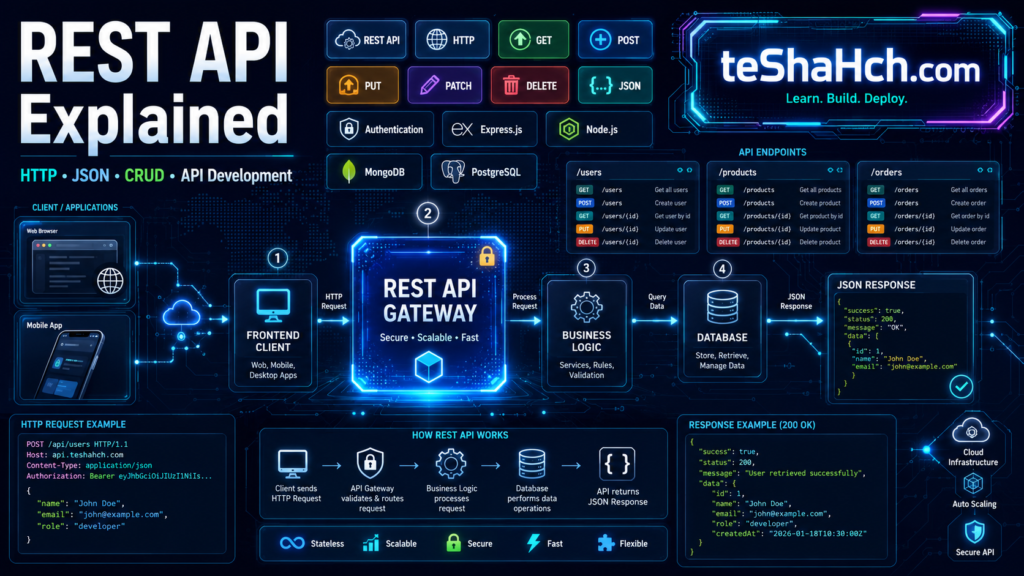
A typical REST architecture looks like this:
Client
   │
   ▼
REST API
   │
   ▼
Business Logic
   │
   ▼
Database
   │
   ▼
JSON Response
The client communicates with the REST API, which processes requests, interacts with the database if necessary, and returns a response.
Understanding the Client–Server Model
REST APIs follow a client–server architecture.
Client
The client sends requests.
Examples:
- React application
- Mobile app
- Browser
- Desktop software
Server
The server receives requests, processes them, and sends responses.
Examples:
- Node.js
- Express.js
- Django
- Laravel
- Spring Boot
Separating the client from the server improves scalability, maintainability, and flexibility.
Understanding HTTP
REST APIs rely on HTTP (Hypertext Transfer Protocol).
HTTP defines how clients and servers communicate.
Every API request is sent using HTTP.
A typical interaction looks like this:
Client Request
       │
       ▼
REST API Server
       │
       ▼
Database
       │
       ▼
HTTP Response
Without HTTP, REST APIs cannot function.
REST API Request–Response Cycle
Every REST API follows the same basic workflow.
Step 1
The client sends an HTTP request.
↓
Step 2
The server receives the request.
↓
Step 3
The application processes business logic.
↓
Step 4
The database is queried if necessary.
↓
Step 5
The server returns a response.
This request–response model forms the foundation of API communication.
What Is an API Endpoint?
An endpoint is a specific URL where an API can be accessed.
Examples:
GET /usersRetrieve all users.
GET /users/5Retrieve user number 5.
POST /usersCreate a new user.
DELETE /users/5Delete user number 5.
Each endpoint performs a specific operation.
Understanding Resources
In REST, everything is treated as a resource.
Examples of resources include:
- Users
- Products
- Orders
- Books
- Students
- Employees
- Articles
Each resource has its own endpoint.
For example:
/users
/products
/orders
/books
This resource-based approach makes APIs intuitive and easy to understand.
What Is JSON?
Most REST APIs exchange data using JSON (JavaScript Object Notation).
JSON is lightweight, easy to read, and supported by almost every programming language.
Example:
{
  "id": 101,
  "name": "John Doe",
  "email": "john@example.com"
}
JSON has become the standard format for REST API communication because of its simplicity and efficiency.
Why Do REST APIs Use JSON?
JSON offers several advantages:
- Human-readable
- Lightweight
- Fast to parse
- Language-independent
- Easy to generate
- Supported by virtually every programming language
Because of these benefits, JSON is the preferred data format for modern REST APIs.
REST API in the MERN Stack
REST APIs play a central role in the MERN Stack.
A simplified workflow looks like this:
React Frontend
        │
        ▼
Express REST API
        │
        ▼
Node.js
        │
        ▼
MongoDB
        │
        ▼
JSON Response
Here’s what happens:
- The React frontend sends an HTTP request.
- Express.js receives the request.
- Node.js executes the backend logic.
- MongoDB stores or retrieves data.
- The API sends a JSON response back to React.
This architecture powers countless modern web applications, from e-commerce platforms to SaaS products.
Why Every Full Stack Developer Should Learn REST APIs
REST APIs connect the frontend, backend, and database into a complete application.
By understanding REST APIs, developers can:
- Build scalable backend services
- Connect frontend applications to databases
- Integrate third-party platforms
- Develop mobile backends
- Create reusable web services
- Build enterprise-grade software
Mastering REST APIs is one of the most valuable skills for modern web development.
HTTP Methods in REST APIs
REST APIs use standard HTTP methods to define what action should be performed on a resource.
Each method has a specific purpose, making APIs predictable and easy to understand.
The five most commonly used HTTP methods are:
- GET
- POST
- PUT
- PATCH
- DELETE
Let’s understand each one.
GET Method
The GET method is used to retrieve data from the server.
It never modifies data.
Examples
Retrieve all products:
GET /productsRetrieve a specific product:
GET /products/10Common Uses
- Fetch user profiles
- Display blog posts
- Load product listings
- Retrieve order details
GET is the most frequently used HTTP method in REST APIs.
POST Method
The POST method is used to create new resources.
When a client submits data, the server processes it and stores it.
Example
POST /usersCommon Uses
- Register a new user
- Create a blog post
- Add a product
- Submit a contact form
Unlike GET, POST changes the application’s data.
PUT Method
The PUT method updates an existing resource.
It typically replaces the entire resource with new data.
Example
PUT /users/5Common Uses
- Update user information
- Modify product details
- Replace an existing record
PUT is generally used for complete updates.
PATCH Method
PATCH updates only specific fields instead of replacing the entire resource.
Example
PATCH /users/5You might only update:
- Email address
- Phone number
- Profile picture
PATCH reduces unnecessary data transfer.
DELETE Method
The DELETE method removes resources.
Example
DELETE /users/5Common Uses
- Delete users
- Remove products
- Delete comments
- Cancel orders
DELETE permanently removes data unless additional recovery mechanisms exist.
HTTP Status Codes
Every REST API response includes an HTTP status code.
These codes tell the client whether the request succeeded or failed.
2xx — Success
| Code | Meaning |
|---|---|
| 200 | OK |
| 201 | Created |
| 204 | No Content |
These indicate successful operations.
4xx — Client Errors
| Code | Meaning |
|---|---|
| 400 | Bad Request |
| 401 | Unauthorized |
| 403 | Forbidden |
| 404 | Not Found |
These usually indicate problems with the client’s request.
5xx — Server Errors
| Code | Meaning |
|---|---|
| 500 | Internal Server Error |
| 502 | Bad Gateway |
| 503 | Service Unavailable |
These indicate server-side problems.
Understanding status codes is essential for debugging APIs.
What Are HTTP Headers?
Headers provide additional information about a request or response.
They help both the client and server understand how to process data.
Common header examples include:
- Authorization
- Content-Type
- Accept
- User-Agent
- Cache-Control
For example, when sending JSON data, the client specifies:
Content-Type: application/jsonHeaders play a critical role in authentication, caching, content negotiation, and security.
Path Parameters
Path parameters identify a specific resource.
Example:
/users/15Here:
users→ Resource15→ Resource ID
Common examples:
- Product ID
- Order ID
- Student ID
- Employee ID
Path parameters are widely used in RESTful APIs.
Query Parameters
Query parameters are used to filter or modify results.
Example:
/products?category=laptopor
/products?page=3&limit=20Common Uses
- Searching
- Filtering
- Sorting
- Pagination
Query parameters improve API flexibility without changing endpoints.
Understanding CRUD Operations
CRUD represents the four basic database operations.
| Operation | HTTP Method |
|---|---|
| Create | POST |
| Read | GET |
| Update | PUT / PATCH |
| Delete | DELETE |
Every REST API performs some form of CRUD operation.
For example, an online store:
- Create products
- Read products
- Update inventory
- Delete discontinued items
CRUD forms the foundation of backend development.
Authentication Basics
Most APIs should not be publicly accessible.
Authentication verifies the identity of users before allowing access.
Common authentication methods include:
- JWT (JSON Web Token)
- OAuth
- API Keys
- Session Authentication
Authentication protects user data and prevents unauthorized access.
Authorization vs Authentication
These two concepts are often confused.
Authentication
Answers:
Who are you?
Example:
A user logs into an application.
Authorization
Answers:
What are you allowed to do?
Example:
An administrator can delete users, while a regular user cannot.
Authentication comes first, followed by authorization.
REST API Best Practices
Professional APIs follow certain design principles.
1. Use Meaningful URLs
Good:
/usersBad:
/getUsersDataNowREST endpoints should represent resources, not actions.
2. Use Correct HTTP Methods
Avoid using POST for everything.
Instead:
- GET → Retrieve
- POST → Create
- PUT → Replace
- PATCH → Modify
- DELETE → Remove
3. Return Proper Status Codes
Don’t always return 200 OK.
Use appropriate codes such as:
- 201 Created
- 400 Bad Request
- 404 Not Found
- 500 Internal Server Error
This helps clients understand what happened.
4. Keep Responses Consistent
Maintain a predictable response format.
Example:
{
  "success": true,
  "message": "User created successfully",
  "data": {
    "id": 101,
    "name": "John Doe"
  }
}
Consistent responses make APIs easier to consume.
5. Secure Your APIs
Always validate input.
Use:
- Authentication
- Authorization
- HTTPS
- Input validation
- Rate limiting
Security should never be an afterthought.
REST vs SOAP
Before REST became dominant, many enterprise systems relied on SOAP.
| REST | SOAP |
|---|---|
| Lightweight | Heavyweight |
| Uses JSON | Uses XML |
| Faster | Slower |
| Easier to learn | More complex |
| Better for web apps | Common in legacy enterprise systems |
Today, REST is generally the preferred choice for modern web and mobile applications.
REST vs GraphQL
GraphQL is another API technology that solves different problems.
| REST | GraphQL |
|---|---|
| Multiple endpoints | Single endpoint |
| Simple | More flexible |
| Easy for beginners | Steeper learning curve |
| Industry standard | Growing adoption |
Learn REST First
For beginners, REST is the recommended starting point.
After mastering REST, learning GraphQL becomes much easier.
Advantages of REST APIs
REST offers numerous benefits.
1. Easy to Learn
Simple architecture and standard HTTP methods make REST beginner-friendly.
2. Fast Performance
REST APIs are lightweight and efficient, especially when using JSON.
3. Platform Independent
Any application capable of making HTTP requests can consume a REST API.
4. Highly Scalable
REST’s stateless architecture makes it ideal for cloud-based applications.
5. Language Independent
Clients and servers can be written in different programming languages.
6. Wide Industry Adoption
REST is used by:
- Microsoft
- Amazon
- Stripe
- Shopify
- Thousands of SaaS companies
Learning REST opens many career opportunities.
Disadvantages of REST APIs
Despite its popularity, REST has some limitations.
1. Overfetching
Sometimes clients receive more data than needed.
2. Underfetching
Multiple requests may be required to gather related data.
3. Stateless Nature
Every request must contain all necessary information because the server does not retain client state.
4. Version Management
As APIs evolve, maintaining multiple versions can become challenging.
Common Mistakes Beginners Make
1. Ignoring HTTP Methods
Using POST for every operation defeats REST principles.
2. Poor Endpoint Design
Endpoints should represent resources clearly.
3. Returning Incorrect Status Codes
Proper status codes improve debugging and API usability.
4. Weak Error Handling
Always return meaningful error messages instead of generic failures.
5. Skipping Authentication
Never expose sensitive endpoints without authentication and authorization.
6. Not Testing APIs
Use tools such as Postman or Insomnia to verify API behavior before deployment.
Is REST API Worth Learning?
Absolutely.
REST APIs remain the backbone of modern web development. Almost every web application, mobile app, SaaS platform, cloud service, and enterprise system relies on REST APIs to exchange data between clients and servers.
If you’re planning to become a Backend Developer, Frontend Developer, Full Stack Developer, Mobile App Developer, or Software Engineer, understanding REST APIs is a fundamental skill.
Why REST APIs Are Still Worth Learning
✅ Industry-standard API architecture
✅ Used in almost every web application
✅ Easy to learn and implement
✅ Platform independent
✅ Language independent
✅ Works perfectly with Node.js, Express.js, React, Angular, Vue, Django, Laravel, Spring Boot, and ASP.NET Core
✅ Highly valued by employers worldwide
REST APIs are not just another technology—they are the standard way modern applications communicate.
Career Opportunities
Developers with REST API knowledge have opportunities across almost every software industry.
Common Job Roles
- Backend Developer
- Full Stack Developer
- API Developer
- Node.js Developer
- Express.js Developer
- React Developer
- Software Engineer
- Cloud Developer
- Mobile App Developer
Industries Hiring REST API Developers
- Software Companies
- SaaS Startups
- E-commerce
- FinTech
- EdTech
- Healthcare Technology
- Logistics
- Enterprise IT
- Digital Agencies
Whether you’re building internal enterprise systems or consumer-facing applications, REST API skills are highly transferable.
Best Resources to Learn REST APIs
The best way to learn REST APIs is through a combination of theory and practice.
1. Official Documentation
Study the official documentation of the framework you’re using (such as Express.js, Django REST Framework, or ASP.NET Core) to understand how REST is implemented.
2. Build Real APIs
Hands-on projects are essential.
Start with:
- Notes API
- To-Do API
- Student Management API
- Blog API
- Product Management API
Then move on to:
- Authentication API
- E-commerce Backend
- CRM Backend
- Learning Management System
3. Learn API Testing
Use API testing tools to understand requests and responses.
Practice:
- Sending requests
- Reading JSON responses
- Testing authentication
- Debugging APIs
4. Read Public API Documentation
Explore APIs from popular platforms to understand real-world API design.
Observe:
- Endpoints
- Status codes
- Authentication methods
- Response formats
5. Practice Every Day
REST API development is a practical skill.
Consistent coding and project-building will improve your understanding much faster than passive learning.
REST API Learning Roadmap
A practical roadmap for beginners:
| Stage | Estimated Time |
|---|---|
| HTTP Fundamentals | 1 Week |
| JSON | 2–3 Days |
| REST Principles | 1 Week |
| HTTP Methods | 2–3 Days |
| Status Codes | 2–3 Days |
| Express.js APIs | 2 Weeks |
| CRUD Operations | 1 Week |
| Authentication (JWT) | 2 Weeks |
| Database Integration | 2 Weeks |
| API Testing | 1 Week |
| Real Projects | Ongoing |
Remember: building projects is the fastest way to master API development.
Frequently Asked Questions (FAQ)
What is a REST API?
A REST API is an API that follows the architectural principles of Representational State Transfer (REST) to enable communication between clients and servers over HTTP.
What is the difference between an API and a REST API?
An API is a general interface that allows software applications to communicate.
A REST API is a specific type of API that follows REST architectural principles and uses standard HTTP methods.
Is REST API a programming language?
No.
REST is an architectural style, not a programming language or framework.
Do I need Express.js to build REST APIs?
No.
REST APIs can be built using many frameworks and languages, including:
- Express.js
- Django REST Framework
- Laravel
- Spring Boot
- ASP.NET Core
- FastAPI
Express.js is simply one of the most popular options for JavaScript developers.
Why do REST APIs use JSON?
JSON is lightweight, human-readable, language-independent, and easy to parse, making it the preferred data format for modern APIs.
Can REST APIs work with any database?
Yes.
REST APIs can connect to relational and non-relational databases such as:
- MongoDB
- PostgreSQL
- MySQL
- MariaDB
- SQL Server
- SQLite
Is REST API still in demand?
Yes.
REST remains the dominant API architecture used in modern web, mobile, and cloud applications.
What should I learn after REST APIs?
A recommended learning path is:
- CRUD Operations
- JWT Authentication
- OAuth
- MongoDB
- PostgreSQL
- Docker
- API Security
- GraphQL
- Deployment
REST APIs are the communication backbone of modern software. They allow applications to exchange information securely, efficiently, and consistently across different platforms and programming languages.
Whether you’re creating a simple personal project or a large-scale enterprise application, REST APIs provide a reliable and scalable approach to building connected systems.
Learning REST APIs also opens the door to understanding more advanced topics such as authentication, authorization, microservices, cloud computing, and API security.
If you’re following a Full Stack Web Development roadmap, mastering REST APIs after learning Node.js and Express.js is the next logical milestone. Combined with databases like MongoDB or PostgreSQL and a frontend library such as React, REST APIs enable you to build complete, production-ready applications.
The key to becoming proficient is to build real-world APIs, follow best practices, write clean code, and continuously improve your understanding through practical projects.