Learn how an API works in simple language with real-life examples, diagrams, and step-by-step explanations. Understand API requests, responses, endpoints, HTTP methods, and the complete API workflow.
How Does an API Work? A Beginner-Friendly Guide
Imagine you’re sitting at a restaurant.
You don’t walk into the kitchen and cook your own food. Instead, you tell the waiter what you want. The waiter carries your order to the kitchen, the chef prepares your meal, and the waiter brings the food back to your table.
This is exactly how an API (Application Programming Interface) works.
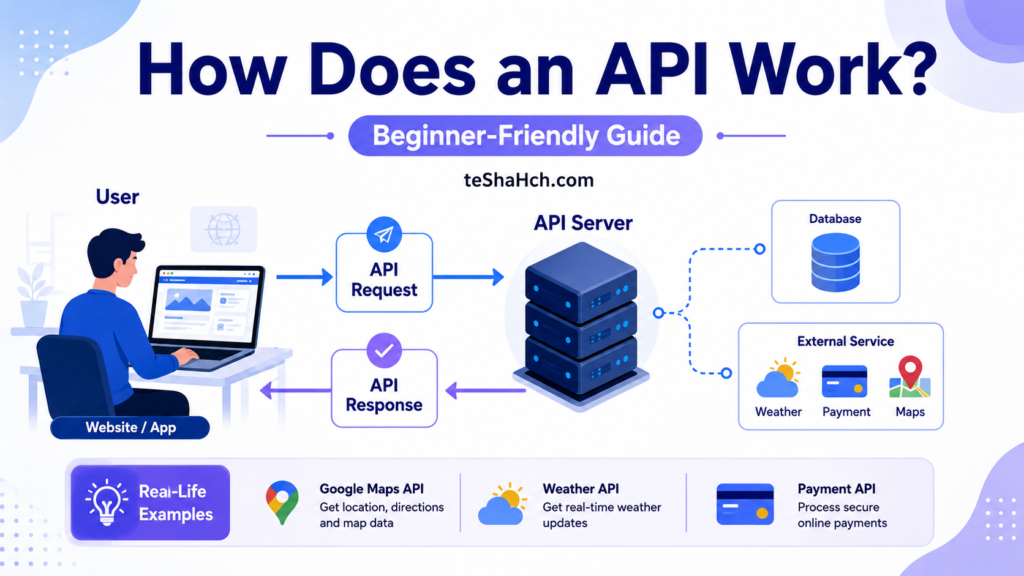
An API acts like a messenger between two software applications. One application sends a request, and another processes that request and sends back the required information.
Whether you’re using Google Maps, checking today’s weather, logging in with Google, ordering food online, or chatting with an AI assistant, APIs work behind the scenes to make everything happen.
In this guide, you’ll learn how an API works step by step using simple language, practical examples, diagrams, and real-world scenarios.
What Does an API Actually Do?
An API allows two different software applications to communicate with each other.
Instead of giving direct access to an application’s database or internal system, an API provides a controlled way to request specific information or perform certain actions.
For example:
- A weather website requests today’s weather from a weather service.
- A payment app requests payment verification from a payment gateway.
- A shopping website requests delivery status from a courier company.
- A mobile banking app requests your account balance from the bank’s server.
In every case, the applications communicate through APIs instead of accessing each other’s internal systems directly.
Understanding API Communication
Think of an API as a translator.
Different applications may be built using different programming languages and technologies.
For example:
- Website → JavaScript
- Server → Python
- Database → MySQL
Even though these technologies are different, they can communicate because they all understand API requests and responses.
The API becomes the common language between them.
How Does an API Work?
Let’s break the process into simple steps.
Step 1: User Performs an Action
Everything starts when a user interacts with an application.
Examples include:
- Clicking a Login button
- Searching for a movie
- Checking today’s weather
- Sending a message
- Booking a hotel
- Viewing a product
At this point, the application realizes it needs information from another system.
Step 2: The Application Creates an API Request
The application prepares a request containing information such as:
- What data is needed
- Which API endpoint should be used
- Authentication credentials (if required)
- Request parameters
- Request headers
Example request:
GET https://api.weather.com/current?city=LondonThis request asks the weather server:
“Please send me the current weather for London.”
Step 3: The API Receives the Request
The server receives the request.
Before processing it, the API checks several things:
- Is the request valid?
- Is the endpoint correct?
- Is the API key valid?
- Does the user have permission?
- Are all required parameters included?
If something is wrong, the API returns an error.
If everything is correct, processing continues.
Step 4: The Server Processes the Request
The API now communicates with its own backend systems.
Depending on the request, it may:
- Read data from a database
- Update existing records
- Delete information
- Calculate results
- Verify login credentials
- Contact another external API
This is where the actual work happens.
Step 5: The Server Creates a Response
After completing the task, the server prepares a response.
The response usually includes:
- Requested data
- Status code
- Success or error message
- Additional metadata
Most modern APIs send responses in JSON format.
Example:
{
  "city": "London",
  "temperature": 18,
  "condition": "Cloudy"
}
Step 6: The Application Displays the Result
Finally, the application receives the response and shows the information to the user.
Instead of seeing JSON, users see a friendly interface like:
London

18°C

Cloudy
The user never notices that an API completed dozens of operations behind the scenes in just a fraction of a second.
Complete API Workflow
The complete process looks like this:
User
   │
   ▼
Website / Mobile App
   │
   ▼
API Request
   │
   ▼
API Server
   │
   ▼
Database / External Services
   │
   ▲
API Response
   │
   ▲
Website / Mobile App
   │
   ▲
User
This simple workflow powers almost every modern website and application.
Real-Life Example 1: Weather Application
Suppose you open a weather app and search for:
New YorkThe app doesn’t already know the weather.
Instead, it sends an API request like:
GET /weather?city=NewYorkThe weather server checks its latest data and responds:
{
  "city":"New York",
  "temperature":24,
  "humidity":68
}
The app then displays:
New York

24°C

Humidity: 68%
Without APIs, developers would have to collect and maintain weather data themselves, which would be extremely difficult.
Real-Life Example 2: Login with Google
When you click:
Continue with Google
Your application doesn’t know your password.
Instead:
- The app sends a request to Google’s authentication API.
- Google verifies your identity.
- Google returns a secure response.
- Your app logs you in.
This entire login process is powered by APIs.
Real-Life Example 3: Food Delivery App
Imagine ordering pizza.
The food delivery app communicates with several APIs simultaneously.
It may use:
- Restaurant API
- Payment API
- Delivery Partner API
- Maps API
- Notification API
Each API performs a specific job, and together they create a seamless user experience.
Components Involved in API Communication
A typical API workflow includes several important components.
Client
The client is the application requesting information.
Examples:
- Website
- Mobile app
- Desktop application
API
The API receives requests and sends responses.
It acts as a bridge between applications.
Server
The server performs the requested task.
It processes data and communicates with databases.
Database
The database stores information such as:
- User accounts
- Products
- Orders
- Messages
- Payment history
The API retrieves or updates this data whenever necessary.
What Happens If Something Goes Wrong?
Sometimes an API cannot complete a request.
Common reasons include:
- Invalid API key
- Wrong endpoint
- Missing parameters
- Server downtime
- Network failure
- Permission denied
Instead of data, the API returns an error message with an HTTP status code.
Examples include:
- 400 – Bad Request
- 401 – Unauthorized
- 403 – Forbidden
- 404 – Not Found
- 500 – Internal Server Error
These status codes help developers identify and fix problems quickly.
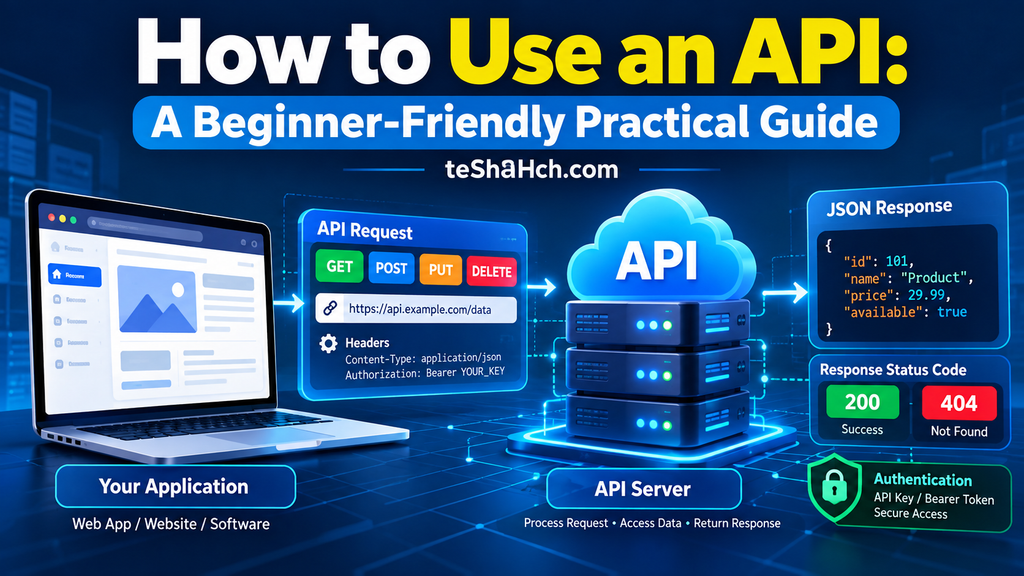
API Request: What Information Is Sent?
Every API communication begins with a request.
An API request is simply a message sent from a client (such as a website, mobile app, or desktop application) to a server asking it to perform a specific action.
A request usually contains several important parts.
1. API Endpoint
The endpoint is the exact URL where the request is sent.
Example:
https://api.example.com/usersThink of an endpoint as the address of a particular service.
Just as every house has its own address, every API service has its own endpoint.
2. HTTP Method
The method tells the server what action should be performed.
Examples include:
| Method | Purpose |
|---|---|
| GET | Retrieve data |
| POST | Create new data |
| PUT | Replace existing data |
| PATCH | Update part of existing data |
| DELETE | Remove data |
For example:
GET /usersmeans:
“Please send me the list of users.”
While
DELETE /users/25means:
“Delete user number 25.”
3. Request Headers
Headers provide additional information about the request.
For example:
- Authorization token
- API Key
- Content Type
- Language
- Cache information
Example:
Authorization: Bearer eyJhbGc...
Content-Type: application/json
Headers help the server understand who is making the request and what type of data is being sent.
4. Request Parameters
Parameters allow the client to customize the request.
Example:
/products?category=laptopHere,
category=laptopis a query parameter.
The server understands that only laptops should be returned.
5. Request Body
Some requests send additional information.
Example:
Creating a new user.
{
  "name":"John",
  "email":"john@example.com"
}
The server receives this data and creates a new account.
API Response: What Does the Server Return?
Once the server finishes processing the request, it sends a response.
A response generally contains four parts.
Status Code
Indicates whether the request succeeded.
Example:
200 OKmeans everything worked successfully.
Response Headers
These contain metadata about the response.
Examples:
- Content Type
- Cache settings
- Server information
Response Body
This contains the actual data.
Example:
{
    "name":"John",
    "age":25,
    "country":"USA"
}
Error Message
If something goes wrong:
{
    "error":"User not found"
}
The client application can display a proper error message to the user.
Understanding API Requests and Responses Together
Imagine searching for a smartphone on an e-commerce website.
The workflow looks like this:
User
↓

Searches "iPhone"

↓

Website

↓

API Request

↓

Product Database

↓

API Response

↓

Website

↓

Displays Products
Everything happens within milliseconds.
How HTTP Methods Work in APIs
HTTP methods define the action that the server should perform.
Let’s look at practical examples.
GET
Used for reading data.
Example:
GET /productsResponse:
List of productsPOST
Used for creating data.
Example:
POST /productsBody:
{
   "name":"Laptop"
}
A new product is created.
PUT
Used for replacing existing information.
Example:
PUT /users/15The server replaces the user’s information completely.
PATCH
Used for updating only certain fields.
Example:
PATCH /users/15Body:
{
   "city":"London"
}
Only the city changes.
Everything else remains the same.
DELETE
Used for deleting data.
Example:
DELETE /products/100The server removes product number 100.
API Endpoint Explained
An endpoint is simply the destination where requests are sent.
Examples:
/users

/products

/orders

/login

/weather
Each endpoint performs a different task.
Think of endpoints as different departments in a company.
- HR Department
- Sales Department
- Accounts Department
Each department performs a unique function.
Similarly, every API endpoint has its own responsibility.
Why Authentication Is Important
Imagine anyone on the internet could access your bank account.
That would be dangerous.
Authentication ensures only authorized users can access protected resources.
Before sending data, the API checks:
- Who are you?
- Are you logged in?
- Do you have permission?
Only after verification does the API process the request.
Popular authentication methods include:
- API Key
- Bearer Token
- JWT
- OAuth 2.0
Each of these topics will be covered in dedicated guides later in this API series.
REST API Workflow
Most modern APIs follow the REST architecture.
The workflow looks like this.
Client

↓

HTTP Request

↓

REST API

↓

Business Logic

↓

Database

↓

REST API

↓

JSON Response

↓

Client
REST APIs are popular because they are:
- Lightweight
- Fast
- Easy to understand
- Platform independent
- Scalable
This is why companies such as Google, GitHub, Stripe, and countless SaaS platforms provide REST APIs.
Real-Life Example: Online Banking
Let’s see what happens when you open your banking app.
You tap:
Check BalanceThe mobile app sends:
GET /account/balanceThe API verifies:
- Your login session
- Your authentication token
- Your account permissions
The banking server retrieves your balance from the database.
The response might look like:
{
  "balance": 45230.75,
  "currency": "INR"
}
The mobile app displays:
Available Balance

₹45,230.75
The banking app never accesses the database directly.
Everything happens securely through APIs.
Real-Life Example: Google Maps
Suppose you’re searching for:
Coffee Shop Near MeThe application sends your search to the Maps API.
The API checks:
- Your location
- Nearby businesses
- Ratings
- Distance
The response contains:
- Business names
- Coordinates
- Photos
- Reviews
The application then places markers on the map.
Without APIs, developers would have to build an entire mapping system from scratch.
Real-Life Example: Online Shopping Website
When you visit an online store, dozens of APIs may work together.
For example:
Product API
Returns product information.
Inventory API
Checks whether the item is in stock.
Pricing API
Returns current price and discounts.
Payment API
Processes online payments.
Shipping API
Calculates delivery charges.
Notification API
Sends SMS or email confirmations.
Although users see only one webpage, multiple APIs are communicating behind the scenes.
Common Mistakes Beginners Make
Many beginners misunderstand how APIs work.
Here are some common mistakes.
Thinking APIs Store Data
APIs usually do not store data.
Databases store data.
APIs simply retrieve, update, create, or delete that data.
Confusing APIs with Databases
A database stores information.
An API is the communication layer that allows applications to access that information safely.
Believing APIs Are Only for Websites
APIs are used in:
- Mobile apps
- Desktop software
- Smart TVs
- IoT devices
- Games
- AI applications
- Cloud platforms
They are not limited to websites.
Assuming Every API Is Public
Some APIs are publicly available.
Others require:
- Login credentials
- API keys
- Paid subscriptions
- Organization approval
Always check the provider’s documentation before using an API.
Best Practices for Working with APIs
Whether you are learning APIs or building applications, following good practices will make your projects more secure and reliable.
- Read the API documentation carefully before writing code.
- Use the correct HTTP method for each operation.
- Keep API keys and authentication tokens private.
- Handle error responses gracefully instead of assuming every request will succeed.
- Validate all user input before sending it to an API.
- Respect API rate limits to avoid temporary blocks.
- Test requests with tools like Postman before integrating them into your application.
- Log API errors during development to simplify debugging.
- Cache responses when appropriate to reduce unnecessary requests.
- Always use HTTPS when communicating with production APIs.
Quick Recap
Let’s quickly review the complete API workflow.
1. User performs an action
        ↓
2. Application creates an API request
        ↓
3. API receives the request
        ↓
4. Server processes the request
        ↓
5. Database or another service returns data
        ↓
6. API prepares a response
        ↓
7. Application displays the result to the user
This entire process usually takes only a few milliseconds, making modern websites and applications feel fast and responsive.
Key Takeaways
Before moving to the next topic in this API series, remember these important points:
- An API acts as a bridge that allows different software applications to communicate.
- Every API interaction starts with a request and ends with a response.
- HTTP methods tell the server what action to perform.
- API endpoints define where requests should be sent.
- JSON is the most commonly used data format for modern APIs.
- Authentication protects APIs from unauthorized access.
- Almost every modern website, mobile app, SaaS platform, and AI application relies on APIs.
Frequently Asked Questions (FAQ)
What is the main purpose of an API?
The main purpose of an API is to enable different software applications to communicate and exchange data securely without exposing their internal implementation.
Does an API store data?
No.
An API usually does not store data. Instead, it communicates with a database or another service to retrieve, update, create, or delete information.
What happens when an API receives a request?
The API validates the request, checks authentication and permissions, processes the required action, retrieves or updates data if needed, and sends a response back to the client.
Why do APIs use JSON?
JSON is lightweight, easy to read, and supported by almost every programming language, making it the preferred format for exchanging data.
What is an API endpoint?
An API endpoint is the specific URL where a client sends requests to access a particular resource or service.
Example:
https://api.example.com/usersWhat is an API request?
An API request is the message sent by a client to ask the server to perform an action such as retrieving, creating, updating, or deleting data.
What is an API response?
An API response is the information returned by the server after processing a request. It usually contains data, a status code, and sometimes an error message.
What are HTTP methods in APIs?
HTTP methods define the action to perform.
Common methods include:
- GET
- POST
- PUT
- PATCH
- DELETE
Why is API authentication important?
Authentication ensures that only authorized users or applications can access protected resources, helping to secure sensitive data and services.
Can two applications communicate without an API?
In some cases, they can use other communication methods, but APIs are the standard and most efficient way for modern applications to exchange data securely and consistently.
Common Beginner Questions
Many beginners ask these questions when learning APIs:
- Is an API a programming language?
- Do APIs require coding?
- Is REST API different from API?
- What is the difference between an API and a database?
- Can I build a website using APIs only?
- Which programming language is best for working with APIs?
- Is API development difficult?
- Which tools should I learn first?
These topics will be covered individually in upcoming articles in this API series.
APIs are one of the most important technologies behind today’s digital world. Every time you check the weather, make an online payment, log in with Google, view a location on a map, or interact with an AI chatbot, APIs are quietly working behind the scenes.
Understanding how an API works is the foundation for learning web development, mobile app development, software engineering, cloud computing, and AI integration. Once you understand the request–response cycle, endpoints, HTTP methods, and authentication, learning more advanced API concepts becomes much easier.
If you’re just starting your API journey, don’t stop here. Continue with the next guide in this series to build a strong understanding of modern APIs step by step.



One response to “How Does an API Work? A Beginner-Friendly Guide with Real-Life Examples”
[…] guess how an API works when official documentation is […]