Learn API Endpoints from scratch with this complete beginner’s guide. Understand endpoints, routes, URLs, REST API resource design, path structure, and real-world examples for modern web development.
API Endpoints Explained for Beginners: Complete Guide to Routes, URLs & Resource Design
When you open a mobile app, browse an online store, watch a YouTube video, or check your bank balance, your device constantly communicates with servers through API endpoints.
Every request sent from a client reaches a specific destination called an endpoint.
Without endpoints, APIs would have no way to identify which resource a client wants to access.
If you’ve already learned REST APIs, HTTP Methods, HTTP Status Codes, CRUD Operations, and JSON, then API endpoints are the next important concept to master.
In this complete beginner-friendly guide, you’ll learn what API endpoints are, how they work, how they’re designed, and why proper endpoint structure is essential for building scalable REST APIs.
What Is an API Endpoint?
An API endpoint is a specific URL where a client sends requests to interact with a server.
Think of an endpoint as the address of a particular resource inside an API.
For example:
https://api.example.com/usersThis endpoint allows clients to work with users.
Another endpoint might be:
https://api.example.com/productsThis one is responsible for products.
Each endpoint represents a specific resource within the application.
A Simple Real-World Analogy
Imagine a large hospital.
The hospital itself is like an API.
Inside the hospital, different departments exist:
- Emergency
- Cardiology
- Pharmacy
- Laboratory
Each department has its own room number.
These room numbers are similar to API endpoints.
If you need medicine, you don’t walk into the operation theater.
You go directly to the pharmacy.
Likewise, when an application needs product information, it sends the request to the products endpoint, not the users endpoint.
API vs Endpoint
Many beginners confuse these two terms.
They are closely related but not identical.
| API | Endpoint |
|---|---|
| Collection of resources and functionality | A single access point inside an API |
| Contains multiple endpoints | Represents one specific resource |
| Larger system | Individual URL |
Example:
API:
https://api.example.comEndpoints:
/users
/products
/orders
/categories
Together they form the complete API.
Endpoint vs URL
Another common confusion is between URLs and endpoints.
Every endpoint is a URL.
However, not every URL is necessarily an API endpoint.
Example:
Website URL:
https://example.com/aboutAPI Endpoint:
https://api.example.com/usersThe first serves a webpage.
The second serves structured data.
Endpoint vs Route
Although these terms are sometimes used interchangeably, they have different meanings.
| Endpoint | Route |
|---|---|
| Public URL clients access | Internal server mapping |
| Visible to clients | Defined in backend code |
| Represents an API resource | Connects requests to controller logic |
For example:
Client accesses:
GET /usersBackend route:
app.get("/users", getUsers);The client only sees the endpoint.
The server uses routes to decide which code should execute.
Why Are API Endpoints Important?
Endpoints provide a clear structure for applications.
They make APIs:
- Easy to understand
- Easier to document
- Easier to maintain
- More scalable
- More secure
Without organized endpoints, APIs quickly become confusing.
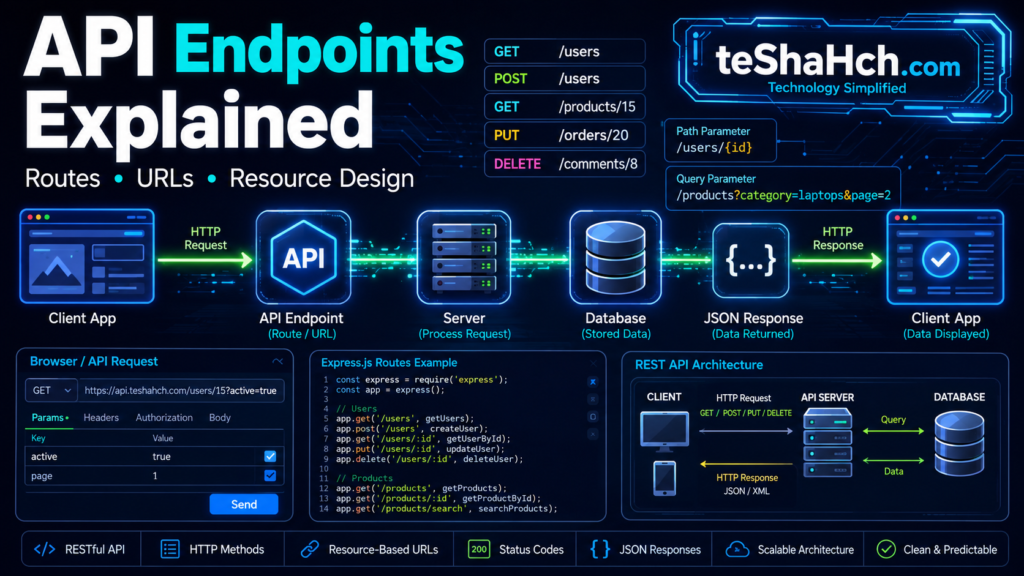
How API Endpoints Work
The communication flow is simple.
Client
   │
   ▼
API Endpoint
   │
   ▼
Server
   │
   ▼
Database
   │
   ▼
JSON Response
The client sends a request to a specific endpoint.
The server processes the request, retrieves data if needed, and returns a response.
Anatomy of an API Endpoint
Let’s examine a complete endpoint.
https://api.example.com/v1/products/15Each section has a purpose.
| Part | Meaning |
|---|---|
| https:// | Protocol |
| api.example.com | Domain |
| /v1 | API version |
| /products | Resource |
| /15 | Resource ID |
Together, these parts uniquely identify the requested resource.
Base URL Explained
The Base URL is the common starting point for every endpoint.
Example:
https://api.example.comEvery endpoint begins with this base URL.
Examples:
https://api.example.com/usershttps://api.example.com/productshttps://api.example.com/ordersUsing a consistent base URL makes APIs easier to manage.
Resource Paths Explained
The resource path identifies what data the client wants.
Examples:
/users/products/orders/categoriesEach resource should represent a noun, not an action.
Good API design focuses on resources rather than verbs.
REST Endpoint Basics
REST APIs organize endpoints around resources.
For example:
Retrieve all users:
GET /usersRetrieve one user:
GET /users/15Create a user:
POST /usersUpdate a user:
PUT /users/15Delete a user:
DELETE /users/15Notice that the endpoint remains almost the same.
Only the HTTP method changes.
This is one of REST’s core principles.
Real-World API Endpoint Examples
E-commerce Website
Products:
/productsOrders:
/ordersCustomers:
/customersShopping Cart:
/cartSocial Media Platform
Users:
/usersPosts:
/postsComments:
/commentsMessages:
/messagesSchool Management System
Students:
/studentsTeachers:
/teachersClasses:
/classesAttendance:
/attendanceWhy REST APIs Prefer Resource-Based Endpoints
Instead of creating endpoints like:
❌
/getUsers❌
/createUserProfessional REST APIs prefer:
✅
/usersThe HTTP method communicates the action.
This results in:
- Cleaner APIs
- Better documentation
- Easier maintenance
- Standardized architecture
Common Endpoint Pattern
Most REST APIs follow this structure:
Base URL
      │
      ▼
Resource
      │
      ▼
Resource ID (Optional)
Example:
https://api.example.com/products/10This predictable structure makes APIs intuitive for developers.
Endpoint Naming Best Practices
A well-designed API should be easy to understand without reading extensive documentation.
Professional developers follow standard naming conventions so that anyone using the API can quickly understand what each endpoint does.
1. Use Nouns Instead of Verbs
REST APIs are resource-oriented, not action-oriented.
❌ Bad
/getUsers
/createUser
/deleteProduct
/updateOrder
✅ Good
/users
/products
/orders
The HTTP method already tells the server what action to perform.
For example:
GET /usersmeans “retrieve users.”
POST /usersmeans “create a user.”
2. Use Plural Resource Names
Professional REST APIs generally use plural nouns.
Good examples:
/users
/products
/orders
/students
/books
Instead of:
/user
/product
/order
Plural naming improves consistency across the API.
3. Keep URLs Short and Meaningful
Good:
/productsBad:
/get-all-products-from-databaseSimple URLs are easier to remember and document.
4. Use Lowercase Letters
Most APIs use lowercase URLs.
Good:
/productsBad:
/Productsor
/PRODUCTS5. Use Hyphens When Necessary
For multi-word resources:
Good:
/user-profilesAvoid:
/user_profilesor
/UserProfilesResource-Based URL Design
REST APIs organize URLs around resources.
Examples:
/users
/products
/orders
/categories
/comments
Each resource represents a collection of similar data.
For example:
/productsrepresents all products.
While:
/products/15represents one specific product.
Collection vs Individual Resource
Understanding this distinction is important.
Collection Endpoint
Returns multiple resources.
GET /productsResponse:
[
  {
    "id": 1,
    "name": "Keyboard"
  },
  {
    "id": 2,
    "name": "Mouse"
  }
]
Individual Resource
Returns one specific resource.
GET /products/2Response:
{
  "id": 2,
  "name": "Mouse"
}
Nested Endpoints
Sometimes resources belong to other resources.
Example:
A user has multiple orders.
Instead of:
/ordersYou may use:
/users/25/ordersMeaning:
“Retrieve all orders belonging to User 25.”
Another example:
/products/50/reviewsMeaning:
“Retrieve reviews for Product 50.”
Nested endpoints clearly show relationships between resources.
Path Parameters Explained
A path parameter identifies a specific resource.
Example:
GET /users/25Here:
25is the path parameter.
General format:
/users/{id}Examples:
/users/1
/users/5
/users/20
Each value points to a different user.
Multiple Path Parameters
Some endpoints require multiple identifiers.
Example:
/users/25/orders/12Meaning:
- User ID = 25
- Order ID = 12
This endpoint uniquely identifies Order 12 belonging to User 25.
Query Parameters Explained
Query parameters are used for:
- Filtering
- Searching
- Sorting
- Pagination
They appear after a question mark (?).
Example:
/products?category=laptopsMeaning:
Show only laptop products.
Multiple Query Parameters
Example:
/products?category=laptops&brand=dellMeaning:
Show Dell laptops.
Sorting Example
/products?sort=priceSort products by price.
Pagination Example
/products?page=2&limit=20Meaning:
- Page 2
- 20 products per page
Pagination is essential for APIs handling large datasets.
Route Parameters vs Path Parameters
Many frameworks use the term route parameter.
For example, in Express.js:
app.get("/users/:id", getUser);Here:
:idis called a route parameter.
When the request arrives:
/ users / 15the route parameter becomes:
id = 15In practice, route parameter and path parameter often refer to the same concept.
CRUD Endpoints
REST APIs combine endpoints with HTTP methods to perform CRUD operations.
| Operation | Method | Endpoint |
|---|---|---|
| Create | POST | /users |
| Read All | GET | /users |
| Read One | GET | /users/15 |
| Update | PUT | /users/15 |
| Delete | DELETE | /users/15 |
Notice how the endpoint remains almost identical.
Only the HTTP method changes.
Complete REST Endpoint Example
Imagine a Book Store API.
Retrieve all books:
GET /booksRetrieve one book:
GET /books/25Create a new book:
POST /booksUpdate a book:
PUT /books/25Delete a book:
DELETE /books/25This predictable structure makes REST APIs easy to understand.
Endpoint Design Workflow
Professional API design usually follows this pattern:
Identify Resource
        │
        ▼
Choose Endpoint
        │
        ▼
Select HTTP Method
        │
        ▼
Validate Request
        │
        ▼
Database Operation
        │
        ▼
JSON Response
This workflow keeps APIs organized and maintainable.
Common Beginner Mistakes
Many beginners make similar mistakes when designing endpoints.
Using Verbs in URLs
❌
/createUser✅
/usersMixing Singular and Plural
Avoid:
/user
/products
/order
Choose one style and remain consistent.
Exposing Database Details
Bad:
/getUserByPrimaryKeyClients don’t need to know how your database works.
Creating Deeply Nested Endpoints
Avoid excessive nesting like:
/companies/1/departments/2/employees/5/projects/8/tasks/3These URLs become difficult to understand.
Ignoring Versioning
Professional APIs include versions.
Example:
/api/v1/productsThis makes future updates easier without breaking existing applications.
Best Practices
Professional API developers follow these guidelines:
- Use resource-based URLs.
- Use HTTP methods correctly.
- Keep endpoint names short.
- Use plural nouns.
- Return consistent JSON responses.
- Include proper HTTP status codes.
- Validate input before processing.
- Document every endpoint.
- Use API versioning.
- Keep naming consistent throughout the project.
Following these practices results in APIs that are easier to maintain and integrate.
Advantages of Well-Designed Endpoints
A good endpoint design offers several benefits:
- Easier to understand
- Easier to document
- Easier to scale
- Improved security
- Better developer experience
- Faster integration
- Simplified maintenance
- Consistent architecture
Limitations and Challenges
While REST endpoints are powerful, developers should be aware of some challenges:
- Poor naming can confuse API consumers.
- Overly nested URLs reduce readability.
- Changing endpoints may break existing clients if versioning is not used.
- Inconsistent endpoint structures make APIs harder to maintain.
Proper planning and adherence to REST principles help avoid these issues.
API Endpoint Design in Real Projects
As you start building real-world applications, you’ll realize that every feature revolves around well-designed API endpoints.
Whether it’s an e-commerce website, a banking application, or a social media platform, endpoints act as the bridge between the client and the server.
Let’s look at how endpoints are organized in different projects.
E-commerce API
An online shopping platform may include endpoints like:
GET    /products
GET    /products/{id}
POST   /products
PUT    /products/{id}
DELETE /products/{id}
Additional endpoints:
GET /categories
GET /orders
GET /customers
POST /cart
Each endpoint represents a specific business resource.
School Management System
Typical endpoints include:
GET /students
GET /teachers
GET /classes
GET /attendance
GET /results
Specific student:
GET /students/105Student attendance:
GET /students/105/attendanceSocial Media Platform
Examples:
GET /posts
GET /users
GET /comments
GET /messages
Retrieve comments for a post:
GET /posts/25/commentsRetrieve a user’s followers:
GET /users/15/followersNested endpoints make relationships between resources easy to understand.
Banking Application
Secure APIs often expose endpoints like:
GET /accounts
GET /transactions
POST /payments
GET /beneficiaries
Retrieve one transaction:
GET /transactions/501Because banking systems are security-sensitive, these endpoints are typically protected with authentication and authorization.
REST Endpoint Design Checklist
Before publishing an API, ask yourself:
✅ Does the endpoint represent a resource?
✅ Does it use plural nouns?
✅ Is the URL short and readable?
✅ Does it avoid verbs?
✅ Is the correct HTTP method used?
✅ Are HTTP status codes returned correctly?
✅ Does it return consistent JSON responses?
✅ Is the endpoint versioned (e.g., /api/v1)?
If the answer is yes to all of these, you’re following REST best practices.
Why Every Developer Should Learn API Endpoints
API endpoints are one of the most fundamental concepts in backend development.
You’ll use them while building:
- REST APIs
- MERN Stack applications
- Mobile apps
- SaaS platforms
- Cloud services
- Microservices
- AI-powered applications
Every interaction between the frontend and backend begins with an endpoint.
Understanding endpoint design helps you build APIs that are intuitive, scalable, and easy for other developers to use.
Career Importance
Knowledge of API endpoints is expected in many software development roles.
Common Job Roles
- Backend Developer
- Full Stack Developer
- MERN Stack Developer
- Node.js Developer
- API Developer
- Software Engineer
- Cloud Engineer
- DevOps Engineer
Common Interview Questions
Recruiters frequently ask:
- What is an API endpoint?
- What is the difference between an API and an endpoint?
- Endpoint vs Route?
- Endpoint vs URL?
- Why should REST APIs use nouns instead of verbs?
- What are path parameters?
- What are query parameters?
- How should REST endpoints be designed?
Being able to answer these confidently demonstrates strong backend fundamentals.
Best Way to Practice API Endpoints
Theory alone isn’t enough.
Build small REST APIs such as:
- Notes API
- Blog API
- Student Management System
- Inventory Management System
- Library Management System
- To-Do Application
Practice designing endpoints before writing any code.
For example, sketch the resources and define:
- Collection endpoints
- Individual resource endpoints
- Nested endpoints
- Query parameters
- CRUD operations
This approach helps you think like a backend architect rather than just a programmer.
Frequently Asked Questions (FAQ)
What is an API endpoint?
An API endpoint is a specific URL where a client sends requests to access or manipulate a resource on a server.
Is every URL an API endpoint?
No.
Every API endpoint is a URL, but not every URL is an API endpoint. Many URLs simply serve web pages rather than structured data.
What is the difference between an API and an endpoint?
An API is the complete interface that exposes functionality and resources.
An endpoint is one specific URL within that API.
What is the difference between an endpoint and a route?
An endpoint is the public URL that clients access.
A route is the server-side code that maps requests to the appropriate controller or handler.
Why do REST APIs use nouns?
REST APIs focus on resources rather than actions.
The HTTP method (GET, POST, PUT, DELETE) already defines the action.
What are path parameters?
Path parameters identify specific resources.
Example:
/users/25Here, 25 is the path parameter.
What are query parameters?
Query parameters provide optional information such as filtering, sorting, searching, or pagination.
Example:
/products?category=laptops&page=2What makes a good API endpoint?
A good endpoint is:
- Resource-based
- Consistent
- Easy to understand
- Properly versioned
- Uses the correct HTTP methods
- Returns meaningful HTTP status codes and JSON responses
API endpoints are the foundation of every RESTful application.
They define how clients communicate with servers, how resources are accessed, and how applications exchange data in a predictable way.
A well-designed endpoint is simple, consistent, and resource-oriented.
By combining clear endpoint structures with the correct HTTP methods, JSON responses, and HTTP status codes, developers create APIs that are easy to understand, maintain, and scale.
As you continue learning backend development, you’ll see API endpoints working together with concepts such as Authentication, JWT, HTTP Headers, Request & Response Objects, Databases, and Cloud Deployment.
The more projects you build, the more natural endpoint design will become.


One response to “API Endpoints Explained for Beginners: Complete Guide to Routes, URLs & Resource Design”
[…] API endpoint is a specific URL through which you interact with an […]