Learn how a domain name works, including DNS, IP addresses, nameservers, hosting, domain registration, and what happens when someone visits your website.
How Does a Domain Name Work?
A Complete Beginner-Friendly Guide
When you type a website address such as google.com or teshahch.com into your browser, the website appears on your screen within seconds.
But have you ever wondered what actually happens behind the scenes?
How does a domain name find the correct website?
The answer involves several important technologies, including domain registration, DNS, nameservers, and IP addresses.
Don’t worry if these terms sound technical. In this guide, we’ll explain everything in simple language.
🌐 What Happens When You Type a Domain Name?
Let’s say you type:
example.com
into your browser.
Your browser needs to find the server where the website is hosted.
But computers communicate using IP addresses, not human-friendly domain names.
For example, a server might have an IP address such as:
192.0.2.1
Remembering numbers like this for every website would be difficult.
That’s why domain names exist.
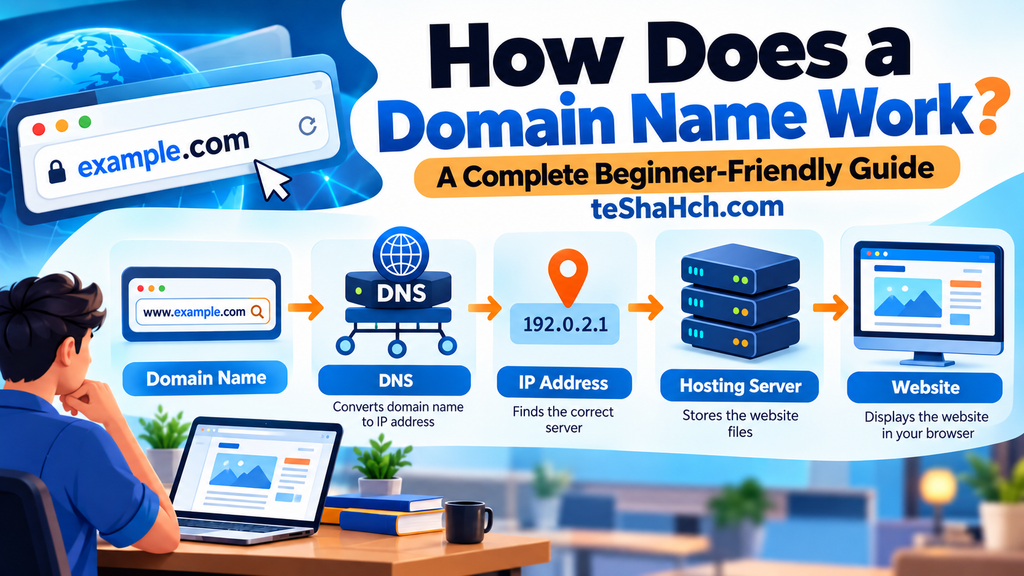
The Domain Name System (DNS) connects the domain name with the correct IP address.
In simple terms:
Domain Name → DNS → IP Address → Web Server → Website
🧠 Domain Name vs IP Address
A domain name is designed for humans.
An IP address is used by computers and networks.
Example:
Domain:example.com
IP Address:192.0.2.1
Instead of remembering a complicated IP address, you can simply type the domain name.
DNS does the technical work in the background.
🔎 What Is DNS?
DNS stands for Domain Name System.
It works like the internet’s address book.
When you enter a domain name, DNS helps your browser find the IP address associated with that domain.
Simple example:
Think about your phone’s contact list.
You save someone’s name as:
John
Instead of remembering their phone number.
When you want to call John, your phone looks up his number.
DNS works in a similar way:
Domain Name → IP Address
🏠 A Simple House Example
You can understand the whole process using a house analogy.
- Domain = House address
- DNS = Directory that finds the address
- IP Address = Exact location of the house
- Hosting Server = The house
- Website Files = Everything inside the house
When someone enters your domain, DNS helps direct them to the correct server.
🔗 What Are Nameservers?
Nameservers are an important part of the DNS system.
They tell the internet which DNS servers are responsible for your domain.
When you buy hosting, your hosting provider may give you nameservers.
For example:
ns1.examplehost.com
ns2.examplehost.com
You can add these nameservers to your domain settings.
This connects your domain with the hosting provider’s DNS system.
⚙️ How Domain and Hosting Work Together
A domain and hosting have different jobs.
Domain
The domain gives your website an address.
Hosting
Hosting stores your website files.
When connected correctly:
Domain → DNS → Hosting Server → Website Files
That’s how visitors can access your website through your domain name.
If you want to understand the difference between these two concepts in more detail, see our guide:
Domain vs Hosting: What’s the Difference?
🛒 What Happens When You Register a Domain?
When you register a domain, you don’t permanently buy the domain name.
Instead, you register the right to use that domain for a specific period.
For example, you might register:
yourbusiness.com
for one year.
You can continue using it by renewing the registration before it expires.
🏢 Who Manages Domain Registration?
Domain names are managed through a system involving several organizations.
A domain registrar provides the service that allows customers to register and manage domains.
For many common domain extensions, the domain registry maintains the central database for that extension.
You don’t normally need to understand all of these organizations to use a domain.
You simply choose a trusted registrar, register your domain, and manage it through your account.
📋 What Happens After You Buy a Domain?
After registering a domain, you generally need to connect it to the service where your website is hosted.
A typical process looks like this:
Step 1: Register Your Domain
Choose an available domain and register it through a domain registrar.
Step 2: Buy Hosting
Choose a hosting service where your website files will be stored.
Step 3: Connect the Domain and Hosting
Update your domain’s DNS or nameserver settings.
Step 4: Upload or Build Your Website
Your website files are placed on the hosting server.
Step 5: Visitors Access Your Website
When someone enters your domain, DNS helps direct them to the correct server.
🔄 What Happens When Someone Visits Your Website?
Let’s look at the process step by step.
1. Visitor Enters the Domain
A visitor types:
yourwebsite.com
into their browser.
2. Browser Looks for DNS Information
The browser needs to discover where the domain points.
3. DNS Finds the Correct IP Address
DNS helps identify the server associated with the domain.
4. Browser Connects to the Server
The browser sends a request to the appropriate server.
5. Server Sends Website Data
The server sends the required website files and information.
6. Website Appears
The browser processes the information and displays the website.
All of this normally happens very quickly.
⚡ What Is DNS Propagation?
When you change DNS settings, the changes may not appear everywhere immediately.
This is commonly called DNS propagation.
For example, if you connect your domain to a new hosting provider, some visitors may see the new website before others.
This happens because DNS information can be temporarily cached by different systems.
DNS changes can therefore take some time to become visible everywhere.
💾 What Is DNS Caching?
DNS information is often temporarily stored, or cached, by browsers, operating systems, routers, and DNS resolvers.
Caching helps websites load efficiently because the system doesn’t need to look up the same DNS information every time.
However, caching can also mean that an old DNS record remains visible for some time after you make a change.
🔐 Does a Domain Automatically Include SSL?
No.
A domain and an SSL certificate are different things.
Domain
Provides your website address.
SSL/TLS
Helps establish an encrypted connection between a visitor’s browser and your website.
A website using HTTPS usually has a secure connection.
Many modern hosting providers offer SSL certificates as part of their hosting plans.
📧 How Does a Domain Work With Email?
A domain can also be used for professional email addresses.
For example:
info@yourbusiness.com
support@yourbusiness.com
Email delivery uses DNS records such as MX (Mail Exchange) records to identify which mail servers should receive messages for your domain.
So DNS isn’t only used for websites.
It can also help manage domain-based email.
🧩 Important DNS Records Beginners Should Know
You don’t need to memorize every DNS record, but understanding a few common ones is useful.
A Record
Connects a domain or hostname to an IPv4 address.
AAAA Record
Connects a domain or hostname to an IPv6 address.
CNAME Record
Creates an alias that points one hostname to another hostname.
MX Record
Specifies which mail servers handle email for a domain.
TXT Record
Stores text information used for different purposes, including domain verification and email authentication.
These records are managed through your DNS settings.
❓ What If DNS Is Not Configured Correctly?
If your DNS settings are incorrect, your website or email may not work properly.
You might see errors such as:
- Website not loading
- Domain pointing to the wrong website
- Email not being delivered
- DNS-related browser errors
That’s why DNS settings should be changed carefully.
If you’re not sure what a particular DNS record does, it’s better to check with your hosting provider or a qualified professional before changing it.
🔄 Can You Change Where a Domain Points?
Yes.
You can change the DNS settings of a domain and point it to a different hosting provider or service.
For example:
Old Hosting → New Hosting
Your domain can remain the same while the website moves to another server.
This is useful when:
- You change hosting providers
- You redesign your website
- You move to a different server
- You use a different website platform
🆚 Domain, DNS, Hosting and Website: Quick Comparison
| Term | What It Does |
|---|---|
| Domain | Gives your website a human-friendly address |
| DNS | Helps connect the domain to the correct services |
| IP Address | Identifies a server or network destination |
| Hosting | Stores your website files |
| Website | The actual pages and content visitors see |
Understanding these five terms makes website management much easier.
⚠️ Common Beginner Mistakes
1. Changing DNS Without Understanding It
An incorrect DNS record can affect your website or email.
2. Forgetting Domain Renewal
If your domain expires, your website and email may stop working.
3. Confusing Domain and Hosting
They are connected, but they are not the same thing.
4. Using the Wrong Nameservers
Incorrect nameservers can prevent your domain from reaching the correct DNS configuration.
5. Changing Multiple DNS Records at Once
If something goes wrong, it becomes harder to identify the cause.
🚀 How a Domain Works in One Simple Diagram
Think of the process like this:
Visitor
↓
Your Domain Name
↓
DNS Lookup
↓
IP Address
↓
Hosting Server
↓
Website
This is the basic journey that happens when someone visits a domain.
❓ Frequently Asked Questions
What is the main purpose of a domain name?
A domain provides a human-readable address that people can use to access a website or other online services.
Does a domain contain my website?
No.
The domain is the address. Your website files are normally stored on a hosting server.
Does DNS host my website?
No.
DNS helps direct users to the correct server or service. Hosting stores your website files.
Can I have a domain without hosting?
Yes.
You can register a domain without buying hosting immediately. You can connect it to hosting later.
Can I use one domain with multiple services?
Yes, depending on your DNS configuration.
For example, different subdomains can point to different services.
How long does DNS propagation take?
It varies depending on the DNS change, caching, and the specific DNS setup. Some changes can appear quickly, while others may take longer to update across different networks.
Can I change my hosting without changing my domain?
Yes.
You can usually keep the same domain and update its DNS configuration to point to the new hosting service.
Is DNS the same as a domain?
No.
A domain is the website’s address, while DNS is the system that helps translate that address into the appropriate network destination.
🔗 Learn More About Domains
If you’re new to domains, start with our beginner guide:
What Is a Domain? A Complete Beginner-Friendly Guide to Domain Names
Once you understand how domains work, the next important concept is understanding how a domain differs from hosting:
Domain vs Hosting: What’s the Difference?
🎯 Final Thoughts
A domain may look like a simple website address, but several systems work behind the scenes to make it useful.
The basic process is:
Domain → DNS → IP Address → Hosting Server → Website
Understanding this process will make it much easier to manage your own website, connect a domain to hosting, configure professional email, and troubleshoot common website problems.
You don’t need to become a DNS expert to run a website.
But knowing the basics can save you time and help you make better decisions when setting up your online presence.
💻 Need Help With Your Domain or Website?
At teShaHch.com, we help businesses, organizations, schools, and individuals with:
✔️ Domain Registration
✔️ Domain & DNS Setup
✔️ Hosting Setup
✔️ Website Development
✔️ Domain + Hosting + Website Solutions
Need help connecting your domain to hosting or setting up your website?
Get in touch with teShaHch.com.