Discover 20+ AI lesson plan prompts for teachers to create engaging lesson plans, activities, worksheets, quizzes, assessments, and differentiated learning materials faster.
AI Lesson Plan Prompts for Teachers: 20+ Ready-to-Use Prompts
Teachers spend a significant amount of time planning lessons, creating classroom activities, preparing questions, designing worksheets, and developing assessments.
Artificial intelligence can help reduce some of this preparation work.
With the right AI lesson plan prompts, teachers can use tools such as ChatGPT and other AI assistants to create lesson-plan drafts, classroom activities, discussion questions, quizzes, worksheets, differentiated learning tasks, and assessment ideas.
However, the quality of the result depends heavily on the quality of the prompt.
Instead of simply asking an AI tool, “Create a lesson plan about photosynthesis,” you can provide the grade level, subject, lesson duration, learning objective, prior knowledge, classroom context, and required activities.
This gives the AI much more useful information to work with.
In this guide, you will find 20+ ready-to-use AI prompts for teachers that you can copy, customize, and use for lesson planning and classroom preparation.
Important: AI-generated lesson plans should be treated as drafts. Teachers should review the content for accuracy, curriculum alignment, age appropriateness, accessibility, and classroom suitability before using it with students.
What Are AI Lesson Plan Prompts?
AI lesson plan prompts are instructions given to an artificial intelligence tool to help generate or improve a lesson plan.
A prompt can tell the AI:
- What subject you teach
- Which grade or age group you teach
- What topic you are teaching
- How long the lesson will be
- What students already know
- What students should learn
- Which activities you want
- What type of assessment you need
- What learning difficulties students may have
- What materials are available
For example, instead of:
Create a science lesson about plants.
You could write:
Create a 45-minute science lesson for Grade 5 students about photosynthesis. Students already understand that plants need sunlight and water to grow. Include a measurable learning objective, a 5-minute warm-up, teacher explanation, one hands-on activity, guided practice, five assessment questions, and a 5-minute exit ticket. Use age-appropriate language.
The second prompt gives the AI much more context and is therefore more likely to produce a useful starting point.
Why Should Teachers Use AI for Lesson Planning?
AI can help teachers with several parts of the lesson-planning process.
1. Generate a First Draft
Instead of starting with a blank page, you can ask AI to create a basic lesson structure that you can edit.
2. Save Preparation Time
AI can quickly generate ideas for activities, questions, examples, discussion topics, and classroom exercises.
3. Create Different Versions of Activities
A single classroom activity can be adapted for beginners, advanced learners, or students who need additional support.
4. Create Teaching Materials
Teachers can use AI to generate worksheets, quizzes, flashcards, examples, discussion questions, and revision activities.
5. Improve Existing Lesson Plans
You can provide an existing lesson outline and ask AI to identify gaps or suggest more interactive activities.
6. Generate Assessment Ideas
AI can help create formative assessments, exit tickets, multiple-choice questions, short-answer questions, and practice exercises.
AI is particularly useful as a planning assistant, rather than as a replacement for teacher expertise. Educational guidance from OpenAI similarly emphasizes that teachers remain responsible for reviewing AI output because AI systems can produce incorrect information.
How to Write a Good AI Lesson Plan Prompt
A useful teacher prompt usually contains several important pieces of information.
Include These Details
1. Role
Tell the AI what perspective it should use.
Example:
Act as an experienced elementary school teacher.
2. Grade Level
Example:
Grade 6 students
3. Subject
Example:
Science
4. Topic
Example:
The water cycle
5. Lesson Duration
Example:
45-minute lesson
6. Learning Objective
Example:
Students should be able to explain the four main stages of the water cycle.
7. Prior Knowledge
Example:
Students already understand evaporation.
8. Activities
Example:
Include a warm-up, group activity, guided practice, and exit ticket.
9. Output Format
Example:
Present the lesson plan in a table with timings.
The more relevant context you provide, the easier it is for the AI to produce a useful first draft.
20+ AI Lesson Plan Prompts for Teachers
Below are ready-to-use prompts that teachers can copy and customize.
Replace the information inside [brackets] with your own details.
1. Complete Lesson Plan Prompt
Use this prompt when you want AI to create a complete lesson-plan draft.
Prompt:
Act as an experienced [SUBJECT] teacher. Create a [LENGTH]-minute lesson plan for [GRADE LEVEL] students on [TOPIC].
Learning objective: [LEARNING OBJECTIVE]
Prior knowledge: [PRIOR KNOWLEDGE]Include:
- Learning objectives
- Warm-up activity
- Introduction
- Teacher explanation
- Guided practice
- Independent or group activity
- Assessment
- Exit ticket
- Required materials
Give realistic timings for each stage and keep the activities appropriate for the students’ age and ability level.
2. Simple Lesson Plan Prompt for Beginners
If you are new to using AI for teaching, start with a simple prompt.
Prompt:
Create a simple and practical lesson plan for [GRADE] students about [TOPIC]. The lesson should last [MINUTES] minutes. Include a learning objective, introduction, teaching activity, student activity, assessment, and conclusion. Use simple language and realistic classroom activities.
3. Standards-Aligned Lesson Plan Prompt
If you teach according to a specific curriculum or standard, include it in your prompt.
Prompt:
Create a lesson plan for [GRADE LEVEL] students based on the following curriculum standard: [PASTE STANDARD].
Subject: [SUBJECT]
Topic: [TOPIC]
Duration: [MINUTES] minutesCreate a measurable learning objective and activities that directly support the standard. Include a warm-up, instruction, guided practice, independent practice, formative assessment, and exit ticket. Clearly explain how each activity supports the learning objective.
Providing the actual standard or curriculum requirement can make the generated plan more focused.
4. Lesson Plan With Timings
Sometimes the biggest challenge is fitting everything into the available class period.
Prompt:
Create a [45]-minute lesson plan for [GRADE] students on [TOPIC]. Divide the lesson into realistic time blocks. Include a 5-minute warm-up, teacher instruction, guided practice, student activity, assessment, and conclusion. Make sure the total time adds up to exactly 45 minutes.
5. Interactive Lesson Plan Prompt
Use this when you want students to participate rather than simply listen.
Prompt:
Create an interactive [SUBJECT] lesson for [GRADE LEVEL] students on [TOPIC]. The lesson should last [MINUTES] minutes. Include at least three student-centered activities such as discussion, pair work, group work, problem-solving, questioning, or a hands-on task. Keep teacher lecture time limited and explain what students should do during each activity.
6. Lesson Plan With a Fun Warm-Up
A good warm-up can help students connect with the topic before formal instruction begins.
Prompt:
Create a 5-minute engaging warm-up activity for a [GRADE] class learning about [TOPIC]. The activity should require minimal preparation and should activate students’ prior knowledge. Give me the teacher instructions, student instructions, and 3 follow-up questions.
7. Lesson Plan With Real-World Examples
Use this prompt when you want to connect academic concepts with everyday life.
Prompt:
Create a lesson plan for [GRADE] students about [TOPIC]. Explain the topic using at least three real-world examples that students can understand. Include one discussion activity where students connect the concept to their everyday lives.
8. Differentiated Lesson Plan Prompt
Different students may need different levels of support.
Prompt:
Create a differentiated lesson plan for [GRADE] students on [TOPIC]. Provide three versions of the main activity:
- Support level — for students who need additional guidance
- Core level — for students working at the expected level
- Extension level — for advanced students
Keep the core learning objective the same across all three versions.
AI can be useful for suggesting adaptations for different ability levels, but teachers should review those adaptations based on their actual students and classroom context.
9. Lesson Plan for Mixed-Ability Classes
Prompt:
Create a [MINUTES]-minute lesson for a mixed-ability [GRADE] class on [TOPIC]. Include activities that allow students with different levels of prior knowledge to participate. Provide additional support for students who struggle and extension questions for students who finish early. Keep the same main learning objective for the whole class.
10. Lesson Plan With Group Activities
Prompt:
Create a [MINUTES]-minute lesson plan for [GRADE] students on [TOPIC]. Include one collaborative group activity for groups of 3–4 students. Explain the task, group roles, teacher instructions, expected student output, and how I can assess the activity.
11. Lesson Plan With Discussion Questions
Prompt:
Create a lesson plan for [GRADE] students on [TOPIC]. Include 10 classroom discussion questions arranged from easy to challenging. Add possible follow-up questions that I can ask when students give short or incomplete answers.
12. Lesson Plan With Hands-On Activity
Prompt:
Create a [MINUTES]-minute hands-on lesson for [GRADE] students about [TOPIC]. Include a simple activity that can be completed using common classroom materials. Provide a materials list, preparation instructions, step-by-step procedure, safety considerations where relevant, expected observations, and questions for discussion.
13. Lesson Plan With Quiz
Prompt:
Create a lesson plan for [GRADE] students on [TOPIC]. At the end of the lesson, include a 10-question quiz containing a mixture of multiple-choice, short-answer, and application questions. Provide the answer key separately. Make sure every question is directly related to the lesson objective.
14. Lesson Plan With Exit Ticket
Exit tickets can help teachers quickly check what students understood.
Prompt:
Create a 5-minute exit ticket for a [GRADE] lesson about [TOPIC]. Write five questions that assess the main learning objective. Include two basic questions, two application questions, and one question that reveals a possible misconception. Provide an answer key.
15. Lesson Plan From an Existing Lesson
You don’t always need AI to create something from scratch.
You can also improve an existing lesson.
Prompt:
Review the following lesson plan and suggest improvements.
Check:
- Learning objective
- Lesson structure
- Timing
- Student engagement
- Difficulty level
- Assessment
- Opportunities for student participation
Identify any weaknesses and suggest specific improvements without changing the main topic.
[PASTE LESSON PLAN]
16. Turn Lesson Notes Into a Lesson Plan
If you already have rough notes, AI can organize them.
Prompt:
Turn the following teaching notes into a structured lesson plan for [GRADE] students.
Include:
- Topic
- Learning objectives
- Prior knowledge
- Materials
- Introduction
- Teacher instruction
- Student activities
- Assessment
- Homework
- Exit ticket
Do not add unnecessary content that is not supported by my notes.
[PASTE NOTES]
17. Create a Lesson Plan From a Textbook Chapter
Prompt:
I need to teach the following textbook chapter to [GRADE] students in [NUMBER] class periods.
[PASTE CHAPTER SUMMARY OR TEXT]
Break it into a logical lesson sequence. For each lesson provide:
- Learning objective
- Key concepts
- Vocabulary
- Classroom activity
- Practice task
- Assessment
- Homework or revision task
Do not assume that students already understand concepts that have not been introduced.
18. Create a Multi-Day Lesson Sequence
Some topics require more than one class.
Prompt:
Create a [NUMBER]-day teaching sequence for [GRADE] students on [TOPIC].
Each lesson is [MINUTES] minutes long.
For each day include:
- Learning objective
- Prior knowledge
- Starter activity
- Main teaching
- Student activity
- Formative assessment
- Homework or practice
Make sure each lesson builds logically on the previous lesson.
19. Create a Lesson Plan for Exam Preparation
Prompt:
Create a [MINUTES]-minute exam-preparation lesson for [GRADE] students on [TOPIC].
Include:
- Quick retrieval practice
- Review of important concepts
- Common mistakes
- Exam-style questions
- Guided solutions
- Independent practice
- Final assessment
Identify the concepts students are most likely to misunderstand and suggest ways to address them.
20. Create a Lesson Plan With Common Misconceptions
Prompt:
Create a lesson plan for [GRADE] students about [TOPIC]. Identify five common misconceptions students may have about this topic. Include activities or questions that help students identify and correct those misconceptions. Finish with a short assessment to check whether the misconceptions have been addressed.
21. Create a Worksheet From a Lesson
Once you have a lesson plan, you can use another prompt to create supporting material.
Prompt:
Create a printable worksheet based on the following lesson plan for [GRADE] students.
Include:
- 5 recall questions
- 5 understanding questions
- 5 application questions
- One challenge question
- Answer key
Keep every question aligned with the lesson objective.
[PASTE LESSON PLAN]
22. Create a Complete Lesson Resource Pack
If you want several resources at once, try this:
Prompt:
Based on the following lesson topic, create a teacher resource pack for [GRADE] students.
Topic: [TOPIC]
Lesson duration: [MINUTES]
Learning objective: [OBJECTIVE]Create:
- Lesson plan
- Warm-up activity
- Teacher explanation
- Vocabulary list
- Classroom activity
- Worksheet
- 10-question quiz
- Answer key
- Exit ticket
- Homework task
Keep all resources aligned with the same learning objective.
How to Make AI Lesson Plan Prompts More Effective
Simply copying a prompt is only the beginning.
You can improve the output by giving AI better context.
1. Mention the Exact Grade Level
Instead of:
Create a math lesson about fractions.
Try:
Create a Grade 5 math lesson about adding fractions with unlike denominators.
2. Specify the Lesson Duration
A 30-minute lesson and a 90-minute lesson need completely different structures.
Mention the available time.
3. Tell AI What Students Already Know
For example:
Students already understand equivalent fractions but struggle with finding common denominators.
This helps the AI create a more targeted lesson.
4. Define the Learning Objective
Instead of asking AI to “teach fractions,” explain what students should be able to do after the lesson.
For example:
By the end of the lesson, students should be able to add two fractions with unlike denominators and explain their method.
5. Specify the Output Format
You can ask AI to provide the result as:
- A table
- A numbered lesson sequence
- Teacher notes
- Student instructions
- Worksheet format
- Presentation outline
- Checklist
For example:
Present the lesson plan in a table with columns for time, teacher activity, student activity, materials, and assessment.
A Powerful AI Lesson Plan Prompt Template
If you want one reusable prompt for most teaching situations, use this template.
Copy and customize:
Act as an experienced [SUBJECT] teacher.
Create a [LENGTH]-minute lesson for [GRADE/AGE] students on [TOPIC].
Learning objective: [OBJECTIVE]
Curriculum/standard: [STANDARD, IF APPLICABLE]
Prior knowledge: [WHAT STUDENTS ALREADY KNOW]
Student needs or classroom context: [CONTEXT]
Available materials: [MATERIALS]
Create:
- Learning objective
- 5-minute warm-up
- Introduction
- Teacher explanation
- Guided practice
- Student activity
- Differentiation/support
- Formative assessment
- Exit ticket
- Homework or follow-up task
Include realistic timings for each section. Keep the lesson age-appropriate, practical, and aligned with the stated objective. Identify any assumptions you make. Do not invent curriculum standards. Flag anything that I should verify before using the lesson.
This type of structured prompt is generally more useful than a very broad request because it tells the AI what information and output structure you need.
Common Mistakes When Using AI for Lesson Planning
AI can make lesson preparation faster, but there are several mistakes teachers should avoid.
Mistake 1: Using Very Vague Prompts
Weak:
Make a lesson about science.
Better:
Create a 45-minute Grade 6 science lesson about the water cycle with a measurable objective, warm-up, demonstration, guided practice, and exit ticket.
Mistake 2: Not Checking AI-Generated Information
AI can generate incorrect facts, explanations, calculations, or answer keys.
Always review important content before giving it to students.
This is especially important for:
- Science
- Mathematics
- History
- Geography
- Health-related topics
- Current events
- Curriculum-specific content
OpenAI’s educator guidance explicitly notes that AI-generated material can be incorrect and should be reviewed by the teacher.
Mistake 3: Asking AI to Do Everything With One Huge Prompt
A very large prompt asking for an entire unit, worksheets, slides, assessments, differentiation, homework, answer keys, and grading rubrics may produce inconsistent results.
A better workflow is often:
Lesson objective → Lesson plan → Activities → Worksheet → Assessment → Review
This also makes it easier to check each part.
Research from Khan Academy’s work on AI lesson planning found that trying to accomplish too much in a single prompt can cause parts of the instructions to be ignored.
Mistake 4: Giving AI Sensitive Student Information
Avoid putting identifiable student information into general-purpose AI tools unless your school or institution has explicitly approved that use and appropriate protections are in place.
Instead of:
Create a lesson for John, who has these specific personal and educational details…
Use:
Create additional support for students who need help with reading comprehension.
Protect student privacy and follow your school’s AI and data-protection policies.
Mistake 5: Treating the AI Output as the Final Lesson
AI does not know your classroom the way you do.
You know:
- Your students
- Their prior knowledge
- Their interests
- Your classroom environment
- Your curriculum
- Available resources
- The pace of your class
Use AI to generate ideas and drafts, then apply your professional judgment.
A Simple AI Lesson Planning Workflow for Teachers
You can build a repeatable workflow around AI.
Step 1: Define the Objective
Start with:
What should students be able to do by the end of this lesson?
Step 2: Give AI the Context
Provide:
- Grade
- Subject
- Topic
- Duration
- Prior knowledge
- Curriculum requirements
Step 3: Generate the Lesson Plan
Ask AI to create the first draft.
Step 4: Improve the Activities
Ask:
Make the main activity more interactive without increasing the lesson duration.
Step 5: Add Differentiation
Ask AI for support and extension activities.
Step 6: Create Assessment
Generate questions, quizzes, or an exit ticket.
Step 7: Review Everything
Check:
- Accuracy
- Curriculum alignment
- Timing
- Age appropriateness
- Accessibility
- Answer keys
- Bias
- Student privacy
Step 8: Customize for Your Classroom
Finally, modify the AI-generated draft based on your own teaching experience.
FAQ
1. What are AI lesson plan prompts for teachers?
AI lesson plan prompts are structured instructions that teachers give to AI tools to generate, improve, or customize lesson plans, classroom activities, assessments, worksheets, and other teaching resources.
2. Can ChatGPT create lesson plans for teachers?
Yes. ChatGPT and similar AI tools can help create lesson-plan drafts based on information such as grade level, subject, topic, lesson duration, learning objectives, and student needs.
3. What should a teacher include in an AI lesson plan prompt?
A good prompt should usually include the grade level, subject, topic, lesson duration, learning objective, prior knowledge, classroom context, desired activities, and preferred output format.
4. Can AI create differentiated lesson plans?
Yes. Teachers can ask AI to create different levels of support, core activities, and extension tasks while keeping the same learning objective.
5. Can AI create worksheets from a lesson plan?
Yes. You can provide an AI tool with a lesson plan and ask it to create worksheets, practice questions, quizzes, answer keys, or exit tickets aligned with the lesson.
6. Are AI-generated lesson plans accurate?
Not always. AI can produce incorrect facts, unsuitable activities, or inaccurate answers. Teachers should review and verify AI-generated content before using it with students.
7. Should teachers use student personal information in AI prompts?
Teachers should avoid entering identifiable or sensitive student information into general-purpose AI tools unless the tool and use have been approved by the relevant school or institution and appropriate privacy protections are in place.
8. Can AI replace teachers in lesson planning?
AI can assist with lesson planning, but it should not replace teacher judgment. Teachers understand their students, curriculum, classroom environment, and learning needs better than a general-purpose AI system.
9. What is the best AI prompt for creating a lesson plan?
There is no single best prompt for every situation. A strong prompt clearly specifies the subject, grade level, topic, duration, learning objective, prior knowledge, activities, assessment requirements, and desired output format.
10. Can teachers use these AI prompts with different AI tools?
Yes. These prompt structures can generally be adapted for different AI assistants. However, the capabilities, privacy policies, and output quality of different tools can vary, so teachers should review the results carefully.
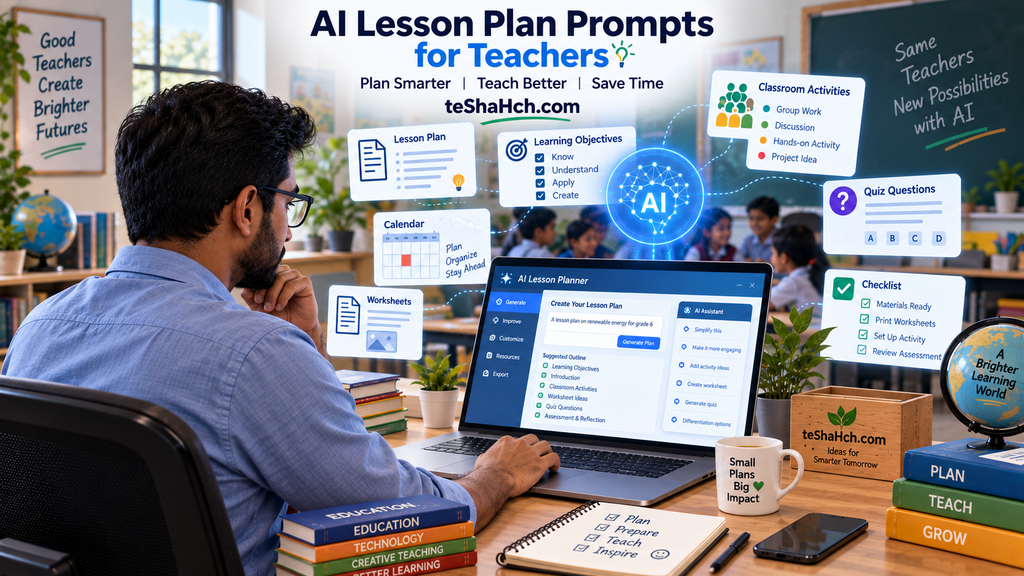
AI can be a useful assistant for teachers who want to make lesson preparation more efficient.
The goal is not to let AI become the teacher.
Instead, think of AI as a lesson-planning assistant that can help you move from a blank page to a workable first draft.
With well-designed AI lesson plan prompts, you can generate ideas for lesson structures, warm-up activities, classroom exercises, differentiated tasks, worksheets, quizzes, discussion questions, and assessments.
The most important principle is simple:
Give AI better instructions, then use your own professional judgment to improve the result.
A strong prompt does not replace good teaching. It can simply make the preparation process faster and more flexible.
For best results, start with one specific teaching task rather than asking AI to do everything at once. Then review and refine each output before using it in your classroom.