Learn Express.js from scratch with this complete beginner’s guide. Discover how Express.js works, routing, middleware, REST APIs, project structure, career opportunities, and why it’s one of the most popular Node.js frameworks.
Express.js Explained for Beginners: Complete Guide to Building Fast and Scalable APIs
Modern web applications need powerful backend systems to process requests, manage databases, authenticate users, and deliver data efficiently. While Node.js provides the runtime environment for running JavaScript on the server, developers still need a framework that simplifies backend development.
That’s where Express.js comes in.
Express.js is the most popular backend framework for Node.js, helping developers build APIs, web applications, and scalable server-side software with minimal effort.
Whether you’re following a Full Stack Developer Roadmap, learning the MERN Stack, or building your first backend application, Express.js is a must-learn technology.
In this comprehensive beginner’s guide, you’ll learn what Express.js is, how it works, why developers love it, its architecture, routing, middleware, career opportunities, and how to master it in 2026.
What Is Express.js?
Express.js is a fast, lightweight, and minimalist web application framework built on top of Node.js.
It provides a simple way to create web servers, build REST APIs, handle routing, manage middleware, and connect applications to databases.
Instead of writing hundreds of lines of server code using the built-in HTTP module, Express.js allows developers to accomplish the same tasks with clean and readable code.
This simplicity has made Express.js the most widely used backend framework in the Node.js ecosystem.
A Brief History of Express.js
Express.js was created by TJ Holowaychuk in 2010.
At that time, Node.js was gaining popularity, but backend development required developers to manually handle many low-level operations.
Express.js was introduced to simplify these tasks.
Its minimalistic design, flexibility, and excellent performance quickly made it the default framework for Node.js development.
Today, Express.js powers millions of web applications and serves as the backend foundation for countless startups, SaaS platforms, enterprise applications, and open-source projects.
Why Was Express.js Created?
Node.js provides the ability to create servers.
However, using only Node.js often requires writing repetitive code.
For example, developers need to manually:
- Create HTTP servers
- Handle routing
- Parse incoming requests
- Send responses
- Manage middleware
- Handle errors
Express.js simplifies all these tasks through an elegant API.
Instead of focusing on boilerplate code, developers can concentrate on building application features.
Why Is Express.js So Popular?
Express.js remains one of the most popular backend frameworks because it combines simplicity with flexibility.
Let’s explore the reasons behind its popularity.
1. Easy to Learn
Express.js has a gentle learning curve.
If you already understand JavaScript and Node.js fundamentals, you can begin building backend applications within a short time.
Its straightforward syntax makes it beginner-friendly.
2. Minimal and Lightweight
Unlike larger frameworks, Express.js includes only essential features.
Developers can choose additional packages based on project requirements.
This keeps applications lightweight and highly customizable.
3. Fast Development
Express.js reduces development time by providing built-in support for:
- Routing
- Middleware
- Request handling
- Response handling
As a result, developers spend less time writing repetitive code.
4. Excellent Performance
Because Express.js runs on Node.js, it benefits from the speed of the V8 JavaScript Engine and Node’s asynchronous architecture.
This makes it suitable for modern web applications with high traffic.
5. Huge Ecosystem
Express.js integrates seamlessly with thousands of npm packages.
Popular integrations include:
- Authentication libraries
- Database drivers
- Validation tools
- File upload packages
- Security middleware
This flexibility allows developers to build almost any type of backend application.
6. Industry Standard
Express.js is widely used by:
- Software companies
- Startups
- SaaS businesses
- Freelancers
- Enterprise development teams
Learning Express.js prepares developers for real-world backend development.
How Express.js Works
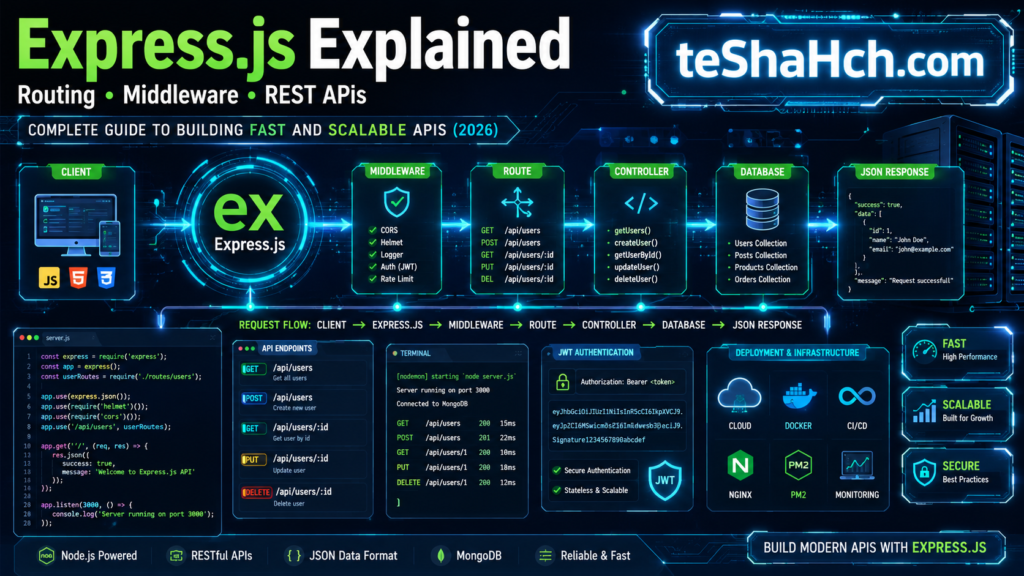
A typical Express.js application follows a request-response cycle.
Here’s the basic workflow:
- A client sends a request.
- Express receives the request.
- Middleware processes the request.
- The appropriate route is identified.
- Business logic executes.
- The database is queried if needed.
- Express sends a response back to the client.
This streamlined workflow enables developers to build fast and maintainable backend systems.
Express.js Architecture
A simplified Express.js architecture looks like this:
                Client
                   │
                   ▼
            Express Server
                   │
        ┌──────────┴──────────┐
        │                     │
   Middleware            Routing
        │                     │
        └──────────┬──────────┘
                   ▼
             Controller Logic
                   │
                   ▼
               Database
                   │
                   ▼
             JSON Response
This modular architecture keeps code organized and scalable.
Understanding Request and Response
Every Express.js application revolves around two core objects:
Request Object (req)
The request object contains information sent by the client.
Examples include:
- URL parameters
- Query strings
- Request body
- Headers
- Cookies
Developers use the request object to access client data.
Response Object (res)
The response object is used to send data back to the client.
Common response types include:
- JSON data
- HTML pages
- Status codes
- Error messages
- File downloads
Together, req and res form the foundation of every Express route.
Installing Express.js
Installing Express.js is straightforward.
Step 1
Create a new project folder.
Step 2
Initialize the project.
npm init -yThis creates a package.json file.
Step 3
Install Express.js.
npm install expressExpress is now ready to use.
Your First Express Server
A minimal Express server looks like this:
const express = require("express");

const app = express();

app.get("/", (req, res) => {
    res.send("Hello, Express!");
});

app.listen(3000, () => {
    console.log("Server running on port 3000");
});
Although simple, this example demonstrates the core concepts:
- Importing Express
- Creating an application
- Defining a route
- Sending a response
- Starting the server
Understanding Project Structure
As applications grow, organizing files becomes essential.
A typical Express.js project structure might look like this:
project/
│
├── node_modules/
├── routes/
├── controllers/
├── models/
├── middleware/
├── config/
├── public/
├── views/
├── package.json
├── app.js
└── server.js
Each folder has a specific responsibility.
This organization improves readability, maintainability, and scalability.
Express.js in the MERN Stack
Express.js plays a central role in the MERN Stack.
The stack consists of:
- MongoDB (Database)
- Express.js (Backend Framework)
- React (Frontend Library)
- Node.js (Runtime Environment)
Express acts as the bridge between the frontend and the database.
It receives requests from React, processes business logic, communicates with MongoDB, and sends responses back to the frontend.
This makes Express.js one of the most important technologies in modern full-stack JavaScript development.
Why Full Stack Developers Should Learn Express.js
Express.js complements Node.js perfectly.
Learning Express enables developers to:
- Build production-ready REST APIs
- Handle user authentication
- Connect databases
- Organize backend applications
- Create scalable server-side architectures
If you’re pursuing a career in backend or full-stack development, Express.js is an essential skill that significantly expands what you can build with JavaScript.
Routing in Express.js
Routing is one of the core features of Express.js.
A route determines how the server responds when a client requests a specific URL using a particular HTTP method.
For example:
| HTTP Method | URL | Purpose |
|---|---|---|
| GET | /products | Retrieve products |
| POST | /products | Create a product |
| PUT | /products/:id | Update a product |
| DELETE | /products/:id | Delete a product |
Without routing, every request would have to be handled manually, making applications difficult to maintain.
HTTP Methods Explained
Express.js supports all major HTTP methods used in REST APIs.
GET
Used to retrieve data.
Examples:
- View products
- Fetch user profile
- Display blog posts
POST
Used to create new data.
Examples:
- Register a user
- Add a new product
- Publish a blog post
PUT
Used to update existing data.
Examples:
- Update profile
- Edit product details
- Change account settings
DELETE
Used to remove data.
Examples:
- Delete a user
- Remove a product
- Delete comments
These four methods form the foundation of almost every backend API.
Route Parameters
Sometimes routes need dynamic values.
Instead of writing separate routes for every product or user, Express.js uses route parameters.
Example:
/products/:idIf the URL is:
/products/15The value 15 becomes the route parameter.
Common examples:
- User ID
- Product ID
- Order ID
- Blog Slug
Route parameters help developers create flexible APIs.
Query Parameters
Query parameters are used to filter, search, or sort data.
Example:
/products?category=laptopor
/products?page=2Common uses:
- Search
- Pagination
- Filtering
- Sorting
Most production APIs rely heavily on query parameters.
What Is Middleware?
Middleware is one of the most powerful features of Express.js.
A middleware function executes between the client request and the final response.
Instead of sending every request directly to a route, middleware can inspect, modify, or reject requests before they reach the application logic.
Simplified flow:
Client
   ↓
Middleware
   ↓
Route
   ↓
Controller
   ↓
Response
Middleware makes applications cleaner, more secure, and easier to maintain.
Common Uses of Middleware
Middleware is commonly used for:
- Authentication
- Authorization
- Logging
- Validation
- Error handling
- Parsing JSON
- Security
- File uploads
Most Express applications use multiple middleware functions.
Types of Middleware
Express.js supports several types of middleware.
Built-in Middleware
Provided by Express itself.
Examples:
- JSON parser
- Static file serving
Third-Party Middleware
Installed using npm.
Popular examples include:
- CORS
- Helmet
- Morgan
- Multer
- Cookie Parser
These packages add useful functionality with minimal code.
Custom Middleware
Developers can also create their own middleware.
Examples include:
- Checking login status
- Validating API keys
- Measuring response time
- Tracking user activity
Custom middleware allows applications to implement project-specific requirements.
Error Handling in Express.js
Errors are inevitable in software development.
Express.js provides a centralized approach for handling errors.
Examples of common errors:
- Invalid routes
- Database failures
- Authentication errors
- Missing data
- Server crashes
Proper error handling improves both application reliability and user experience.
Building REST APIs with Express.js
One of the primary reasons developers use Express.js is to build REST APIs.
A REST API allows applications to communicate using HTTP requests.
Typical workflow:
React Frontend
        │
        ▼
Express API
        │
        ▼
MongoDB / PostgreSQL
        │
        ▼
JSON Response
This architecture is used by most modern web applications.
Express.js with MongoDB
Express.js works seamlessly with MongoDB.
Typical MERN workflow:
React
   ↓
Express
   ↓
Node.js
   ↓
MongoDB
Express receives requests from the frontend, processes business logic, interacts with MongoDB, and returns JSON responses.
This combination is widely used by startups and SaaS companies.
Express.js with PostgreSQL
Express also integrates smoothly with relational databases like PostgreSQL.
Typical PERN workflow:
React
   ↓
Express
   ↓
Node.js
   ↓
PostgreSQL
PostgreSQL is often chosen for applications requiring:
- Strong relationships
- ACID compliance
- Complex business logic
- Financial systems
Express supports both SQL and NoSQL databases, giving developers great flexibility.
Advantages of Express.js
Express.js has become the leading Node.js framework because it offers numerous benefits.
1. Simple Syntax
Express code is concise and easy to read.
This helps beginners learn backend development faster.
2. Fast Development
Built-in routing and middleware reduce repetitive coding.
Developers can focus on business logic rather than server configuration.
3. Flexible Architecture
Express does not enforce a rigid project structure.
Teams can organize applications according to their own preferences.
4. Massive npm Ecosystem
Express integrates with thousands of third-party packages.
Popular integrations include:
- Authentication
- Validation
- Payments
- Security
5. High Performance
Running on Node.js gives Express excellent speed for API development.
6. Excellent Community Support
Express has one of the largest communities in backend development.
Developers have access to:
- Documentation
- Tutorials
- Open-source projects
- Community forums
Disadvantages of Express.js
Although Express is extremely popular, it also has limitations.
1. Minimal by Design
Express intentionally provides only core features.
Developers often need additional packages for authentication, validation, and security.
2. No Built-in Structure
Large projects require developers to establish their own folder organization.
Without proper architecture, applications can become difficult to maintain.
3. Learning Backend Concepts
Express itself is easy to learn.
However, backend development also requires understanding:
- Databases
- Authentication
- APIs
- Security
- Deployment
These topics take time to master.
Express.js vs Node.js
Many beginners ask:
Are Node.js and Express.js the same?
No.
| Node.js | Express.js |
|---|---|
| Runtime Environment | Backend Framework |
| Runs JavaScript | Simplifies backend development |
| Built on V8 Engine | Built on Node.js |
| Handles low-level server operations | Provides routing and middleware |
Think of Node.js as the engine, while Express.js is the framework that makes backend development easier.
Express.js vs Fastify
Fastify is another modern Node.js framework.
Express.js
Best for:
- Beginners
- Large ecosystem
- Community support
- Learning backend development
Fastify
Best for:
- Performance-focused applications
- Experienced backend developers
- High-throughput APIs
For most beginners, Express.js remains the recommended starting point.
Beginner Express.js Projects
Building projects is the fastest way to learn Express.
Beginner
- Hello World Server
- Calculator API
- Notes API
- To-Do API
- Contact Form Backend
Intermediate
- Blog API
- Authentication System
- Expense Tracker Backend
- Student Management System
- Inventory API
Advanced
- E-commerce Backend
- Learning Management System
- CRM Backend
- Project Management API
- SaaS Backend
These projects demonstrate practical backend skills and strengthen your portfolio.
Express.js Learning Roadmap
Follow this roadmap for a structured learning journey.
Step 1
Master JavaScript fundamentals.
Step 2
Learn Node.js basics.
Step 3
Understand Express fundamentals.
Topics include:
- Routing
- Middleware
- Request & Response
- Static Files
Step 4
Build REST APIs.
Step 5
Connect a Database.
Choose:
- MongoDB
- PostgreSQL
Step 6
Implement Authentication.
Learn:
- JWT
- Sessions
- Password Hashing
Step 7
Handle Errors & Validation.
Step 8
Deploy Applications.
Common Mistakes Beginners Make
1. Skipping Node.js Fundamentals
Express builds on Node.js. Learn the runtime first before diving deep into the framework.
2. Ignoring HTTP Basics
Understanding HTTP methods, status codes, and REST principles makes Express development much easier.
3. Writing Everything in One File
As applications grow, separate your code into routes, controllers, models, and middleware for better maintainability.
4. Neglecting Error Handling
Always validate input and handle errors gracefully to create reliable APIs.
5. Building Too Few Projects
Practical experience is essential. Build real-world applications instead of only following tutorials.
Is Express.js Worth Learning?
Absolutely.
Express.js remains the most widely used backend framework in the Node.js ecosystem. Despite the emergence of newer frameworks, Express continues to power millions of production applications because of its simplicity, flexibility, and mature ecosystem.
If you’re aiming to become a Backend Developer, Full Stack Developer, or MERN Stack Developer, learning Express.js is one of the best investments you can make.
Why Express.js Is Still Worth Learning
✅ Industry-standard Node.js framework
✅ Lightweight and beginner-friendly
✅ Excellent for building REST APIs
✅ Massive npm ecosystem
✅ Used in MERN Stack development
✅ Strong community support
✅ High demand in software companies
Express.js continues to be a foundational technology for modern backend development.
Career Opportunities
Express.js is a highly valuable skill because it’s commonly paired with Node.js in professional development.
Common Job Roles
- Express.js Developer
- Backend Developer
- Node.js Developer
- Full Stack Developer
- MERN Stack Developer
- API Developer
- Software Engineer
Industries Hiring Express.js Developers
- Software Companies
- SaaS Startups
- FinTech
- E-commerce
- EdTech
- Healthcare Technology
- Enterprise IT
- Digital Agencies
Express.js is also a popular choice for freelance projects and remote backend development roles.
Best Resources to Learn Express.js
The fastest way to master Express.js is to combine documentation, hands-on practice, and project building.
1. Official Documentation
The official Express.js documentation is the best place to understand routing, middleware, and APIs.
2. Build Real Projects
Practice by creating applications such as:
- Blog API
- Authentication API
- Task Manager
- E-commerce Backend
Real projects help you understand how backend systems work in production.
3. Read Open-Source Code
Exploring Express.js projects on GitHub helps you learn:
- Folder organization
- API design
- Error handling
- Authentication
- Best practices
4. Practice Every Day
Backend development is a practical skill.
Writing code regularly is far more effective than watching endless tutorials.
Express.js Learning Timeline
A realistic roadmap for beginners:
| Stage | Estimated Time |
|---|---|
| JavaScript Fundamentals | 4–8 Weeks |
| Node.js Basics | 2–3 Weeks |
| Express.js Fundamentals | 2 Weeks |
| Routing & Middleware | 1–2 Weeks |
| REST API Development | 2–3 Weeks |
| Database Integration | 2–4 Weeks |
| Authentication | 1–2 Weeks |
| Deployment | 1 Week |
| Real Projects | Ongoing |
Everyone learns at a different pace. Focus on understanding concepts and building projects rather than rushing through tutorials.
Frequently Asked Questions (FAQ)
What is Express.js used for?
Express.js is used to build web servers, REST APIs, backend applications, and scalable server-side software using Node.js.
Is Express.js a programming language?
No.
Express.js is a backend web framework built on top of Node.js.
Do I need Node.js before learning Express.js?
Yes.
Express.js runs on Node.js, so you should understand basic Node.js concepts before learning Express.
Is Express.js easy to learn?
Yes.
Developers with a basic understanding of JavaScript and Node.js can learn Express.js relatively quickly because of its simple and minimalist design.
Can I build APIs with Express.js?
Absolutely.
Express.js is one of the most popular frameworks for building RESTful APIs and backend services.
What databases work with Express.js?
Express.js supports many databases, including:
- MongoDB
- PostgreSQL
- MySQL
- MariaDB
- SQL Server
- SQLite
This flexibility allows developers to choose the best database for their applications.
Is Express.js still in demand?
Yes.
Express.js continues to be one of the most requested backend frameworks in Full Stack and MERN Stack job postings.
What should I learn after Express.js?
A recommended learning path is:
- REST APIs
- MongoDB
- PostgreSQL
- JWT Authentication
- OAuth
- Docker
- TypeScript
- Testing
- Deployment
These skills help you build production-ready backend applications.
Express.js has become the backbone of backend development for countless JavaScript applications. Its lightweight architecture, intuitive routing system, and powerful middleware support allow developers to create secure, scalable, and maintainable APIs with ease.
Whether you’re building a personal project, a startup MVP, or an enterprise-grade web application, Express.js provides the flexibility and performance needed for modern backend development.
When combined with Node.js, React, and MongoDB, Express forms the heart of the MERN Stack—one of the most popular technology stacks in the software industry.
If you’re serious about becoming a professional backend or full-stack developer, mastering Express.js is a logical and rewarding step in your learning journey.
Remember, the key to success isn’t just learning the framework—it’s consistently building projects, solving real-world problems, and writing clean, maintainable code.