Learn HTTP Status Codes from scratch with this complete beginner’s guide. Understand 1xx, 2xx, 3xx, 4xx, and 5xx status codes, REST APIs, debugging, common errors, best practices, and real-world examples for modern web development.
HTTP Status Codes Explained for Beginners: Complete Guide to 1xx, 2xx, 3xx, 4xx & 5xx Status Codes
Every time your browser communicates with a website or an API, the server responds with more than just data—it also sends an HTTP status code.
These status codes indicate whether the request was successful, failed, redirected, or encountered an unexpected issue.
Whether you’re building REST APIs, debugging applications, or simply browsing the web, understanding HTTP status codes is an essential skill for every web developer.
If you’ve already learned HTTP Methods, REST APIs, and CRUD Operations, then HTTP Status Codes are the next important step in understanding how clients and servers communicate.
In this comprehensive guide, you’ll learn what HTTP status codes are, why they matter, how each category works, and how developers use them to build reliable web applications in 2026.
What Are HTTP Status Codes?
HTTP status codes are three-digit numbers returned by a server in response to an HTTP request.
These numbers tell the client whether the request was:
- Successful
- Redirected
- Invalid
- Unauthorized
- Failed because of a server problem
Without status codes, browsers and applications would have no standardized way to understand the result of a request.
Why Are HTTP Status Codes Important?
Imagine clicking a link to open a webpage.
Several things could happen:
- The page loads successfully.
- The page has moved to another location.
- The page doesn’t exist.
- The server crashes.
Although these situations look different to users, servers communicate them using HTTP status codes.
For developers, these codes are extremely valuable because they simplify debugging and improve API communication.
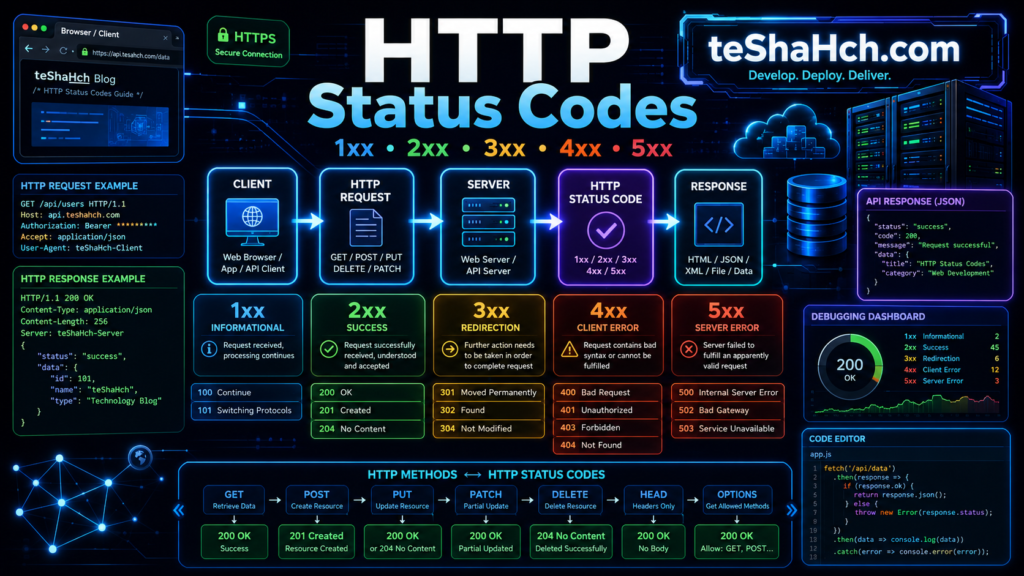
How HTTP Status Codes Work
A typical request-response flow looks like this:
Browser / Mobile App
         │
         ▼
HTTP Request
(GET, POST, PUT...)
         │
         ▼
Server
         │
         ▼
HTTP Status Code
         │
         ▼
Response Body (JSON / HTML)
The server processes the request and returns both:
- An HTTP status code
- The requested data (if applicable)
Understanding the Three Digits
Every HTTP status code contains three digits.
Example:
200The first digit determines the category.
| First Digit | Category |
|---|---|
| 1xx | Informational |
| 2xx | Success |
| 3xx | Redirection |
| 4xx | Client Errors |
| 5xx | Server Errors |
Learning these five categories makes it much easier to understand any HTTP response.
HTTP Status Code Categories
HTTP status codes are grouped into five major classes.
1xx — Informational
The request has been received, and the server is continuing to process it.
2xx — Success
The request was received, understood, and successfully processed.
3xx — Redirection
The requested resource has moved or requires another request.
4xx — Client Error
The problem originated from the client.
Examples include:
- Invalid URL
- Missing authentication
- Incorrect request
5xx — Server Error
The server encountered an unexpected problem while processing the request.
1xx Informational Status Codes
Informational responses are uncommon in everyday web development.
They simply indicate that communication is continuing.
100 Continue
The server has received the request headers.
The client may continue sending the request body.
Example
Uploading a very large file.
The server replies:
100 ContinueThe client proceeds with the upload.
101 Switching Protocols
The server agrees to switch communication protocols.
Common example:
- HTTP → WebSocket
When Are 1xx Codes Used?
Most frontend developers rarely encounter them.
They are primarily used in:
- File uploads
- Streaming
- WebSockets
- Low-level networking
2xx Success Status Codes
Success responses indicate that the request completed successfully.
These are the status codes you’ll encounter most often.
200 OK
The request succeeded.
Examples:
- View products
- Load homepage
- Retrieve users
- Fetch blog posts
Example
GET /productsServer response:
200 OKProducts are returned successfully.
201 Created
A new resource was successfully created.
Common after:
- Registering a user
- Creating an order
- Publishing an article
- Uploading a file
Example
POST /usersServer response:
201 CreatedThe new user now exists in the database.
202 Accepted
The server accepted the request but hasn’t finished processing it yet.
Examples:
- Background jobs
- Video processing
- Email sending
- Report generation
204 No Content
The request succeeded, but there is no response body.
Often used after:
- DELETE requests
- Successful updates
- API operations that don’t return data
Example
DELETE /products/10Response:
204 No ContentThe product was deleted successfully.
Real-World Examples of 2xx Responses
Social Media
Viewing your feed:
200 OKCreating a new post:
201 CreatedDeleting a comment:
204 No ContentOnline Shopping
Viewing products:
200 OKCreating an order:
201 CreatedBanking
Viewing transactions:
200 OKScheduling a payment:
202 AcceptedWhy Developers Love 2xx Codes
Success codes provide clear communication between clients and servers.
They help developers know:
- The request worked
- Data was created
- Processing has started
- No response body is needed
Using the correct success status code makes APIs more predictable and easier to integrate.
HTTP Status Codes in REST APIs
Every REST API request returns a status code.
For example:
Retrieve users:
GET /usersResponse:
200 OKCreate user:
POST /usersResponse:
201 CreatedDelete user:
DELETE /users/5Response:
204 No ContentNotice how the status code changes depending on the action performed.
3xx Redirection Status Codes
The 3xx category indicates that the requested resource has moved or that additional action is required before the request can be completed.
Redirection responses are commonly used when websites change URLs, migrate content, or enforce HTTPS.
Instead of returning an error, the server tells the client where to go next.
301 Moved Permanently
301 means the requested resource has been permanently moved to a new URL.
Browsers and search engines update their records to use the new location.
Example
Old URL:
https://example.com/blogRedirects to:
https://example.com/articlesResponse:
301 Moved PermanentlyCommon Uses
- Website migration
- URL restructuring
- SEO redirects
- Domain changes
302 Found (Temporary Redirect)
A 302 response tells the browser that the resource is temporarily available at another location.
Unlike 301, search engines generally keep the original URL indexed.
Example
During website maintenance:
/productstemporarily redirects to:
/maintenance304 Not Modified
The requested resource has not changed since the browser last cached it.
Instead of downloading the same content again, the browser uses its cached copy.
Benefits
- Faster page loading
- Reduced bandwidth
- Improved performance
Why 3xx Status Codes Matter
Redirection codes improve:
- User experience
- Website performance
- SEO
- URL management
- Browser caching
Modern websites rely heavily on proper redirection strategies.
4xx Client Error Status Codes
The 4xx category indicates that something is wrong with the client’s request.
In other words, the request cannot be completed because of an issue originating from the client.
These are among the most common status codes developers encounter.
400 Bad Request
The server cannot understand the request because it is malformed or contains invalid data.
Examples
- Invalid JSON
- Missing required fields
- Incorrect request syntax
Example
POST /usersInvalid request body:
{
"name":
}
Response:
400 Bad Request401 Unauthorized
The request requires authentication.
The client has not provided valid credentials.
Examples
- Missing access token
- Expired JWT
- Invalid API key
Example
GET /profileWithout logging in:
401 Unauthorized403 Forbidden
The client is authenticated but does not have permission to access the requested resource.
Example
A normal user attempts to access:
/adminResponse:
403 Forbidden404 Not Found
Probably the most well-known HTTP status code.
It means the requested resource does not exist.
Example
GET /products/99999Response:
404 Not FoundReal-World Causes
- Broken links
- Deleted pages
- Incorrect URLs
- Missing API endpoints
405 Method Not Allowed
The requested HTTP method is not supported by the endpoint.
Example:
DELETE /loginIf DELETE isn’t supported:
405 Method Not Allowed409 Conflict
The request conflicts with the current state of the resource.
Example
Trying to register:
alice@example.comwhen it already exists.
Response:
409 Conflict422 Unprocessable Content
The request format is valid, but the submitted data fails validation.
Examples
- Weak password
- Invalid email format
- Negative product price
Why 4xx Status Codes Matter
Client error responses help developers:
- Identify incorrect requests
- Validate user input
- Improve API reliability
- Build better frontend applications
What Does 5xx Mean in HTTP Status Codes?
A 5xx status code is an HTTP response status code that indicates a server-side error. It generally means that the server failed to fulfill a valid request or could not complete the request because of a problem while processing it.
Common 5xx status codes include:
- 500 Internal Server Error: The server encountered an unexpected condition.
- 501 Not Implemented: The server does not support the functionality required to fulfill the request.
- 502 Bad Gateway: A gateway or proxy received an invalid response from an upstream server.
- 503 Service Unavailable: The server is temporarily unable to handle the request.
- 504 Gateway Timeout: A gateway or proxy did not receive a timely response from an upstream server.
A 5xx response does not automatically mean that the main web server itself is broken. The problem may originate from an application, database, reverse proxy, upstream API, or another component in the request-processing chain.
For example, a website may return a 502 error when its reverse proxy cannot obtain a valid response from the application server. A 504 error may occur when the upstream application takes too long to respond.
Understanding the specific status code helps developers identify where to begin troubleshooting.
500 vs 502 vs 503 vs 504: What’s the Difference?
The most common 5xx status codes can look similar to website visitors, but they indicate different types of problems.
| Status Code | Meaning | Common Causes | What to Check |
|---|---|---|---|
| 500 Internal Server Error | Unexpected server-side failure | Application exceptions, programming bugs, configuration errors | Application logs, stack traces, recent deployments |
| 502 Bad Gateway | Invalid response from an upstream server | Upstream crash, connection failure, invalid response | Reverse proxy logs, upstream health, network connectivity |
| 503 Service Unavailable | Service temporarily cannot handle requests | Overload, maintenance, unavailable dependencies | Server load, application health, maintenance configuration |
| 504 Gateway Timeout | Upstream response took too long | Slow database queries, delayed APIs, network latency | Request duration, proxy timeout, database and upstream latency |
500 Internal Server Error
A 500 error indicates that the server encountered an unexpected condition while processing a request.
Possible causes include:
- Unhandled application exceptions
- Programming errors
- Incorrect server configuration
- Database operation failures
- Unexpected conditions after a software deployment
How to troubleshoot: Check application logs around the time of the failed request. Look for exceptions, stack traces, failed database operations, and configuration changes. Avoid displaying sensitive debugging details to public visitors.
502 Bad Gateway
A 502 error occurs when a server acting as a gateway or proxy receives an invalid response from an upstream server.
For example, a reverse proxy may receive a connection reset because the application server has crashed or is not responding correctly.
Possible causes include:
- An unavailable or crashed upstream application
- Connection resets between proxy and application
- Incorrect upstream host or port configuration
- Network or DNS problems
- An upstream service returning an invalid response
How to troubleshoot: Check the reverse proxy error logs, confirm that the upstream service is running, and verify the configured host, port, and network connectivity.
503 Service Unavailable
A 503 error means that the server is temporarily unable to handle the request.
Possible causes include:
- Scheduled maintenance
- Excessive traffic or resource exhaustion
- Application instances being unavailable
- Temporary overload
- A required dependency being unavailable
How to troubleshoot: Check server load, application health, available worker processes, and dependency status. If the service is undergoing planned maintenance, provide an appropriate maintenance response. When applicable, a Retry-After header can indicate when a client should retry.
504 Gateway Timeout
A 504 error occurs when a gateway or proxy does not receive a timely response from an upstream server.
For example, a web application may wait for a database query or external API call that takes longer than the configured timeout.
Possible causes include:
- Slow database queries
- Delayed external API responses
- Network latency
- An overloaded application server
- Proxy or gateway timeout limits
How to troubleshoot: Identify which upstream operation is taking too long. Review request durations, database query performance, external service latency, and proxy timeout settings. Increasing a timeout without fixing the underlying delay may only postpone the failure.
How to Troubleshoot 5xx Errors
The most effective way to diagnose a 5xx error is to trace the failed request through the application’s infrastructure rather than assuming that every error has the same cause.
Step 1: Identify the Exact Status Code
Start by identifying whether the response is 500, 502, 503, 504, or another 5xx status code.
Record the affected URL, approximate time, request method, and any request ID available in the logs. These details help you correlate the same request across multiple services.
Step 2: Check Application and Server Logs
Application logs can reveal exceptions, failed dependencies, and unexpected application behavior.
Look for:
- Error messages and stack traces
- Failed database operations
- Connection errors
- Application restarts or crashes
- Memory or CPU exhaustion
- Errors that began after a deployment
For example, an application log may contain a database connection timeout immediately before a request returns a 500 error.
Web server and reverse proxy logs can provide additional clues. An upstream connection failure may point toward a 502 response, while an upstream timeout may help explain a 504 response.
Important: Log details vary by server and application framework. A status code alone cannot prove the root cause.
Step 3: Check the Reverse Proxy and Upstream Server
If your architecture uses a reverse proxy or gateway, verify that it can communicate with the upstream application.
Check:
- Whether the upstream application is running
- Whether the configured hostname and port are correct
- Whether the upstream service is reachable
- Whether connections are being refused or reset
- Whether DNS resolution is working correctly
- Whether the proxy reports upstream timeouts or invalid responses
For Nginx, for example, the error log may contain messages about an upstream connection failure or a timeout while reading the upstream response.
Do not change proxy settings blindly. First identify whether the failure originates at the proxy, the application, or a downstream dependency.
Step 4: Investigate Database Problems
A database problem can contribute to different 5xx responses depending on how the application handles the failure.
Check:
- Database connection availability
- Connection pool exhaustion
- Slow queries and missing indexes
- Database CPU, memory, and storage usage
- Lock contention and long-running transactions
- Database error logs
- Recent schema or configuration changes
If a database query is slow, inspect its execution plan and performance metrics before increasing timeouts. If database connections are exhausted, investigate connection usage and pool configuration.
A database problem does not always produce the same HTTP status code. The application may return a 500 error, become temporarily unavailable, or trigger a gateway timeout depending on its architecture and error-handling behavior.
Step 5: Investigate Timeouts and External APIs
If a request depends on another service, measure how long each operation takes.
For example, a request may follow this path:
Browser → Reverse Proxy → Application → Database or External API
If the database or external API responds too slowly, the application may exceed a proxy timeout.
Check:
- Application request duration
- Database query duration
- External API response time
- Network latency
- Connection and read timeout settings
- Retry behavior
- Whether requests are waiting on multiple sequential dependencies
Set timeouts according to the expected behavior of each dependency. Avoid simply increasing every timeout, because this can tie up application workers and make overload worse.
Step 6: Review Recent Changes
If the error started suddenly, compare the failure time with recent changes.
Investigate:
- Application deployments
- Server configuration updates
- Dependency or library upgrades
- Database schema changes
- DNS or networking changes
- Firewall or access-control changes
- Infrastructure scaling or maintenance
When appropriate, roll back a verified problematic change using your normal deployment procedure.
Step 7: Verify the Fix
After applying a fix, repeat the original request and confirm that the service behaves as expected.
Check:
- The HTTP status code
- Application and proxy logs
- Response time
- Database and upstream service health
- Error rates across other endpoints
- Whether the issue returns under normal traffic
A single successful request does not always prove that the underlying problem is resolved. Monitor the relevant metrics after the fix.
Quick 5xx Troubleshooting Checklist
Use this checklist when investigating a server error:
- Identify the exact HTTP status code and affected endpoint.
- Record the time of failure and available request or trace ID.
- Check application logs for exceptions and failed dependencies.
- Review web server and reverse proxy error logs.
- Confirm that upstream application instances are healthy.
- Investigate database connections, slow queries, and resource usage.
- Check external API latency and network connectivity.
- Review timeout settings and connection pool limits.
- Compare the failure with recent deployments or configuration changes.
- Retest the request and monitor error rates after the fix.
Can a 5xx Error Be Caused by a Client Request?
A 5xx status code generally indicates a server-side failure, but a client request can sometimes trigger a condition that exposes a server bug or resource limitation.
For example, an unusually expensive query or a large request may contribute to resource exhaustion. That does not automatically make the HTTP response a client-error status code.
If the request itself is invalid, a 4xx response is generally more appropriate. If the server fails while processing the request, a 5xx response may be appropriate depending on the circumstances.
Are All 5xx Errors the Same?
No. All 5xx status codes belong to the server-error category, but their meanings differ.
A 500 error indicates an unexpected server-side condition. A 502 points to an invalid upstream response, a 503 indicates temporary unavailability, and a 504 indicates that an upstream response did not arrive in time.
Correctly identifying the status code helps narrow down the investigation and avoids unnecessary changes to unrelated parts of the infrastructure.
Most Common HTTP Status Codes
As a beginner, these are the codes you’ll encounter most frequently.
| Code | Meaning | Category |
|---|---|---|
| 200 | OK | Success |
| 201 | Created | Success |
| 204 | No Content | Success |
| 301 | Moved Permanently | Redirection |
| 304 | Not Modified | Redirection |
| 400 | Bad Request | Client Error |
| 401 | Unauthorized | Client Error |
| 403 | Forbidden | Client Error |
| 404 | Not Found | Client Error |
| 405 | Method Not Allowed | Client Error |
| 409 | Conflict | Client Error |
| 422 | Unprocessable Content | Client Error |
| 500 | Internal Server Error | Server Error |
| 502 | Bad Gateway | Server Error |
| 503 | Service Unavailable | Server Error |
| 504 | Gateway Timeout | Server Error |
Memorizing these codes will make API development and debugging much easier.
Status Code Comparison Table
| Category | Meaning | Examples |
|---|---|---|
| 1xx | Information | 100, 101 |
| 2xx | Success | 200, 201, 204 |
| 3xx | Redirection | 301, 302, 304 |
| 4xx | Client Errors | 400, 401, 403, 404 |
| 5xx | Server Errors | 500, 502, 503, 504 |
Best Practices
Professional API developers follow these practices when working with HTTP status codes.
1. Always Return the Correct Status Code
Don’t return 200 OK for every response.
Use the status code that accurately reflects the outcome.
2. Be Consistent
Your API should use the same status codes for similar situations across all endpoints.
3. Include Meaningful Error Messages
Instead of only returning:
400 Bad RequestReturn structured JSON:
{
  "success": false,
  "message": "Email address is required."
}
This helps frontend developers and API consumers understand what went wrong.
4. Don’t Expose Sensitive Information
Avoid returning internal server details in production.
For example, don’t expose:
- Database passwords
- File paths
- Stack traces
- SQL queries
Instead, log those internally and return a generic error message to the client.
5. Document Your API
Provide documentation that clearly explains:
- Expected status codes
- Error responses
- Success responses
- Validation rules
Well-documented APIs are easier to integrate and maintain.
Common Beginner Mistakes
New developers often make these mistakes:
Returning 200 OK for Errors
A failed request should not return a success status.
Using 500 Internal Server Error for Validation Issues
Validation errors should return 400 Bad Request or 422 Unprocessable Content, not 500.
Confusing 401 Unauthorized and 403 Forbidden
- 401 = Authentication is missing or invalid.
- 403 = Authentication succeeded, but access is denied.
Ignoring 404 Not Found
When a requested resource doesn’t exist, return 404 instead of an empty success response.
Forgetting to Handle Errors
Every API should gracefully handle unexpected situations and return appropriate status codes.
Debugging with HTTP Status Codes
Status codes are one of the most useful debugging tools.
When an API behaves unexpectedly, the status code provides the first clue.
Examples:
- 200 → Everything worked.
- 400 → Check the request.
- 401 → Verify authentication.
- 404 → Confirm the endpoint or resource exists.
- 500 → Investigate the server.
Learning to interpret these codes will save countless hours during development and troubleshooting.
Which HTTP Status Codes Should You Use?
Choosing the correct HTTP status code makes your API more predictable, easier to debug, and compliant with REST principles.
Here’s a quick reference for the most commonly used status codes.
| Situation | Recommended Status Code |
|---|---|
| Successfully retrieve data | 200 OK |
| Successfully create a resource | 201 Created |
| Successfully delete a resource | 204 No Content |
| Invalid request | 400 Bad Request |
| Authentication required | 401 Unauthorized |
| Permission denied | 403 Forbidden |
| Resource not found | 404 Not Found |
| Duplicate resource | 409 Conflict |
| Validation failed | 422 Unprocessable Content |
| Unexpected server error | 500 Internal Server Error |
Professional APIs consistently use these status codes to communicate clearly with clients.
Real-World REST API Examples
Let’s see how status codes are used in a typical e-commerce API.
Retrieve Products
GET /productsResponse:
200 OKAdd a Product
POST /productsResponse:
201 CreatedUpdate Product
PUT /products/12Response:
200 OKDelete Product
DELETE /products/12Response:
204 No ContentProduct Not Found
GET /products/9999Response:
404 Not FoundUser Not Logged In
GET /ordersResponse:
401 UnauthorizedAdmin Access Required
DELETE /users/10Response:
403 ForbiddenThese examples demonstrate how HTTP status codes improve communication between the client and server.
Why Every Developer Should Learn HTTP Status Codes
HTTP status codes are one of the first things developers check when debugging an application.
Whether you’re building:
- REST APIs
- MERN Stack applications
- E-commerce platforms
- Mobile applications
- SaaS products
you’ll encounter status codes every day.
Understanding them allows you to:
- Debug faster
- Design better APIs
- Improve frontend-backend communication
- Follow REST best practices
- Build production-ready applications
Career Importance
Knowledge of HTTP status codes is expected in many software development roles.
Common Job Roles
- Backend Developer
- Full Stack Developer
- Node.js Developer
- MERN Stack Developer
- API Developer
- Software Engineer
- Cloud Developer
- DevOps Engineer (Basic API Knowledge)
Frequently Asked in Interviews
Interviewers often ask:
- What is the difference between 401 and 403?
- When should you return 201 Created?
- Why use 204 No Content?
- What causes 500 Internal Server Error?
- Explain 404 Not Found.
- What are the five categories of HTTP status codes?
Being comfortable with these questions demonstrates a solid understanding of backend fundamentals.
Best Way to Practice HTTP Status Codes
Theory is important, but practice is essential.
Build small projects such as:
- Notes API
- Blog API
- Student Management System
- Inventory Management API
- Task Manager
While developing, deliberately trigger different scenarios:
- Missing resources
- Invalid input
- Authentication failures
- Successful operations
- Server-side errors
Observing the returned status codes will help you understand their purpose in real-world development.
Frequently Asked Questions (FAQ)
What are HTTP status codes?
HTTP status codes are three-digit numbers returned by a web server to indicate the result of an HTTP request.
Which HTTP status code means success?
The most common success status code is:
200 OK
Other success codes include:
- 201 Created
- 202 Accepted
- 204 No Content
What does 404 Not Found mean?
It means the requested resource or URL does not exist on the server.
What is the difference between 401 and 403?
401 Unauthorized
The user has not successfully authenticated.
403 Forbidden
The user is authenticated but does not have permission to access the resource.
What causes a 500 Internal Server Error?
A 500 error usually occurs because of an unexpected issue on the server, such as:
- Application bugs
- Database failures
- Server misconfiguration
- Unhandled exceptions
Which status code is returned after creating a resource?
The recommended response is:
201 Created
Why is 204 No Content used?
It indicates that the request succeeded but there is no response body to return.
It is commonly used after successful DELETE operations.
Do browsers use HTTP status codes?
Yes.
Every time you visit a website, your browser receives an HTTP status code from the server before displaying the page.
HTTP status codes are one of the most fundamental parts of web communication.
Whenever a browser, mobile application, or API sends a request, the server responds with a status code that clearly communicates the outcome.
By understanding the five categories—1xx Informational, 2xx Success, 3xx Redirection, 4xx Client Errors, and 5xx Server Errors—you can debug applications more efficiently, design better APIs, and build software that follows modern web standards.
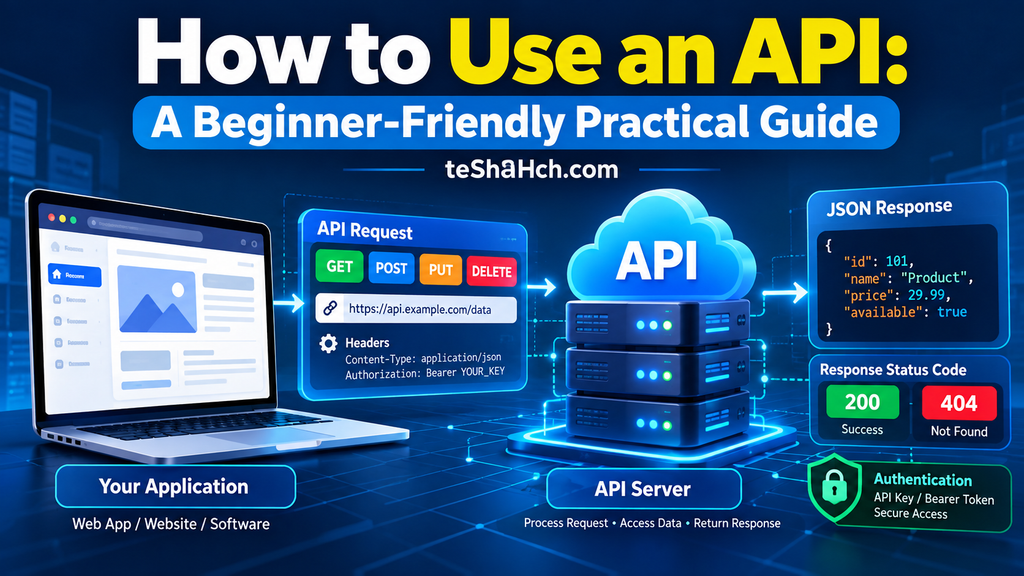
As you progress in backend development, you’ll realize that HTTP methods and status codes work together to create predictable and well-structured REST APIs.
Mastering these concepts early will make learning authentication, API security, database integration, testing, and deployment much easier.
The best way to become confident with HTTP status codes is to build APIs, observe real responses, and practice handling both successful and error scenarios.



One response to “HTTP Status Codes Explained for Beginners: Complete Guide to 1xx, 2xx, 3xx, 4xx & 5xx Status Codes”
[…] you’ve already learned HTTP Methods, HTTP Status Codes, REST APIs, and CRUD Operations, then JSON is the next building block that connects all these […]