Learn what Git is, how version control works, why developers use Git, and the basic Git concepts every beginner should know. A complete beginner-friendly guide.
What Is Git? Understanding Version Control for Beginners
If you’ve started learning programming or software development, you’ve probably heard the term “Git” countless times.
Whether you’re exploring GitHub, GitLab, Bitbucket, or open-source projects, Git is one of the most important tools you’ll encounter.
But what exactly is Git?
Why do almost all professional developers use it?
And how can beginners start understanding Git without feeling overwhelmed?
In this guide, we’ll explain Git in simple terms and cover the essential concepts every beginner should know.
🚀 What Is Git?
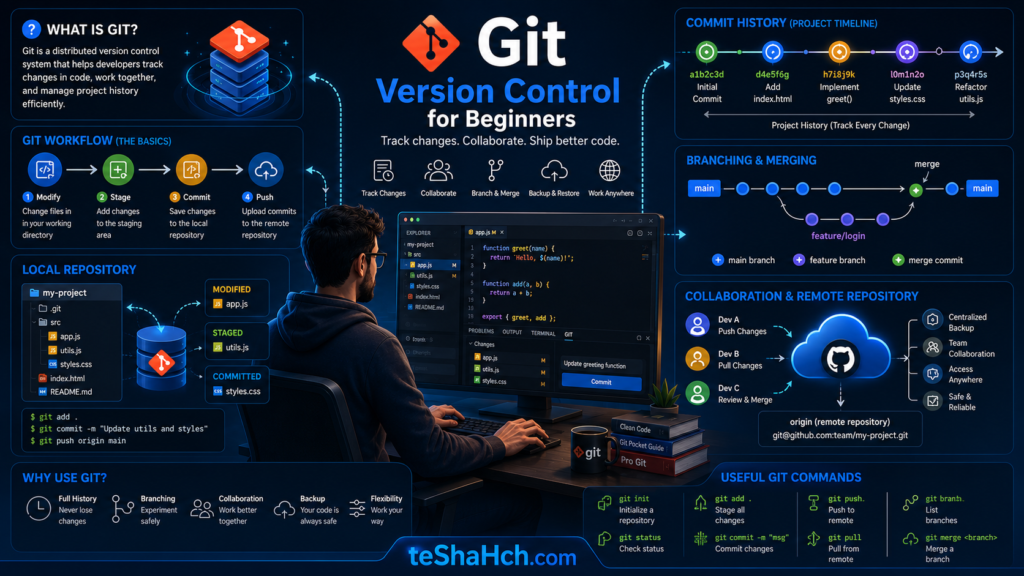
Git is a distributed version control system (VCS) that helps developers track changes made to files and source code over time.
In simple words, Git allows developers to:
✅ Save project history
✅ Track changes
✅ Collaborate with other developers
✅ Restore previous versions
✅ Experiment safely without breaking existing code
Git was created by software engineer Linus Torvalds, the creator of Linux, to help manage large software development projects efficiently.
Today, Git has become the industry standard for version control.
📌 What Is Version Control?
Before understanding Git, it’s important to understand version control.
Imagine you’re working on a project and save files like this:
project-final.doc
project-final-v2.doc
project-final-v3.doc
project-final-latest.doc
project-final-really-final.doc
Sounds familiar?
Managing projects this way quickly becomes confusing.
Version control solves this problem by keeping track of every change automatically.
Instead of creating dozens of file copies, Git stores a complete history of your project.
💡 Why Was Git Created?
As software projects grow, multiple developers often work on the same codebase.
Without a version control system, teams face challenges such as:
❌ Lost code
❌ Overwritten changes
❌ Difficult collaboration
❌ No change history
❌ Hard-to-fix mistakes
Git was designed to eliminate these problems and make software development more organized and reliable.
⚙️ How Git Works
Git records snapshots of your project whenever you save important changes.
Each snapshot is called a “commit.”
Think of commits as checkpoints in a video game.
If something goes wrong later, you can return to a previous checkpoint.
This allows developers to experiment confidently without fear of permanently breaking a project.
📂 What Is a Git Repository?
A Git repository (repo) is a project folder managed by Git.
A repository contains:
📁 Source code
📁 Project files
📁 Documentation
📁 Configuration files
📁 Complete version history
Every tracked change is stored inside the repository.
🔄 What Is a Commit?
A commit is a saved snapshot of your project at a specific point in time.
For example:
Commit 1 → Initial project setup
Commit 2 → Added homepage
Commit 3 → Fixed login bug
Commit 4 → Improved performance
Each commit creates a permanent record that can be reviewed later.
🌿 What Is a Branch?
A branch is an independent version of your project.
Developers use branches to:
✅ Add new features
✅ Fix bugs
✅ Test ideas
✅ Experiment safely
Without affecting the main project.
Once work is completed, the branch can be merged back into the main codebase.
🔀 What Is Merging?
Merging combines changes from one branch into another.
For example:
Main Branch
↓
Feature Branch
↓
Feature Completed
↓
Merge Back into Main
This allows multiple developers to work simultaneously without interfering with each other.
🌎 Why Is Git Called a Distributed Version Control System?
Traditional version control systems often rely on a central server.
Git is different.
Every developer has a complete copy of:
✅ Project files
✅ Commit history
✅ Branches
✅ Repository data
This makes Git:
✔ Faster
✔ More reliable
✔ Less dependent on a central server
✔ Better for collaboration
🎯 Benefits of Using Git
Git offers many advantages for developers and teams.
✅ Complete Project History
Every change is recorded and can be reviewed later.
✅ Easy Collaboration
Multiple developers can work on the same project.
✅ Safer Development
Mistakes can be reversed quickly.
✅ Faster Workflows
Branches and merges make development more efficient.
✅ Backup Protection
Every copy of a repository contains project history.
✅ Industry Standard
Git is used by millions of developers worldwide.
🔧 Common Git Commands for Beginners
While mastering Git takes time, beginners should know a few basic commands.
git init
Creates a new Git repository.
git status
Shows the current status of project files.
git add
Prepares files for committing.
git commit
Saves changes to project history.
git log
Displays commit history.
git branch
Shows available branches.
git merge
Combines branches.
These commands form the foundation of everyday Git usage.
🔗 Git vs GitHub: What’s the Difference?
One of the most common beginner questions is:
“Are Git and GitHub the same thing?”
The answer is no.
Git
✔ Version control system
✔ Installed on your computer
✔ Tracks project changes
GitHub
✔ Online hosting platform
✔ Stores Git repositories
✔ Adds collaboration features
✔ Makes sharing projects easier
Think of Git as the engine and GitHub as the platform that helps developers collaborate using Git.
🏆 Who Should Learn Git?
Git is useful for:
👨💻 Software Developers
👨💻 Web Developers
👨💻 Mobile App Developers
👨💻 DevOps Engineers
👨💻 Data Scientists
👨💻 Open-Source Contributors
👨💻 Computer Science Students
If you write code, Git is a skill worth learning.
Git is one of the most important tools in modern software development.
It helps developers track changes, manage project history, collaborate with teams, and work more efficiently.
Although Git may seem complicated at first, understanding the basic concepts—repositories, commits, branches, and merging—provides a strong foundation for learning advanced development workflows.
If you’re serious about programming, learning Git is one of the best investments you can make in your development journey.
Frequently Asked Questions (FAQ)
What is Git in simple words?
Git is a version control system that helps developers track changes and manage project history.
Is Git free to use?
Yes. Git is completely free and open-source software.
Is Git difficult to learn?
No. Beginners can learn the basic concepts of Git relatively quickly, although mastering advanced workflows takes practice.
What is the difference between Git and GitHub?
Git is a version control system, while GitHub is an online platform that hosts Git repositories.
Why do developers use Git?
Developers use Git to track changes, collaborate with teams, manage project history, and safely develop software.
Do I need Git before learning GitHub?
Yes. Understanding Git fundamentals makes learning GitHub much easier.