Learn Node.js from scratch with this complete beginner’s guide. Discover how Node.js works, its architecture, event loop, npm, modules, advantages, career opportunities, and why it’s one of the most popular backend technologies.
Node.js Explained for Beginners: Complete Guide to Server-Side JavaScript
Modern web applications require much more than attractive user interfaces. Behind every website, mobile app, and SaaS platform lies a powerful backend responsible for handling requests, processing data, authenticating users, and communicating with databases.
One of the most popular technologies used for backend development today is Node.js.
From startups to global enterprises, Node.js powers millions of web applications because of its speed, scalability, and ability to use JavaScript on the server.
If you’re learning Full Stack Development or following the MERN Stack roadmap, Node.js is an essential technology you should master.
In this beginner-friendly guide, you’ll learn what Node.js is, how it works, why it’s so popular, its architecture, advantages, disadvantages, career opportunities, and how to start learning it in 2026.
What Is Node.js?
Node.js is an open-source, cross-platform JavaScript runtime environment.
It allows developers to run JavaScript code outside the browser, making it possible to build backend applications, APIs, command-line tools, and server-side software using JavaScript.
Before Node.js, JavaScript was mainly used for frontend development inside web browsers.
With Node.js, developers can now use JavaScript for both frontend and backend development, enabling a complete full-stack JavaScript workflow.
Why Was Node.js Created?
Before Node.js, developers typically used different programming languages for frontend and backend development.
For example:
Frontend
- HTML
- CSS
- JavaScript
Backend
- PHP
- Java
- Python
- Ruby
- C#
This meant developers had to switch between different languages and ecosystems.
Node.js solved this problem by allowing JavaScript to run on the server.
Now developers can build entire applications using a single programming language.
Why Is Node.js So Popular?
Node.js has become one of the most widely adopted backend technologies for several reasons.
1. JavaScript Everywhere
The biggest advantage of Node.js is that developers only need to learn one language.
JavaScript can now be used for:
- Frontend
- Backend
- APIs
- Real-time applications
- Server-side scripting
This makes development faster and more efficient.
2. High Performance
Node.js is built on Google’s V8 JavaScript Engine.
The V8 engine compiles JavaScript into highly optimized machine code, allowing applications to run extremely fast.
This performance advantage makes Node.js ideal for modern web applications.
3. Huge Ecosystem
Node.js has one of the largest software ecosystems in the world.
Through npm (Node Package Manager), developers can access millions of open-source packages that simplify development.
Instead of building every feature from scratch, developers can install trusted libraries and focus on creating applications.
4. Excellent Career Opportunities
Node.js skills are in high demand across various industries.
Common job roles include:
- Backend Developer
- Full Stack Developer
- MERN Stack Developer
- JavaScript Developer
- API Developer
Learning Node.js significantly improves career prospects in web development.
5. Great for Scalable Applications
Node.js is designed to handle thousands of simultaneous connections efficiently.
This makes it an excellent choice for applications that require real-time communication and high scalability.
Examples include:
- Chat applications
- Live notifications
- Online gaming
- Streaming platforms
- Collaboration tools
How Node.js Works
Unlike traditional backend technologies, Node.js follows a unique architecture.
Instead of creating a separate thread for every request, Node.js uses an event-driven, non-blocking model.
Here’s how it works:
- A user sends a request.
- Node.js receives the request.
- Long-running tasks are delegated when necessary.
- Node.js continues handling other incoming requests.
- When the task completes, the response is returned.
This approach allows Node.js to serve many users efficiently without creating excessive system overhead.
Node.js Architecture
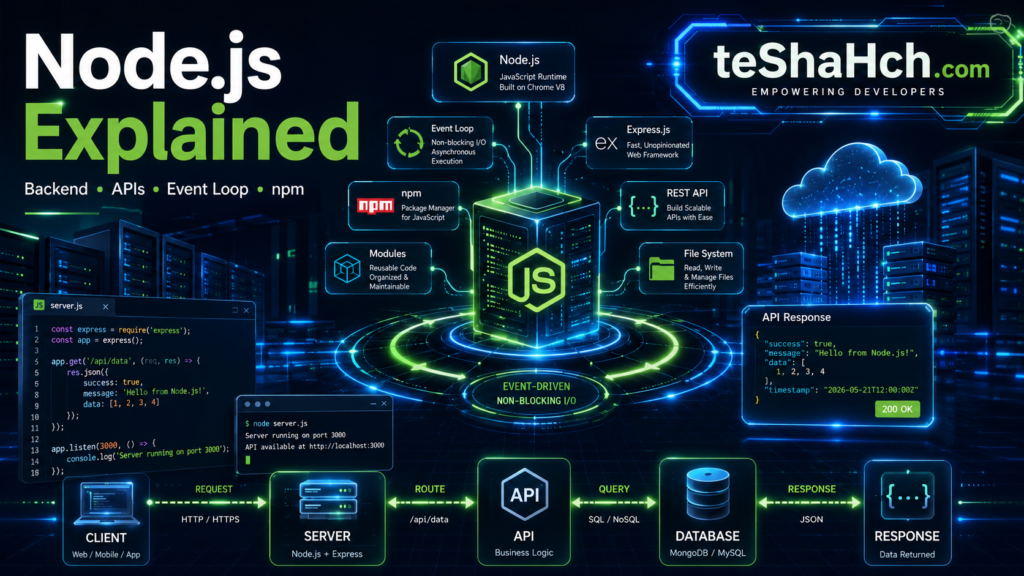
A simplified Node.js architecture looks like this:
Client Request
      │
      ▼
 Node.js Server
      │
      ▼
 Event Loop
      │
 ┌────┴────┐
 │         │
API      Database
 │         │
 └────┬────┘
      ▼
 Response
At the heart of this architecture is the Event Loop, which makes Node.js highly efficient.
What Is the Event Loop?
The Event Loop is one of the most important concepts in Node.js.
It continuously checks whether there are tasks waiting to be executed.
If an operation takes time—such as reading a file or querying a database—Node.js doesn’t wait.
Instead:
- It delegates the task.
- Continues processing other requests.
- Returns to the completed task later.
This makes Node.js highly responsive even under heavy traffic.
Synchronous vs Asynchronous Programming
Understanding this difference is essential.
Synchronous
Tasks execute one after another.
If one task takes a long time, everything else must wait.
Example:
Task A
↓
Task B
↓
Task C
Asynchronous
Tasks can run independently.
Long-running operations don’t block the rest of the application.
Example:
Task A
↓
Task B (Running)
↓
Task C
↓
Task B Completes
This asynchronous model is one of Node.js’s greatest strengths.
What Is npm?
npm stands for Node Package Manager.
It is the world’s largest software package registry and comes bundled with Node.js.
Developers use npm to:
- Install libraries
- Manage project dependencies
- Update packages
- Share reusable code
For example, instead of writing an authentication system from scratch, you can install a well-tested package through npm.
This dramatically speeds up development.
What Are Modules?
Node.js applications are built using modules.
A module is a reusable piece of code that performs a specific task.
Examples include:
- File handling
- HTTP requests
- Authentication
- Database connections
- Email sending
Using modules keeps projects organized and maintainable.
Types of Modules
Node.js supports three main types of modules.
Core Modules
Built into Node.js.
Examples:
- HTTP
- File System (FS)
- Path
- URL
- Events
No installation is required.
Local Modules
Modules created by developers within their own projects.
These are used to organize application logic.
Third-Party Modules
Installed through npm.
Examples include:
- Express.js
- Mongoose
- Axios
- JWT
- Nodemailer
These packages significantly reduce development time.
Common Use Cases of Node.js
Node.js is extremely versatile and can be used for many different applications.
Popular use cases include:
- REST APIs
- Web Servers
- E-commerce Platforms
- Real-Time Chat Applications
- Video Streaming Platforms
- SaaS Products
- Content Management Systems
- IoT Applications
- Microservices
- Command-Line Tools
Its flexibility makes it suitable for both small projects and enterprise-scale applications.
Why Full Stack Developers Love Node.js
Node.js is a core part of the MERN Stack and PERN Stack.
This means developers can use JavaScript across the entire application:
- React for the frontend
- Node.js for the backend
- Express.js for APIs
- MongoDB or PostgreSQL for the database
Using a single language simplifies development, improves productivity, and reduces the learning curve for beginners.
Node.js and Express.js
Many beginners confuse Node.js and Express.js, but they serve different purposes.
Think of Node.js as the engine, while Express.js is a framework built on top of it.
Node.js
- Runtime environment
- Executes JavaScript outside the browser
- Handles low-level server operations
Express.js
- Backend framework
- Simplifies routing
- Builds REST APIs
- Handles middleware
- Makes backend development much easier
Most modern Node.js applications use Express.js because it significantly reduces the amount of code developers need to write.
Understanding the File System (FS) Module
One of the most commonly used built-in Node.js modules is the File System (FS) module.
It allows applications to interact with files stored on a computer or server.
Common tasks include:
- Reading files
- Creating files
- Updating files
- Deleting files
- Renaming files
Real-world examples:
- Uploading user documents
- Saving application logs
- Reading configuration files
- Exporting reports
The FS module is built into Node.js, so no additional installation is required.
Understanding the HTTP Module
The HTTP module is another built-in Node.js feature.
It enables developers to create web servers without installing any external packages.
With the HTTP module, developers can:
- Receive client requests
- Send server responses
- Build simple APIs
- Serve web pages
Although modern projects often use Express.js instead, understanding the HTTP module helps beginners learn how web servers work internally.
Understanding APIs in Node.js
One of the biggest reasons developers choose Node.js is its ability to build APIs.
What Is an API?
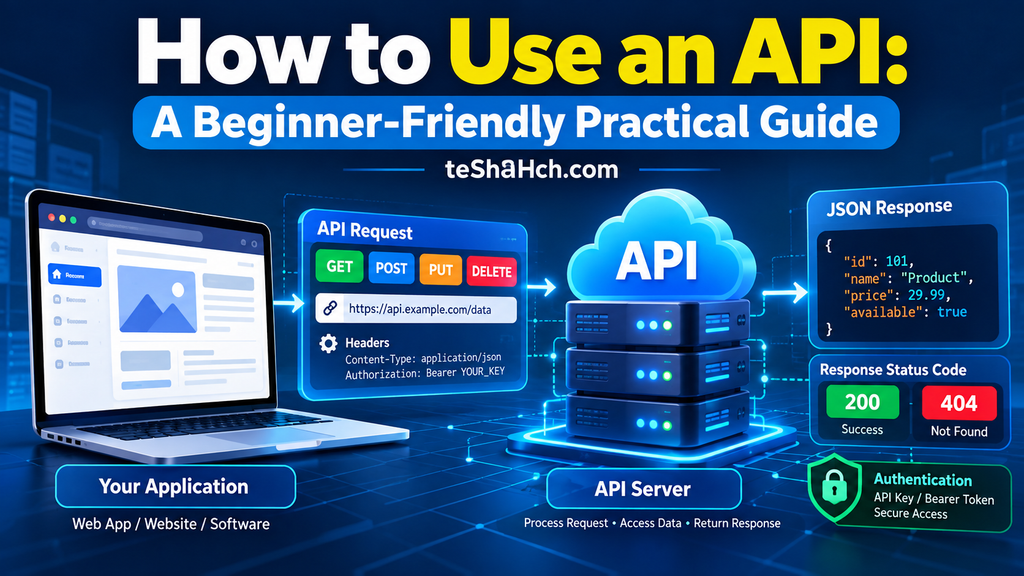
An API (Application Programming Interface) allows different applications to communicate with each other.
For example:
A React frontend requests user information.
↓
Node.js processes the request.
↓
The database returns the data.
↓
Node.js sends the response back to React.
This architecture powers most modern web applications.
How Does an API Work? A Beginner-Friendly Guide with Real-Life Examples
Node.js and Databases
Node.js works seamlessly with many popular databases.
NoSQL Databases
- MongoDB
- Firebase
SQL Databases
- PostgreSQL
- MySQL
- MariaDB
- SQL Server
Because Node.js supports both SQL and NoSQL databases, developers can choose the best option for their project requirements.
Advantages of Node.js
Node.js has become one of the world’s most popular backend technologies because it offers several significant advantages.
1. Fast Performance
The V8 JavaScript Engine compiles JavaScript into machine code, allowing applications to execute quickly.
This makes Node.js ideal for high-performance web applications.
2. Single Programming Language
Developers can use JavaScript across the entire application.
Frontend:
- HTML
- CSS
- JavaScript
- React
Backend:
- Node.js
- Express.js
Database:
- MongoDB
- PostgreSQL
This unified approach simplifies development.
3. Large npm Ecosystem
Millions of open-source packages are available through npm.
Popular examples include:
- Express.js
- Mongoose
- Passport
- Axios
- Socket.IO
This dramatically speeds up development.
4. Excellent Scalability
Node.js handles thousands of simultaneous connections efficiently.
This makes it suitable for:
- Chat applications
- Video streaming
- SaaS platforms
- Real-time dashboards
5. Strong Community Support
Node.js has one of the largest open-source communities.
Developers benefit from:
- Extensive documentation
- Tutorials
- Libraries
- Community support
6. Cross-Platform Development
Node.js runs on:
- Windows
- Linux
- macOS
Applications can be developed once and deployed across multiple operating systems.
Disadvantages of Node.js
Although Node.js is powerful, it’s important to understand its limitations.
1. Not Ideal for CPU-Intensive Tasks
Node.js excels at handling many lightweight tasks simultaneously.
However, heavy CPU operations such as:
- Video rendering
- Large image processing
- Scientific calculations
may perform better in other technologies.
2. Fast-Changing Ecosystem
The JavaScript ecosystem evolves rapidly.
Developers need to keep up with new packages, best practices, and framework updates.
3. Callback Complexity
Older Node.js applications often used nested callbacks, making code difficult to read.
Fortunately, modern JavaScript features like Promises and Async/Await have solved most of these issues.
Node.js vs PHP
Both technologies are widely used for backend development.
Choose Node.js If:
- You prefer JavaScript.
- You’re learning MERN Stack.
- You need real-time applications.
- You want a modern JavaScript ecosystem.
Choose PHP If:
- You’re maintaining existing PHP projects.
- You primarily work with WordPress or Laravel.
- Your company already uses PHP extensively.
For new full-stack JavaScript projects, Node.js is generally the preferred choice.
Node.js vs Python
This is another common comparison among beginners.
Node.js
Best for:
- Real-time applications
- APIs
- Web development
- JavaScript developers
Python
Best for:
- Artificial Intelligence
- Machine Learning
- Data Science
- Automation
- Scientific Computing
Both technologies are excellent—the right choice depends on your career goals.
Popular Frameworks Built for Node.js
Node.js has a rich ecosystem of frameworks.
Some popular options include:
- Express.js
- NestJS
- Fastify
- Koa.js
- Hapi.js
For beginners, Express.js is the best place to start because of its simplicity and widespread adoption.
What Can You Build with Node.js?
Node.js can power a wide range of modern applications.
Examples include:
- REST APIs
- Blogging Platforms
- E-commerce Websites
- Learning Management Systems
- CRM Software
- Project Management Tools
- Video Streaming Platforms
- Real-Time Chat Applications
- Multiplayer Games
- SaaS Applications
- Authentication Servers
- Microservices
Its flexibility makes it suitable for both startups and enterprise organizations.
Beginner Node.js Projects
Building projects is the fastest way to improve your backend development skills.
Beginner Projects
- Basic HTTP Server
- Calculator API
- Notes API
- To-Do API
- Weather API
Intermediate Projects
- Authentication System
- Blog Backend
- Expense Tracker API
- Student Management System
- Inventory Management API
Advanced Projects
- E-commerce Backend
- Chat Application
- Learning Management System
- SaaS Backend
- Project Management API
These projects help strengthen your portfolio and prepare you for real-world development.
Node.js Learning Roadmap
A structured learning path helps beginners stay focused.
Step 1
Master JavaScript fundamentals.
Step 2
Understand ES6+ features such as:
- Arrow Functions
- Modules
- Destructuring
- Async/Await
- Promises
Step 3
Learn Node.js basics.
Topics include:
- Runtime Environment
- Modules
- npm
- Event Loop
- File System
- HTTP Module
Step 4
Learn Express.js.
Step 5
Build REST APIs.
Step 6
Connect a Database.
Learn MongoDB or PostgreSQL.
Step 7
Implement Authentication.
Step 8
Deploy Applications.
Common Mistakes Beginners Make
1. Weak JavaScript Fundamentals
Node.js is JavaScript.
Without a solid understanding of JavaScript, backend development becomes much harder.
2. Skipping Express.js
After learning Node.js basics, move on to Express.js to build practical backend applications.
3. Ignoring Error Handling
Professional applications require proper error handling to improve reliability and user experience.
4. Not Building Projects
Watching tutorials alone isn’t enough.
The best way to learn Node.js is by creating real-world applications.
5. Avoiding Documentation
The official Node.js documentation is an excellent resource and should become part of your learning routine.
Is Node.js Worth Learning?
Absolutely.
Node.js continues to be one of the most in-demand backend technologies in the software industry. It powers everything from small startup projects to large-scale enterprise applications, making it a valuable skill for developers of all experience levels.
If you’re planning to become a Backend Developer, Full Stack Developer, or MERN Stack Developer, learning Node.js is a smart investment.
Why Node.js Is Still Worth Learning
✅ Uses JavaScript for backend development
✅ Excellent performance
✅ Huge npm ecosystem
✅ Strong community support
✅ Ideal for REST APIs
✅ Perfect for MERN & PERN Stack
✅ High demand in startups and enterprise companies
Node.js remains one of the best backend technologies to learn.
Node.js Career Opportunities
Node.js skills are valued across a wide range of industries.
Common Job Roles
- Node.js Developer
- Backend Developer
- Full Stack Developer
- MERN Stack Developer
- JavaScript Developer
- API Developer
- Software Engineer
Industries Hiring Node.js Developers
- Software Companies
- SaaS Startups
- FinTech
- E-commerce
- EdTech
- Healthcare Technology
- Digital Agencies
- Enterprise IT
Many remote and freelance opportunities also require Node.js expertise.
Best Resources to Learn Node.js
The best way to learn Node.js is through a combination of documentation, hands-on practice, and real-world projects.
Official Documentation
The official Node.js documentation is the most reliable source for learning core concepts and APIs.
Build Real Projects
Projects help reinforce theoretical knowledge.
Start with:
- Basic APIs
- Authentication Systems
- CRUD Applications
Then gradually move to more complex backend systems.
Explore Open-Source Code
Reading well-structured Node.js projects on GitHub can teach you best practices for organizing code, managing dependencies, and building scalable applications.
Practice Regularly
Even one hour of consistent practice each day can make a significant difference over time.
Focus on understanding concepts instead of memorizing code.
Node.js Learning Timeline
A realistic roadmap for beginners:
| Stage | Estimated Time |
|---|---|
| JavaScript Fundamentals | 4–8 Weeks |
| Node.js Basics | 2–3 Weeks |
| Express.js | 2–3 Weeks |
| REST API Development | 2–3 Weeks |
| Database Integration | 2–4 Weeks |
| Authentication | 1–2 Weeks |
| Deployment | 1 Week |
| Real-World Projects | Ongoing |
Remember, practical experience is more valuable than completing courses quickly.
Frequently Asked Questions (FAQ)
What is Node.js used for?
Node.js is used for building backend applications, REST APIs, web servers, real-time applications, command-line tools, and scalable web services using JavaScript.
Is Node.js a programming language?
No.
Node.js is a JavaScript runtime environment that allows JavaScript to run outside the browser.
Is Node.js easy to learn?
Yes.
If you already understand JavaScript fundamentals, learning Node.js is relatively straightforward because it uses the same language on the server side.
Should I learn Node.js or Python?
It depends on your goals.
Choose Node.js for web development, REST APIs, and full-stack JavaScript applications.
Choose Python if you’re interested in artificial intelligence, machine learning, data science, or automation.
Is Node.js good for beginners?
Absolutely.
It is one of the best backend technologies for beginners, especially those learning the MERN Stack or Full Stack Web Development.
What should I learn after Node.js?
A recommended learning path is:
- Express.js
- REST APIs
- MongoDB
- PostgreSQL
- Authentication (JWT, OAuth)
- Docker
- TypeScript
- Testing
- Deployment
Is Node.js still in demand?
Yes.
Node.js continues to be widely adopted by startups, software companies, and enterprise organizations worldwide.
Can I get a job after learning Node.js?
Yes.
Combine Node.js with JavaScript, Express.js, databases, Git, and real-world projects to build a strong portfolio for backend or full-stack developer roles.
Node.js has transformed backend development by enabling developers to use JavaScript across the entire application stack.
Its event-driven architecture, non-blocking I/O model, and extensive npm ecosystem make it a powerful choice for building fast, scalable, and modern web applications.
Whether you’re developing REST APIs, real-time chat applications, SaaS platforms, or enterprise software, Node.js provides the tools and flexibility needed for professional backend development.
If you’re following a Full Stack roadmap, mastering Node.js is a natural step after learning JavaScript and React. Pair it with Express.js and a database like MongoDB or PostgreSQL, and you’ll have the foundation to build complete production-ready applications.
The best way to become proficient is to build projects, explore open-source code, and practice consistently. Over time, these experiences will help you grow from a beginner into a confident backend developer.