Learn React.js from scratch with this beginner-friendly guide. Discover how React works, its features, components, JSX, advantages, career opportunities, and why it’s one of the most popular frontend technologies.
React.js Explained for Beginners: Complete Guide to Building Modern User Interfaces
Modern websites and web applications are expected to be fast, interactive, and user-friendly. From social media platforms and online stores to dashboards and SaaS products, users demand smooth experiences that feel almost like native applications.
This is where React.js comes in.
React has become one of the most popular frontend technologies in the world, powering countless websites and applications used by millions of people every day.
If you’re starting your web development journey or following a Full Stack Developer roadmap, learning React is one of the most valuable skills you can acquire.
In this complete beginner’s guide, you’ll learn what React.js is, how it works, why it’s so popular, and how it fits into modern web development.
What Is React.js?
React.js, commonly known as React, is a JavaScript library used for building user interfaces.
It helps developers create interactive, dynamic, and reusable UI components for web applications.
Instead of manually updating every part of a webpage, React intelligently updates only the necessary elements, resulting in better performance and a smoother user experience.
React is primarily used for:
- Single Page Applications (SPAs)
- Interactive websites
- SaaS platforms
- Dashboards
- E-commerce stores
- Social media applications
Today, React is considered one of the most important frontend technologies for modern web development.
A Brief History of React
React was created by engineers at Facebook to solve performance and scalability challenges in large web applications.
The library was first introduced in 2013 and quickly gained popularity among developers because of its simplicity and efficiency.
Over the years, React has evolved into one of the largest frontend ecosystems in the software industry.
Its adoption by startups, enterprises, and independent developers has made it a standard skill for frontend and full stack developers.
Why Is React So Popular?
Many frontend technologies exist, but React continues to dominate the web development landscape.
There are several reasons for this popularity.
1. Easy to Learn
Developers with basic JavaScript knowledge can start learning React relatively quickly.
The concepts are straightforward compared to many other frontend frameworks.
2. Reusable Components
React applications are built using components.
Instead of rewriting the same code repeatedly, developers can create reusable building blocks.
For example:
- Navigation bars
- Buttons
- Product cards
- Forms
- User profiles
These components can be reused throughout an application.
This significantly speeds up development.
3. Strong Community Support
React has one of the largest developer communities in the world.
Benefits include:
- Thousands of tutorials
- Extensive documentation
- Open-source libraries
- Community support forums
This makes learning and troubleshooting much easier.
4. Excellent Job Opportunities
React developers are in demand worldwide.
Many companies actively hire:
- React Developers
- Frontend Developers
- Full Stack Developers
- JavaScript Developers
Because React is used in countless production applications, learning it can open many career opportunities.
5. High Performance
React uses a technique called the Virtual DOM.
Instead of reloading an entire webpage after every change, React updates only the necessary elements.
This improves speed and user experience.
How React Works
To understand React, you need to understand how traditional websites work.
In traditional web development:
- User performs an action.
- Browser sends a request.
- Entire sections of the page reload.
- Updated content appears.
This approach can become inefficient for large applications.
React improves this process.
With React:
- User performs an action.
- React updates only the affected components.
- The rest of the page remains unchanged.
- Updates happen instantly.
This creates smoother and faster user experiences.
Understanding the Virtual DOM
One of React’s most important concepts is the Virtual DOM.
What Is the DOM?
DOM stands for Document Object Model.
It represents the structure of a webpage.
Whenever content changes, the browser must update the DOM.
Frequent DOM updates can slow down applications.
What Is the Virtual DOM?
React creates a lightweight copy of the DOM called the Virtual DOM.
When data changes:
- React updates the Virtual DOM.
- React compares old and new versions.
- React identifies the differences.
- Only necessary changes are applied to the real DOM.
This process is known as Diffing.
The result is faster rendering and improved performance.
React Architecture
React applications are built using a component-based architecture.
Instead of building one large application file, developers break the interface into smaller components.
Example:
App
│
├── Header
├── Navigation
├── Hero Section
├── Product List
├── Product Card
├── Footer
Each component has a specific responsibility.
This makes applications:
- Easier to maintain
- Easier to scale
- Easier to debug
What Is JSX?
When learning React, you’ll encounter JSX.
JSX stands for JavaScript XML.
It allows developers to write HTML-like code inside JavaScript.
Example:
function Welcome() {
  return <h1>Hello World</h1>;
}
At first glance, this looks like HTML.
However, it is actually JavaScript enhanced with JSX syntax.
Why Use JSX?
JSX provides several advantages:
Better Readability
UI code becomes easier to understand.
Faster Development
Developers can write UI structures quickly.
Easier Maintenance
Large applications become easier to manage.
Understanding Components
Components are the foundation of React.
Everything in React revolves around components.
A component is an independent, reusable piece of the user interface.
Examples:
- Header
- Sidebar
- Search Bar
- Product Card
- Login Form
Think of components as LEGO blocks.
You build complex applications by combining smaller reusable pieces.
Types of Components
React primarily uses two types of components.
Functional Components
Modern React development relies heavily on functional components.
Example:
function Header() {
  return <h1>Welcome</h1>;
}
Functional components are:
- Simple
- Lightweight
- Easy to understand
Class Components
Older React applications often use class components.
Example:
class Header extends React.Component {
  render() {
    return <h1>Welcome</h1>;
  }
}
Today, most developers prefer functional components because they are cleaner and easier to maintain.
Props in React
Props stands for Properties.
Props allow components to pass data to one another.
Example:
function Welcome(props) {
  return <h1>Hello, {props.name}</h1>;
}
Usage:
<Welcome name="John" />Output:
Hello, JohnProps make components dynamic and reusable.
State in React
State is used to manage changing data within a component.
Examples:
- User input
- Form data
- Shopping cart items
- Notifications
- Theme settings
Unlike props, state can change over time.
This allows React applications to be interactive and dynamic.
Why React Is Essential for Full Stack Developers
React plays a major role in modern Full Stack development.
Popular stacks include:
MERN Stack
- MongoDB
- Express.js
- React
- Node.js
PERN Stack
- PostgreSQL
- Express.js
- React
- Node.js
Because React is used in both stacks, learning React significantly increases your development capabilities.
React Hooks Explained
React Hooks are one of the most important features introduced in modern React.
Before Hooks, developers relied heavily on class components to manage state and lifecycle methods.
Today, Hooks allow developers to use these features inside functional components, making code cleaner and easier to maintain.
Some of the most commonly used Hooks include:
- useState
- useEffect
- useContext
- useRef
- useMemo
- useCallback
For beginners, mastering useState and useEffect should be the first priority.
Understanding useState
The useState Hook allows components to store and update data.
Examples include:
- Counter values
- User names
- Form inputs
- Theme settings
- Shopping cart items
Whenever the state changes, React automatically updates the user interface.
This is one of the reasons React applications feel so dynamic and responsive.
Understanding useEffect
Many applications need to perform tasks after a page loads.
For example:
- Fetching data from an API
- Updating the page title
- Setting timers
- Listening for browser events
The useEffect Hook handles these side effects efficiently.
Instead of manually controlling page updates, developers simply define what should happen when data changes.
React Router
Most modern websites contain multiple pages.
Examples include:
- Home
- About
- Contact
- Products
- Dashboard
React Router enables navigation between these pages without refreshing the entire website.
Benefits include:
- Faster navigation
- Better user experience
- Single Page Application architecture
- Cleaner URLs
React Router is considered an essential skill for React developers.
Forms in React
Almost every application contains forms.
Examples include:
- Login
- Registration
- Contact forms
- Checkout pages
- Search bars
React makes form handling simple through controlled components.
Developers can validate user input, display error messages, and update form values in real time.
API Integration
Real-world applications rarely use static data.
Instead, they fetch information from servers through APIs.
Examples include:
- Weather applications
- News websites
- E-commerce stores
- Banking dashboards
- Social media platforms
React can easily consume REST APIs using:
- Fetch API
- Axios
This allows applications to display real-time information.
React Project Structure
A typical React application looks like this:
src
│
├── components
├── pages
├── assets
├── hooks
├── services
├── styles
├── App.jsx
└── main.jsx
Organizing files properly makes projects easier to scale and maintain.
React Ecosystem
React itself focuses on building user interfaces.
However, modern React development also includes several supporting libraries.
Common React Tools
- React Router
- Redux Toolkit
- Context API
- Axios
- Vite
- Next.js
- React Query
- Tailwind CSS
You don’t need to learn everything at once.
Start with React fundamentals before exploring the broader ecosystem.
Advantages of React.js
React has remained one of the leading frontend technologies because it offers numerous benefits.
1. Component-Based Development
Developers can create reusable UI components, reducing duplicate code.
2. Fast Performance
The Virtual DOM updates only the necessary parts of the interface.
This improves application speed.
3. Large Community
React has millions of developers worldwide.
Finding tutorials, documentation, and solutions is rarely difficult.
4. Strong Job Market
Thousands of companies actively hire React developers.
Learning React can significantly improve career opportunities.
5. Excellent Ecosystem
React integrates easily with:
- Node.js
- Express.js
- MongoDB
- PostgreSQL
- Firebase
- GraphQL
6. Cross-Platform Development
React knowledge also helps developers learn React Native for mobile application development.
Disadvantages of React.js
Although React is powerful, it also has some limitations.
Fast-Changing Ecosystem
React evolves quickly.
Developers must continuously learn new tools and best practices.
Additional Libraries
Unlike some frameworks, React focuses only on the user interface.
Routing, state management, and other features require additional libraries.
Learning Curve
While React fundamentals are beginner-friendly, mastering advanced concepts requires time and practice.
What Can You Build with React?
React is incredibly versatile.
Common applications include:
- Portfolio websites
- Landing pages
- Dashboards
- Blogging platforms
- Learning management systems
- E-commerce websites
- Chat applications
- Social media platforms
- SaaS products
- CRM software
- Project management tools
Many large-scale applications rely heavily on React.
Companies Using React
React is trusted by startups and enterprise organizations alike.
It is commonly used for building:
- Social networking platforms
- Streaming services
- Online marketplaces
- Developer tools
- Business dashboards
- Financial applications
Its widespread adoption demonstrates its reliability for production environments.
React Learning Roadmap
If you’re starting from scratch, follow this order:
Step 1
Learn HTML
Step 2
Learn CSS
Step 3
Master JavaScript fundamentals.
Topics include:
- Variables
- Functions
- Objects
- Arrays
- DOM
- ES6+
Step 4
Learn Git and GitHub.
Step 5
Install Node.js and npm.
Understand how packages work.
Step 6
Learn React Fundamentals.
Focus on:
- JSX
- Components
- Props
- State
Step 7
Master React Hooks.
Especially:
- useState
- useEffect
Step 8
Learn Routing.
Step 9
Learn API Integration.
Step 10
Build Real Projects.
Beginner React Projects
Projects help reinforce concepts and prepare you for real-world development.
Beginner
- Counter App
- Calculator
- Digital Clock
- To-Do List
- Notes App
Intermediate
- Weather App
- Movie Search App
- Expense Tracker
- Quiz Application
- Blog Frontend
Advanced
- E-commerce Store
- Learning Management System
- Admin Dashboard
- Chat Application
- SaaS Dashboard
Employers value projects far more than certificates.
React Career Opportunities
Learning React opens doors to various technology careers.
Common roles include:
- React Developer
- Frontend Developer
- JavaScript Developer
- Full Stack Developer
- MERN Stack Developer
- UI Developer
Many freelancers also build React applications for clients around the world.
React vs Angular vs Vue
This is one of the most frequently asked questions among beginners.
React
Best for:
- Large ecosystem
- Flexible development
- MERN Stack
- High job demand
Angular
Best for:
- Enterprise applications
- Large development teams
- Structured architecture
Vue
Best for:
- Simplicity
- Small to medium projects
- Fast learning
For most beginners, React offers the strongest combination of learning resources, community support, and career opportunities.
Common Mistakes Beginners Make
1. Ignoring JavaScript
React is built on JavaScript.
Without strong JavaScript fundamentals, React becomes difficult.
2. Skipping Projects
Watching tutorials alone isn’t enough.
Build applications consistently.
3. Learning Too Many Libraries
Master React before exploring Redux, Next.js, or other advanced tools.
4. Poor Component Structure
Keep components small, reusable, and focused on a single responsibility.
5. Not Reading Documentation
The official React documentation is one of the best learning resources available.
Is React.js Worth Learning?
Absolutely.
React continues to be one of the most valuable frontend technologies for modern web development. It powers thousands of startups, enterprise applications, SaaS platforms, e-commerce websites, and dashboards.
If your goal is to become a professional Frontend or Full Stack Developer, React should be one of your core skills.
Why React Is Still Worth Learning
✅ Massive job market
✅ Beginner-friendly ecosystem
✅ Huge developer community
✅ Excellent documentation
✅ Strong open-source ecosystem
✅ Ideal for Full Stack Development
✅ Used in MERN and PERN Stack applications
React is not just another JavaScript library—it’s one of the foundations of modern frontend development.
React Developer Salary & Career Opportunities
React developers remain among the most sought-after professionals in the software industry.
Common Job Roles
- React Developer
- Frontend Developer
- JavaScript Developer
- Full Stack Developer
- MERN Stack Developer
- UI Engineer
Career Opportunities
React skills are valuable in:
- Software companies
- SaaS startups
- Digital agencies
- Enterprise organizations
- E-commerce businesses
- Freelancing platforms
- Remote development teams
As your experience grows, you can specialize further in areas such as performance optimization, frontend architecture, or full-stack JavaScript development.
Best Resources to Learn React
Learning from reliable sources helps you build strong fundamentals.
Official Documentation
The official React documentation should always be your primary reference.
Practice Platforms
Improve your JavaScript and React skills by building real-world projects and solving coding challenges.
GitHub
Explore open-source React projects to understand how experienced developers structure applications.
YouTube & Technical Blogs
Use them to reinforce concepts—but avoid relying solely on tutorials. Build projects alongside your learning.
Tips for Learning React Faster
Follow these practical tips to accelerate your progress:
- Master JavaScript before diving deep into React.
- Build small projects after learning each new concept.
- Read error messages carefully instead of copying fixes blindly.
- Learn by rebuilding popular UI designs.
- Write clean and reusable components.
- Practice consistently, even if it’s just one hour a day.
Consistency matters more than speed.
React Learning Timeline
A realistic roadmap for beginners:
| Stage | Estimated Time |
|---|---|
| HTML & CSS | 2–4 Weeks |
| JavaScript Fundamentals | 4–8 Weeks |
| React Basics | 3–4 Weeks |
| Hooks & Routing | 2–3 Weeks |
| API Integration | 1–2 Weeks |
| Projects | Ongoing |
Remember, everyone learns at a different pace. Focus on understanding concepts rather than rushing through tutorials.
Frequently Asked Questions (FAQ)
What is React.js used for?
React.js is used to build interactive, dynamic, and responsive user interfaces for websites and web applications.
Is React.js easy to learn?
Yes. If you already know HTML, CSS, and JavaScript, React is relatively easy to learn because of its component-based architecture and extensive learning resources.
Do I need JavaScript before learning React?
Absolutely. JavaScript is the foundation of React. A solid understanding of JavaScript makes learning React significantly easier.
Is React a framework or a library?
React is a JavaScript library focused on building user interfaces. Developers often combine it with additional libraries for routing, state management, and backend integration.
Can I build full websites with React?
Yes. React can be used to build complete websites, dashboards, e-commerce platforms, SaaS applications, and single-page applications. When combined with backend technologies such as Node.js and databases like MongoDB or PostgreSQL, it becomes part of a Full Stack solution.
Should I learn React or Angular?
For most beginners, React is the recommended starting point because of its simpler learning curve, large community, and excellent career opportunities.
Is React still in demand?
Yes. React continues to be one of the most in-demand frontend technologies worldwide and remains a preferred choice for startups, agencies, and enterprise development teams.
What should I learn after React?
A logical next step is:
- React Router
- State Management (Context API / Redux Toolkit)
- API Integration
- Authentication
- Next.js
- TypeScript
- Testing
- Performance Optimization
These skills will help you build production-ready React applications.
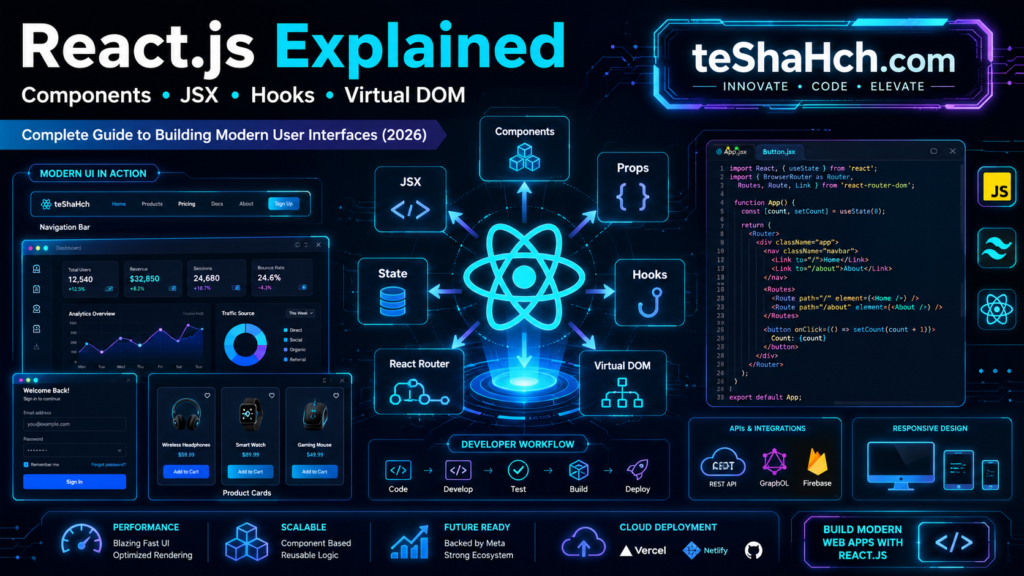
React.js has transformed the way developers build modern user interfaces. Its component-based architecture, Virtual DOM, and rich ecosystem make it an excellent choice for both beginners and experienced developers.
Whether you’re aiming to become a Frontend Developer, a MERN Stack Developer, or a Full Stack Engineer, React provides a strong foundation for creating fast, scalable, and maintainable web applications.
The key to mastering React isn’t watching endless tutorials—it’s building real-world projects, understanding JavaScript deeply, and practicing consistently.
If you stay committed to learning and continue building applications, React can become one of the most valuable skills in your web development career.