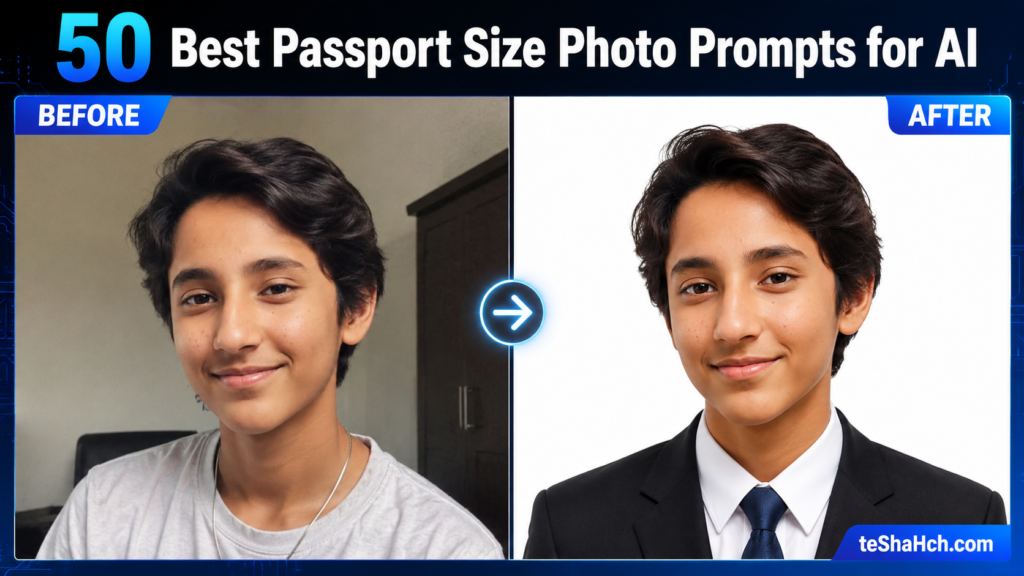
Discover 50 detailed Passport Size Photo Prompts for AI image generation. Transform your uploaded photo into professional passport-style, visa, ID card, and official-looking portraits with realistic backgrounds, studio lighting, and identity preservation.
50 Best Passport Size Photo Prompts for AI Image Generation (Professional ID & Passport-Style Portraits)
Artificial Intelligence has made professional portrait editing easier than ever. Today, you can upload your own photo and transform it into a clean, studio-quality passport-style portrait in seconds using AI image generators.
Whether you’re creating a professional-looking ID photo, visa-style portrait, employee badge photo, student ID picture, LinkedIn headshot, or passport-style image, the right prompt makes all the difference.
This collection contains 50 carefully written Passport Size Photo Prompts specifically designed for image-to-image AI generation. Every prompt assumes that you first upload your own photo and then ask the AI to transform it while preserving your identity.
These prompts work well with modern AI image generators including ChatGPT Image Generation, Gemini, Grok, Midjourney, Leonardo AI, Flux, Ideogram, and similar tools.
Important Disclaimer
These prompts are designed to create passport-style and professional ID-style portraits.
Although they produce realistic results, they do not guarantee compliance with the official passport, visa, or government ID photo requirements of every country.
Before using any AI-generated image for an official application, always verify the latest photo specifications issued by the relevant government authority or organization.
How to Use These Prompts
Using these prompts is simple.
Step 1
Upload your original photo.
Step 2
Copy one of the prompts below.
Step 3
Paste it into your favorite AI image generator.
Step 4
Generate the image.
Step 5
If necessary, adjust the prompt by specifying your country’s passport photo background color, dimensions, clothing requirements, or facial expression guidelines.
Universal Identity Preservation Instruction
For the best results, add this instruction before every prompt.
Keep the same person from the uploaded photo. Preserve facial identity, facial structure, skin tone, hairstyle, eye color, nose, lips, ears, facial proportions, age appearance, and all unique facial characteristics. Do not change the person’s identity. Improve only the clothing, posture, lighting, background, image quality, and professional studio appearance while maintaining a completely natural and realistic look.
50 Best Passport Size Photo Prompts
1. Classic White Background Passport Photo
Transform the uploaded photo into a professional passport-style portrait with a clean white background. Keep the same person from the uploaded image and preserve facial identity perfectly. Replace casual clothing with a neat formal shirt in a solid color suitable for official photographs. Ensure the subject is looking directly at the camera with a neutral facial expression, closed mouth, natural posture, and evenly distributed studio lighting. Remove distracting shadows, improve image sharpness, maintain realistic skin texture, center the face correctly, create a high-resolution professional portrait suitable for passport-style use, ultra realistic, DSLR-quality photography, 8K.
2. Official Blue Background ID Photo
Transform the uploaded image into a professional passport-style ID portrait with a smooth light blue background. Preserve the person’s identity exactly as in the uploaded photo. Improve lighting, sharpen facial details, maintain natural skin texture, position the head correctly, use a neutral expression, direct eye contact, formal clothing, soft studio lighting, symmetrical composition, realistic colors, professional photography, ultra-detailed, 8K quality.
3. Visa Application Style Portrait
Transform the uploaded photo into a professional visa-style portrait with a plain white background, realistic studio lighting, centered face, natural skin tone, formal attire, high-resolution facial details, perfect sharpness, passport-style framing, clean composition, realistic DSLR photography, preserve identity exactly.
4. Government ID Card Portrait
Transform the uploaded photo into a government ID-style portrait. Preserve every facial feature while improving image quality. Use a plain white background, balanced lighting, realistic skin texture, natural facial expression, direct eye contact, formal shirt, centered composition, professional camera quality, highly detailed.
5. Professional Studio Passport Portrait
Transform the uploaded image into a premium studio passport portrait with softbox lighting, balanced exposure, crystal-clear facial details, white seamless background, realistic photography, professional retouching without changing identity, ultra realistic, 8K resolution.
6. Employee ID Card Photo
Transform the uploaded photo into a clean corporate employee ID portrait. Preserve identity perfectly while replacing casual clothing with business formal attire. Use professional office-style lighting, plain light gray background, realistic facial texture, centered composition, professional DSLR quality.
7. University Student ID Portrait
Transform the uploaded image into a university student ID photograph. Maintain facial identity, use a clean white background, realistic lighting, natural smile if appropriate, neat hairstyle, centered framing, professional studio photography, high-resolution image suitable for academic identification.
8. Driving License Style Portrait
Transform the uploaded photo into a clean driving license portrait. Preserve all facial features, use realistic lighting, neutral background, proper head positioning, direct eye contact, natural expression, professional image quality, ultra realistic.
9. Immigration Photo Style
Transform the uploaded photo into a realistic immigration office portrait. Maintain perfect identity preservation while improving image clarity, facial lighting, and composition. Use a plain white background, formal clothing, centered face, natural expression, realistic DSLR-quality photography.
10. Embassy Application Portrait
Transform the uploaded image into a premium embassy application portrait with a white background, balanced lighting, high-resolution facial details, realistic skin texture, formal appearance, centered composition, passport-style framing, professional photography.
11. Professional Headshot for Official Documents
Transform the uploaded photo into a professional official-document headshot. Keep the same facial identity while improving lighting, clothing, image sharpness, facial symmetry, realistic skin tone, and background cleanliness. Maintain a natural and authentic appearance.
12. International Passport Style Portrait
Transform the uploaded image into an international passport-style portrait with soft studio lighting, perfectly centered face, neutral facial expression, plain white background, realistic skin texture, formal attire, ultra-high-resolution photography.
13. European Visa Style Photo
Transform the uploaded photo into a European-style visa portrait with a bright white background, professional studio lighting, realistic facial features, centered composition, sharp details, balanced colors, formal clothing, natural expression.
14. Clean Corporate ID Portrait
Transform the uploaded image into a premium corporate ID photograph with business attire, clean white background, realistic lighting, symmetrical composition, sharp facial details, professional DSLR photography, preserve identity perfectly.
15. Medical Staff ID Photo
Transform the uploaded photo into a professional hospital staff ID portrait. Keep the same person while replacing clothing with a clean white medical coat over professional attire. Use a plain background, balanced studio lighting, realistic skin texture, centered composition, official-looking photography.
16. Teacher Identity Card Portrait
Transform the uploaded image into a teacher ID card portrait with professional clothing, soft lighting, clean white background, realistic skin texture, centered face, authentic appearance, high-resolution photography.
17. Police Verification Style Portrait
Transform the uploaded photo into a formal police verification portrait with neutral facial expression, direct eye contact, plain white background, balanced lighting, professional image quality, preserve identity exactly.
18. Banking KYC Style Portrait
Transform the uploaded image into a clean Know Your Customer (KYC) style portrait suitable for banking documentation. Preserve all facial features, improve clarity, maintain realistic lighting, plain white background, professional composition.
19. Employment Verification Portrait
Transform the uploaded photo into a professional employment verification portrait with business attire, realistic studio lighting, centered face, white background, ultra-realistic photography, natural skin texture.
20. High-End Professional Passport Portrait
Transform the uploaded image into a premium passport-style portrait captured using a professional DSLR camera with an 85mm lens, ultra-realistic facial details, soft studio lighting, clean white background, business formal clothing, perfectly centered composition, high dynamic range, photorealistic skin texture, professional retouching while preserving identity, award-winning studio photography, 8K resolution.
Business & Professional Passport Portraits
21. Executive Passport Portrait
Transform the uploaded photo into a premium executive passport-style portrait. Preserve the person’s identity exactly while replacing casual clothing with a dark navy business suit, white formal shirt, and elegant tie. Use a clean white background, balanced professional studio lighting, direct eye contact, neutral facial expression, realistic skin texture, DSLR-quality photography, ultra detailed, 8K resolution.
22. Business Formal Headshot
Transform the uploaded photo into a professional business passport portrait with formal office attire, clean hairstyle, centered composition, realistic facial details, plain white background, studio-quality lighting, ultra-realistic photography, and natural color grading.
23. International Business Traveler Portrait
Transform the uploaded photo into a premium passport-style portrait suitable for an international business traveler. Maintain perfect facial identity while using elegant formal clothing, bright white background, soft studio lighting, professional DSLR quality, realistic skin tones, centered framing, and exceptional image sharpness.
24. Premium Corporate Identity Portrait
Transform the uploaded photo into a premium corporate identity portrait with formal executive clothing, perfectly ironed shirt, modern blazer, white seamless background, softbox lighting, natural facial texture, ultra-realistic details, centered passport-style composition.
25. Minimal Professional Passport Photo
Transform the uploaded photo into a clean minimalist passport portrait with simple formal clothing, plain white background, balanced lighting, natural facial expression, crystal-clear details, authentic appearance, professional photography, realistic skin texture.
Student & Education ID Portraits
26. College Student Passport Portrait
Transform the uploaded photo into a clean university passport-style portrait. Preserve identity while replacing clothing with a neat collared shirt suitable for official academic documentation. Use a plain white background, soft lighting, centered composition, natural appearance, and DSLR-quality photography.
27. School Student ID Portrait
Transform the uploaded image into a professional school identification portrait. Preserve identity while dressing the person in a clean school uniform, maintaining a natural expression, plain white background, balanced lighting, and professional studio quality.
28. Scholarship Application Portrait
Transform the uploaded photo into a premium scholarship application portrait with formal attire, clean hairstyle, bright white background, realistic lighting, natural skin tones, centered framing, ultra-realistic photography.
29. Graduation Registration Portrait
Transform the uploaded image into an official graduation registration portrait. Preserve facial identity completely while enhancing image quality, improving lighting, replacing casual clothing with formal attire, and using a clean white background.
30. Student Visa Portrait
Transform the uploaded photo into a professional student visa passport portrait with neutral expression, realistic lighting, centered composition, plain white background, authentic skin texture, formal appearance, and DSLR-quality image.
Visa & Immigration Portraits
31. Tourist Visa Portrait
Transform the uploaded photo into a passport-style tourist visa photograph with formal clothing, white background, balanced lighting, realistic skin tones, centered framing, natural expression, ultra-realistic photography.
32. Work Visa Portrait
Transform the uploaded photo into a work visa application portrait suitable for professional documentation. Preserve identity while improving clothing, lighting, composition, facial sharpness, and overall image quality.
33. Permanent Residency Photo
Transform the uploaded photo into a premium permanent residency application portrait using a bright white background, centered composition, professional lighting, realistic skin texture, business formal clothing, and natural expression.
34. Immigration Office Portrait
Transform the uploaded image into a realistic immigration office portrait with official document styling, perfectly balanced lighting, neutral expression, direct eye contact, clean white background, professional DSLR photography.
35. Global Travel Passport Portrait
Transform the uploaded photo into a premium international passport portrait suitable for global travel documentation. Maintain identity while enhancing lighting, image clarity, formal clothing, facial sharpness, and professional appearance.
Background Variations
36. White Studio Background
Transform the uploaded photo into a passport-style portrait with a perfectly clean white seamless background, balanced lighting, realistic facial details, centered composition, professional photography, 8K resolution.
37. Light Blue Background
Transform the uploaded photo into a professional passport portrait with a soft light-blue background commonly used for ID photography. Preserve identity while improving image quality, lighting, and facial clarity.
38. Light Gray Background
Transform the uploaded image into a realistic official portrait using a neutral light-gray background, professional studio lighting, business attire, centered framing, authentic skin texture, ultra-detailed DSLR photography.
39. Off-White Professional Background
Transform the uploaded photo into a premium ID portrait using a subtle off-white background, soft natural lighting, realistic facial details, formal appearance, high-resolution professional photography, centered composition.
Premium AI Studio Portrait
40. Luxury Studio Passport Masterpiece
Transform the uploaded photo into the highest-quality passport-style portrait possible while preserving facial identity with absolute accuracy. Replace casual clothing with premium formal business attire, use flawless professional studio lighting with dual softboxes, perfectly balanced exposure, realistic skin texture without excessive retouching, crystal-clear eyes, natural facial details, seamless white background, centered passport composition, DSLR 85mm portrait lens simulation, ultra-photorealistic rendering, HDR quality, magazine-level sharpness, award-winning professional studio photography, masterpiece composition, 8K ultra-high resolution.
Advanced Passport-Style AI Photo Prompts
41. Embassy Interview Passport Portrait
Transform the uploaded photo into a professional embassy interview passport-style portrait. Preserve facial identity exactly while replacing casual clothing with elegant formal business attire. Use a perfectly clean white background, balanced soft studio lighting, neutral facial expression, direct eye contact, centered composition, natural skin texture, ultra-realistic DSLR photography, crisp facial details, HDR quality, and 8K resolution.
42. International Conference ID Portrait
Transform the uploaded photo into a premium international conference identification portrait. Maintain the same facial identity while enhancing lighting, improving sharpness, replacing clothing with a modern business suit, using a bright white background, professional head positioning, realistic skin tones, and award-winning studio photography.
43. Government Employee ID Portrait
Transform the uploaded photo into an official government employee ID-style portrait. Preserve facial features perfectly while improving posture, lighting, clothing, background, and image quality. Use a plain white background, neutral expression, realistic skin texture, and professional DSLR-quality photography.
44. Airline Crew Passport Portrait
Transform the uploaded photo into a premium airline crew passport-style portrait. Keep the same facial identity while dressing the subject in elegant airline-style formal attire. Use clean studio lighting, white seamless background, centered composition, realistic facial details, ultra-photorealistic rendering, and professional camera quality.
45. Medical License Portrait
Transform the uploaded photo into a professional medical license portrait with a clean white doctor’s coat over formal attire. Preserve facial identity completely, improve lighting, maintain natural skin texture, realistic facial details, centered composition, white background, and studio-quality photography.
46. Lawyer Bar Registration Portrait
Transform the uploaded photo into a premium legal professional portrait suitable for bar registration or law firm documentation. Preserve identity perfectly while replacing clothing with a dark formal suit, white shirt, elegant tie, bright white background, realistic lighting, DSLR portrait quality, ultra-detailed facial features, and professional composition.
47. Premium Biometric Portrait
Transform the uploaded photo into a highly realistic biometric-style portrait while preserving facial identity perfectly. Use balanced lighting across the entire face, remove harsh shadows, maintain natural facial proportions, use a seamless white background, ensure direct eye contact, neutral expression, realistic skin texture, professional studio photography, and ultra-high-resolution quality.
48. AI Enhanced Official Portrait
Transform the uploaded photo into a professional official portrait with advanced AI enhancement while maintaining complete identity preservation. Improve image sharpness, reduce digital noise, optimize facial lighting, enhance natural skin texture, use business formal attire, white background, realistic color grading, premium DSLR photography, and 8K quality.
49. Ultra HD Passport Portrait
Transform the uploaded photo into an ultra-HD passport-style portrait with flawless studio lighting, professional composition, centered framing, formal clothing, realistic facial details, sharp eyes, natural skin tones, seamless white background, HDR image quality, photorealistic rendering, and award-winning portrait photography.
50. Ultimate Professional Passport Photo Master Prompt
Transform the uploaded photo into the highest-quality professional passport-style portrait possible while preserving facial identity with absolute accuracy. Keep the same facial structure, skin tone, hairstyle, facial proportions, and all unique characteristics unchanged. Replace casual clothing with premium business formal attire appropriate for official identification photographs. Position the subject facing directly toward the camera with a neutral facial expression and natural posture. Use a perfectly clean white seamless background, soft symmetrical studio lighting with dual softboxes, balanced exposure, realistic skin texture, crystal-clear eyes, natural color grading, ultra-sharp facial details, DSLR 85mm portrait lens simulation, shallow but compliant depth of field, HDR processing, magazine-quality image clarity, photorealistic rendering, masterpiece composition, award-winning studio photography, and ultra-detailed 8K resolution.
Pro Tips for Better AI Passport-Style Photos
To improve your AI-generated passport-style portraits, consider adding these keywords to your prompts when appropriate:
- Professional DSLR Photography
- 85mm Portrait Lens
- Studio Softbox Lighting
- Natural Skin Texture
- Photorealistic
- Ultra Realistic
- HDR
- High Dynamic Range
- High Resolution
- Sharp Focus
- Centered Composition
- Neutral Facial Expression
- Direct Eye Contact
- Seamless White Background
- Award-Winning Photography
- Professional Retouching
- Realistic Color Grading
- Clean Background
- Ultra Detailed
- 8K Resolution
Common Mistakes to Avoid
Avoid these instructions if you want an official-looking passport-style portrait:
- Smiling with visible teeth
- Wearing sunglasses
- Heavy beauty filters
- Cartoon or anime styles
- Dramatic side lighting
- Busy or colorful backgrounds
- Extreme head tilt
- Face partially covered by hair
- Hats or fashion accessories (unless required for religious or medical reasons)
- Unrealistic skin smoothing
- Oversaturated colors
Best Use Cases
These prompts are ideal for creating:
- Professional passport-style portraits
- Visa-style photos
- Employee ID photos
- Student ID portraits
- Company badges
- Conference ID cards
- LinkedIn profile headshots
- Corporate directories
- Resume profile photos
- Professional portfolio images
Creating a clean, professional passport-style portrait no longer requires an expensive photography studio. With the right AI image prompt and a high-quality uploaded photo, you can generate realistic, studio-quality ID-style portraits in minutes while preserving your natural identity.
This collection of 50 Passport Size Photo Prompts gives you a wide range of styles for professional, academic, corporate, and travel-related use. Remember that while these prompts create highly realistic images, official passport, visa, and government ID applications may have country-specific photo requirements. Always verify the latest guidelines before submitting an AI-generated image for official purposes.
Frequently Asked Questions (FAQ)
Can I use these prompts with my own uploaded photo?
Yes. Every prompt in this collection is specifically designed for image-to-image AI generation, where you upload your own photo first and then apply the prompt.
Will AI change my face?
No. Each prompt includes detailed identity preservation instructions that tell the AI to keep your facial structure, skin tone, hairstyle, and unique facial features unchanged while only improving the environment, clothing, lighting, and overall image quality.
Which AI image generators work best?
These prompts work well with most modern AI image generation platforms, including ChatGPT Image Generation, Gemini, Grok, Midjourney, Leonardo AI, Flux, Ideogram, and similar image-to-image tools.
Can I use these prompts for LinkedIn or business profiles?
Absolutely. Many of these prompts create professional headshots that are suitable for LinkedIn profiles, company websites, resumes, employee directories, and business branding.
Are AI-generated passport photos officially accepted?
Acceptance depends on the requirements of the government or organization issuing the passport, visa, or ID card. Always review the official photo guidelines before submitting an AI-generated image.
Can I customize the prompts?
Yes. You can easily modify clothing, background color, lighting style, camera lens simulation, image resolution, or composition to better match your specific needs while keeping the identity preservation instruction intact.