Learn JSON from scratch with this complete beginner’s guide. Understand JSON syntax, objects, arrays, data types, JSON vs XML, JSON vs JavaScript Objects, and how JSON powers REST APIs and modern web development.
JSON Explained for Beginners: Complete Guide to JavaScript Object Notation and API Data Exchange
Modern websites and applications constantly exchange data.
When you log in to a website, browse products on an e-commerce store, send a WhatsApp message, check your bank balance, or scroll through social media, data is continuously moving between your device and a server.
But how is that data organized?
The answer is JSON.
JSON has become the standard format for exchanging data on the web because it is lightweight, human-readable, and supported by virtually every modern programming language.
Whether you’re building a REST API, developing a MERN Stack application, creating a mobile app, or working with cloud services, understanding JSON is one of the most important skills for every developer.
If you’ve already learned HTTP Methods, HTTP Status Codes, REST APIs, and CRUD Operations, then JSON is the next building block that connects all these concepts together.
In this beginner-friendly guide, you’ll learn what JSON is, why it’s so popular, how its syntax works, and how developers use it every day to exchange data between applications.
What Is JSON?
JSON stands for:
JavaScript Object Notation
Despite its name, JSON is not limited to JavaScript.
Today, almost every programming language—including Python, Java, PHP, C#, Go, Ruby, Swift, Kotlin, and Rust—supports JSON.
JSON is simply a text-based data format used to store and exchange structured information.
It allows different systems, applications, and programming languages to communicate using a common format.
Why Is JSON Important?
Imagine a shopping website.
When you search for a product, the browser sends a request to the server.
The server retrieves the product information from a database and sends it back.
But it doesn’t send database tables directly.
Instead, it sends neatly organized JSON data.
Example:
{
  "id": 101,
  "name": "Wireless Mouse",
  "price": 799,
  "stock": true
}
Your browser reads this JSON and displays the product on the screen.
Without JSON, communication between modern applications would be much more complicated.
A Simple Real-World Analogy
Think of JSON as a digital form.
Imagine filling out a student admission form.
It contains fields like:
- Name
- Age
- Class
- Roll Number
Instead of writing everything in a paragraph, the information is organized into labeled fields.
JSON follows exactly the same idea.
Example:
{
  "name": "Rahul",
  "age": 15,
  "class": "10",
  "roll": 23
}
Each piece of information has a label (called a key) and a corresponding value.
This structure makes the data easy for both humans and computers to understand.
Brief History of JSON
JSON was introduced by Douglas Crockford in the early 2000s.
At that time, XML was the most common format for data exchange.
However, XML was often verbose and difficult to read.
Developers wanted something:
- Simpler
- Faster
- Easier to parse
- Lightweight
JSON quickly became the preferred choice.
Today, it is the standard format used by:
- REST APIs
- Mobile apps
- Web applications
- Cloud services
- IoT devices
- AI applications
JSON vs XML
Before JSON became popular, XML dominated web communication.
Let’s compare them.
JSON
{
  "name": "Alice",
  "age": 25
}
XML
<user>
  <name>Alice</name>
  <age>25</age>
</user>
Comparison
| JSON | XML |
|---|---|
| Lightweight | More verbose |
| Easy to read | More complex |
| Faster parsing | Slower parsing |
| Smaller file size | Larger file size |
| Widely used in APIs | Mostly legacy systems |
For modern web development, JSON is almost always the preferred choice.
Understanding JSON Structure
JSON organizes data using two main structures:
- Objects
- Arrays
Almost every JSON document is built using these two concepts.
JSON Object Explained
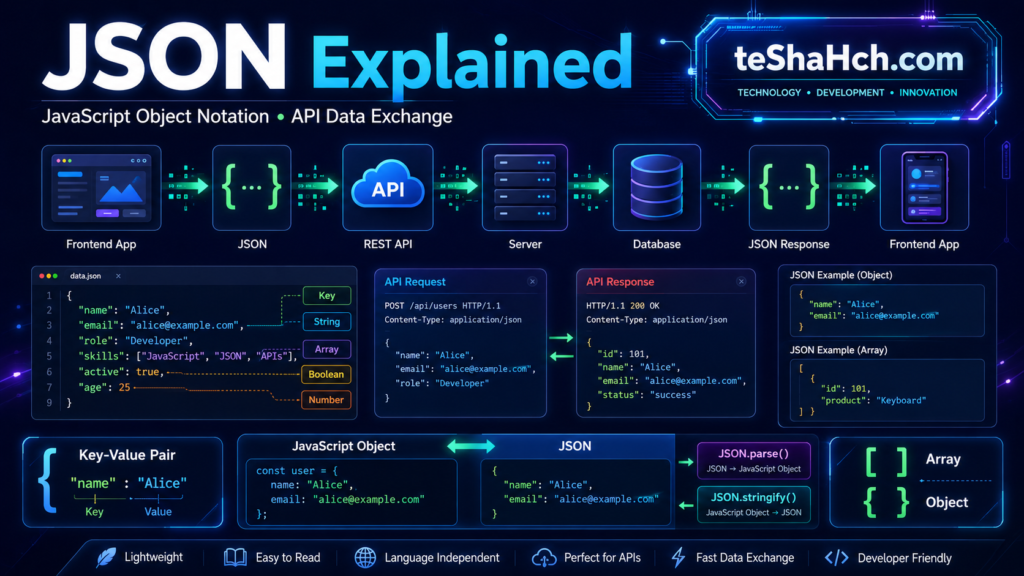
A JSON Object is a collection of key-value pairs enclosed within curly braces {}.
Example:
{
  "name": "Alice",
  "age": 25,
  "city": "London"
}
Here:
| Key | Value |
|---|---|
| name | Alice |
| age | 25 |
| city | London |
Objects are the foundation of JSON.
What Is a Key?
A key is the name of a property.
Example:
{
  "email": "alice@example.com"
}
The key is:
emailKeys must always be enclosed in double quotes.
What Is a Value?
A value is the actual information associated with a key.
Example:
{
  "age": 30
}
The value is:
30Values can have different data types.
JSON Syntax Rules
JSON follows strict syntax rules.
Rule 1
Data is enclosed inside curly braces.
{
}
Rule 2
Keys must use double quotes.
Correct:
{
  "name": "Alice"
}
Incorrect:
{
  name: "Alice"
}
Rule 3
Keys and values are separated using a colon (:).
{
  "age": 25
}
Rule 4
Multiple key-value pairs are separated using commas.
{
  "name": "Alice",
  "age": 25
}
Rule 5
No trailing comma after the last item.
Correct:
{
  "city": "Delhi"
}
Incorrect:
{
  "city": "Delhi",
}
JSON Data Types
JSON supports several built-in data types.
String
Text enclosed in double quotes.
{
  "name": "Alice"
}
Number
{
  "age": 28
}
Numbers do not use quotes.
Boolean
{
  "isStudent": true
}
Possible values:
- true
- false
Null
Represents an empty value.
{
  "middleName": null
}
Object
Objects can contain other objects.
{
  "address": {
    "city": "London"
  }
}
Array
Stores multiple values.
{
  "subjects": ["Math", "Science", "English"]
}
Arrays are discussed in detail below.
JSON Array Explained
An array stores multiple values inside square brackets [].
Example:
{
  "colors": [
    "Red",
    "Blue",
    "Green"
  ]
}
Arrays are useful when storing:
- Products
- Students
- Orders
- Messages
- Comments
- Categories
Real-World JSON Example
Imagine a user profile returned by a REST API.
{
  "id": 101,
  "name": "John Smith",
  "email": "john@example.com",
  "verified": true,
  "skills": [
    "HTML",
    "CSS",
    "JavaScript"
  ]
}
This single JSON object contains:
- Numbers
- Strings
- Boolean values
- Arrays
Such structures are commonly exchanged between frontend applications and backend servers.
Where Is JSON Used?
JSON powers almost every modern web application.
It is commonly used in:
- REST APIs
- Mobile applications
- Single Page Applications (SPAs)
- Cloud platforms
- Microservices
- AI services
- Payment gateways
- E-commerce websites
- Social media platforms
- Real-time chat applications
Whenever applications exchange structured data, JSON is often the preferred format.
Nested JSON Explained
Real-world applications rarely use flat JSON structures.
Instead, they organize related information using nested objects and nested arrays.
Nested JSON simply means placing one JSON object or array inside another.
Example
{
  "id": 101,
  "name": "Alice Johnson",
  "email": "alice@example.com",
  "address": {
    "street": "21 Park Street",
    "city": "London",
    "country": "United Kingdom"
  }
}
Here, the address itself is another JSON object.
Nested Arrays
Arrays can also contain multiple objects.
Example:
{
  "student": "Rahul",
  "subjects": [
    {
      "name": "Mathematics",
      "marks": 92
    },
    {
      "name": "Science",
      "marks": 89
    },
    {
      "name": "English",
      "marks": 95
    }
  ]
}
This type of structure is extremely common in APIs.
JSON in REST APIs
JSON became popular because of REST APIs.
Whenever a frontend application communicates with a backend server, JSON is usually the format used to exchange information.
The communication looks like this:
Browser / Mobile App
          │
          ▼
HTTP Request
          │
          ▼
REST API
          │
          ▼
Database
          │
          ▼
JSON Response
Without JSON, modern APIs would be far more complicated.
JSON Request Example
Suppose a user registers on a website.
The frontend sends the following JSON to the server.
{
  "name": "Alice Johnson",
  "email": "alice@example.com",
  "password": "********"
}
The backend receives this data and stores it in the database.
JSON Response Example
After successful registration, the server may respond like this:
{
  "success": true,
  "message": "User registered successfully.",
  "userId": 101
}
The frontend reads this response and displays a success message.
Another API Example
Retrieve product information:
{
  "id": 501,
  "name": "Wireless Keyboard",
  "price": 1299,
  "stock": true,
  "category": "Electronics"
}
The browser converts this JSON into a user-friendly interface.
JSON vs JavaScript Object
Many beginners think JSON and JavaScript Objects are the same.
They are similar—but not identical.
| JSON | JavaScript Object |
|---|---|
| Data exchange format | Programming object |
| Keys require double quotes | Quotes optional |
| Text format | JavaScript data type |
| Cannot contain functions | Can contain functions |
| Used across languages | JavaScript only |
JSON Example
{
  "name": "Alice"
}
JavaScript Object Example
const user = {
  name: "Alice"
};
Notice that JavaScript does not require quotation marks around property names.
What is JSON.parse()?
APIs send JSON as plain text.
JavaScript must convert that text into an object before it can use it.
This is done using:
JSON.parse()Example:
const jsonData = '{"name":"Alice","age":25}';

const user = JSON.parse(jsonData);

console.log(user.name);
Output:
AliceWhat is JSON.stringify()?
Sometimes we need to convert a JavaScript object into JSON before sending it to a server.
This is done using:
JSON.stringify()Example:
const user = {
  name: "Alice",
  age: 25
};

const json = JSON.stringify(user);

console.log(json);
Output:
{"name":"Alice","age":25}JSON Workflow
A simplified workflow looks like this:
JavaScript Object
        │
        ▼
JSON.stringify()
        │
        ▼
JSON Text
        │
        ▼
REST API
        │
        ▼
Database
        │
        ▼
JSON Response
        │
        ▼
JSON.parse()
        │
        ▼
JavaScript Object
This conversion happens constantly in modern web applications.
Why Developers Love JSON
JSON has become the universal language of APIs for several reasons.
Lightweight
Smaller than XML, resulting in faster data transfer.
Easy to Read
Its simple key-value format is understandable for both humans and machines.
Language Independent
Almost every modern programming language supports JSON.
Fast Parsing
Applications can quickly read and process JSON.
Excellent API Support
REST APIs almost always use JSON as the default response format.
Common Beginner Mistakes
When learning JSON, beginners often make these errors.
Using Single Quotes
Incorrect:
{
  'name': 'Alice'
}
Correct:
{
  "name": "Alice"
}
JSON always requires double quotes.
Forgetting Commas
Incorrect:
{
  "name": "Alice"
  "age": 25
}
Correct:
{
  "name": "Alice",
  "age": 25
}
Adding a Trailing Comma
Incorrect:
{
  "name": "Alice",
}
Trailing commas are not allowed in JSON.
Forgetting Quotes Around Keys
Incorrect:
{
  name: "Alice"
}
Correct:
{
  "name": "Alice"
}
Mixing JSON with JavaScript Objects
Although they look similar, JSON has stricter syntax rules.
Understanding the difference prevents many common bugs.
Best Practices
Professional developers follow these best practices when working with JSON.
Use Meaningful Key Names
Good:
{
  "email": "alice@example.com"
}
Bad:
{
  "e": "alice@example.com"
}
Keep JSON Organized
Group related information together using nested objects.
Avoid Deep Nesting
Excessively nested JSON becomes difficult to maintain.
Validate Incoming JSON
Always validate:
- Required fields
- Data types
- Empty values
- Input length
Never assume client data is correct.
Keep Responses Consistent
Similar API endpoints should return data using the same structure whenever possible.
Consistency makes APIs easier to consume.
Advantages of JSON
JSON offers several important benefits.
- Lightweight
- Human-readable
- Machine-readable
- Easy to parse
- Fast data transfer
- Cross-platform support
- Language independent
- Ideal for REST APIs
- Supported by virtually every modern programming language
These advantages explain why JSON has become the industry standard for data exchange.
Limitations of JSON
Despite its popularity, JSON has some limitations.
- No comments allowed
- Cannot store functions
- Limited data types
- Requires strict syntax
- Large nested structures can become difficult to manage
Even with these limitations, JSON remains the preferred choice for modern API communication.
JSON in Everyday Applications
You interact with JSON more often than you might realize.
Examples include:
- Logging into websites
- Online shopping
- Food delivery apps
- Banking applications
- Google Maps
- Weather apps
- Social media feeds
- Streaming platforms
- Chat applications
- Online booking systems
Whenever data moves between a client and a server, JSON is often involved.
JSON in Modern Web Development
Today, almost every modern web application relies on JSON.
Whether you’re browsing an online store, watching videos, checking the weather, or using a banking app, JSON is working behind the scenes.
JSON acts as the common language that allows different systems to exchange information quickly and efficiently.
It is widely used in:
- REST APIs
- Mobile Applications
- Single Page Applications (SPAs)
- Cloud Computing
- Microservices
- AI Applications
- IoT Devices
- SaaS Platforms
- E-commerce Websites
- Social Media Platforms
Because JSON is lightweight and language-independent, it has become the industry standard for transferring structured data.
Real-World Project Examples
Once you start building projects, you’ll notice JSON everywhere.
E-commerce Website
JSON is used for:
- Product lists
- Shopping carts
- Customer profiles
- Orders
- Payments
Example:
{
  "productId": 501,
  "name": "Wireless Keyboard",
  "price": 1299,
  "stock": true
}
School Management System
JSON stores and transfers:
- Student information
- Attendance
- Exam results
- Teacher details
- Class schedules
Social Media Platform
Every feed is powered by JSON.
Examples include:
- Posts
- Comments
- Likes
- Notifications
- Friend requests
Banking Application
JSON exchanges secure information like:
- Account details
- Transaction history
- Payment status
- Balance information
Weather Application
Weather APIs typically return JSON such as:
{
  "city": "London",
  "temperature": 28,
  "humidity": 65,
  "condition": "Cloudy"
}
The application converts this data into a user-friendly interface.
Why Every Developer Should Learn JSON
Learning JSON is one of the best investments for aspiring developers.
Whether you’re becoming a:
- Frontend Developer
- Backend Developer
- Full Stack Developer
- MERN Stack Developer
- Mobile App Developer
- Cloud Engineer
- API Developer
JSON will be part of your daily workflow.
Without understanding JSON, working with APIs becomes extremely difficult.
Career Importance
Almost every software development interview expects candidates to understand JSON.
Common interview questions include:
- What is JSON?
- Why is JSON popular?
- JSON vs XML
- JSON vs JavaScript Objects
- What is
JSON.parse()? - What is
JSON.stringify()? - What are JSON Objects and Arrays?
- Why do REST APIs use JSON?
A strong understanding of JSON demonstrates that you’re comfortable working with modern web technologies.
Best Way to Practice JSON
The fastest way to master JSON is through hands-on practice.
Try creating JSON data for:
- Student records
- Employee management
- Blog posts
- Product catalogs
- To-do applications
- Book libraries
- Movie databases
Then use that data in small projects.
You can also:
- Build REST APIs
- Read API responses
- Create mock JSON files
- Validate JSON using online validators
- Practice converting JavaScript objects using
JSON.stringify()andJSON.parse()
Frequently Asked Questions (FAQ)
What is JSON?
JSON (JavaScript Object Notation) is a lightweight, text-based data format used to store and exchange structured information between applications.
Is JSON only used with JavaScript?
No.
Despite its name, JSON is supported by almost every modern programming language, including Python, Java, PHP, C#, Go, Ruby, Swift, and Kotlin.
Why is JSON used in APIs?
JSON is lightweight, easy to read, easy to parse, and language-independent, making it ideal for exchanging data between clients and servers.
What is the difference between JSON and XML?
JSON is simpler, smaller, and faster to parse than XML.
For modern REST APIs, JSON is generally the preferred format.
What is the difference between JSON and JavaScript Objects?
JSON is a text-based data format.
A JavaScript Object is a programming object that exists in memory.
Although they look similar, they are not the same.
What does JSON.parse() do?
JSON.parse() converts a JSON string into a JavaScript object.
What does JSON.stringify() do?
JSON.stringify() converts a JavaScript object into a JSON string.
Can JSON store functions?
No.
JSON can only store data, not executable code.
Can JSON contain arrays?
Yes.
Arrays are one of the fundamental structures supported by JSON.
Is JSON still relevant?
Absolutely.
JSON remains the most widely used data exchange format in modern web development.
JSON is one of the core technologies behind the modern web.
Every time an application exchanges information with a server, there’s a high chance that JSON is involved.
Its simple structure, lightweight design, and universal support have made it the preferred data format for APIs, cloud services, mobile applications, and web development.
By mastering JSON, you gain the ability to understand how applications communicate, how APIs transfer information, and how frontend and backend systems work together.
As you continue learning web development, you’ll discover that technologies like REST APIs, React, Node.js, Express.js, Authentication, JWT, and Database Integration all rely heavily on JSON.
The best way to become confident with JSON is to build projects, inspect API responses, create your own JSON files, and practice using it in real-world applications.